Helpdesk Plugin
Customer support tickets, agent inbox, private internal notes, SLA targets, and canned replies
Best for
Teams that need a customer ticket portal and a separate support agent inbox.
Handle customer support tickets inside your application.
BTST supplies
- Customer ticket portal and agent inbox with status, priority, and assignee controls
- Agent-only internal notes, canned replies, and per-priority SLA targets
- Typed APIs, SSR-aware pages, React hooks, and ejectable page components
You supply
- A BTST database adapter
- Authoritative customer identities and authorization rules for support agents
- SLA targets and any email or notification delivery
- The application shell and deployment
You own and customize
Tickets and messages stay in your database. Your application supplies customer identity, support agent access rules, SLA targets, and notification delivery.
Compatibility and dependencies
Maintained: Next.js 15+ App Router, React Router v7, TanStack Start.
Requires: A BTST database adapter.
External services: None required.
From registration to result
A semantic workflow, not a setup shortcut
- 1Open a ticket
Customers describe a problem and follow public replies in their own portal.
- 2Triage the inbox
Support agents set status, priority, and assignee while checking response deadlines.
- 3Reply or leave a note
Use canned replies for customers and internal notes for agent-only context.
Helpdesk provides a customer ticket portal and a separate support agent inbox.
Install @btst/plugin-helpdesk@1.0.0 alongside the current Core. It has no dependency
on another feature package or @btst/components.
Registration
Follow the framework installation guide, then register the
canonical helpdesk key on both stacks:
import { createBackendStack } from "@btst/stack/api"
import { helpdeskBackendPlugin } from "@btst/plugin-helpdesk/api"

export const myStack = createBackendStack({
  basePath: "/api/data",
  plugins: {
    helpdesk: helpdeskBackendPlugin({
      slaTargets: { low: 2880, medium: 1440, high: 240, urgent: 60 },
    }),
  },
  adapter,
  auth: serverAuth,
})
adapter and serverAuth are the application's database adapter and request
identity/authorization provider. Enable isolated adapter transactions for ticket
writes. Generated SQL scaffolds enable transactions for Helpdesk. The CLI rejects
the default MongoDB scaffold because its generated adapter has transactions
disabled; manually configured adapters still need enabled, isolated transactions.
The plugin persists helpdeskTicket, helpdeskMessage, and
helpdeskCannedReply models; apply your adapter's schema migration before use.
import { createClientStack } from "@btst/stack/client"
import { helpdeskClientPlugin } from "@btst/plugin-helpdesk/client"

export const clientStack = createClientStack({
  api: { baseURL: "https://example.com", basePath: "/api/data" },
  site: { baseURL: "https://example.com", basePath: "/pages" },
  queryClient,
  plugins: { helpdesk: helpdeskClientPlugin() },
})
Import @btst/plugin-helpdesk/css in the application's global stylesheet.
Configure the shared StackProvider with the resolved stack, framework router,
and client auth provider. When reusing a QueryClient across identities, pass a
current identity snapshot as identityPartition to the client plugin and clear private cache
when signing out or changing users.
Authorization and internal notes
Import helpdeskPermissions from @btst/plugin-helpdesk/permissions and include
it in the application's defineAuthorization contract. Grant
helpdesk.customerTicket.list and create to authenticated customers. Grant
customerTicket.read and reply only when identity.id === facts.customerId.
The backend derives customer identity from the trusted request provider, scopes
all customer list/detail/reply operations to that identity, and never accepts a
customer ID from the request body.
Grant helpdesk.ticket.list, read, update, and reply, plus
helpdesk.cannedReply.list, create, update, and delete, only to support
agents. Defining these rules and connecting authoritative identity are required;
request operations fail closed without authorization.
An agent reply with isInternalNote: true is visible only through agent
operations. Customer serializers allowlist public fields and omit those messages
entirely, together with assignee IDs, customer/author IDs, SLA internals, and the
internal-note flag. Creating a customer ticket or reply also uses that public
projection. Customer and agent data use separate query resources and cache keys.
Direct lower-level database helpers are server-only primitives; callers own
validation and access control. Use myStack.forRequest(request).operations.helpdesk
for request work and myStack.trusted.helpdesk for explicitly trusted jobs.
Routes
Paths below assume site.basePath: "/pages". The plugin itself registers paths
starting with /helpdesk.
| Path | Purpose |
|---|---|
/pages/helpdesk | Search own tickets and open a new ticket |
/pages/helpdesk/:id | Customer conversation and public reply form |
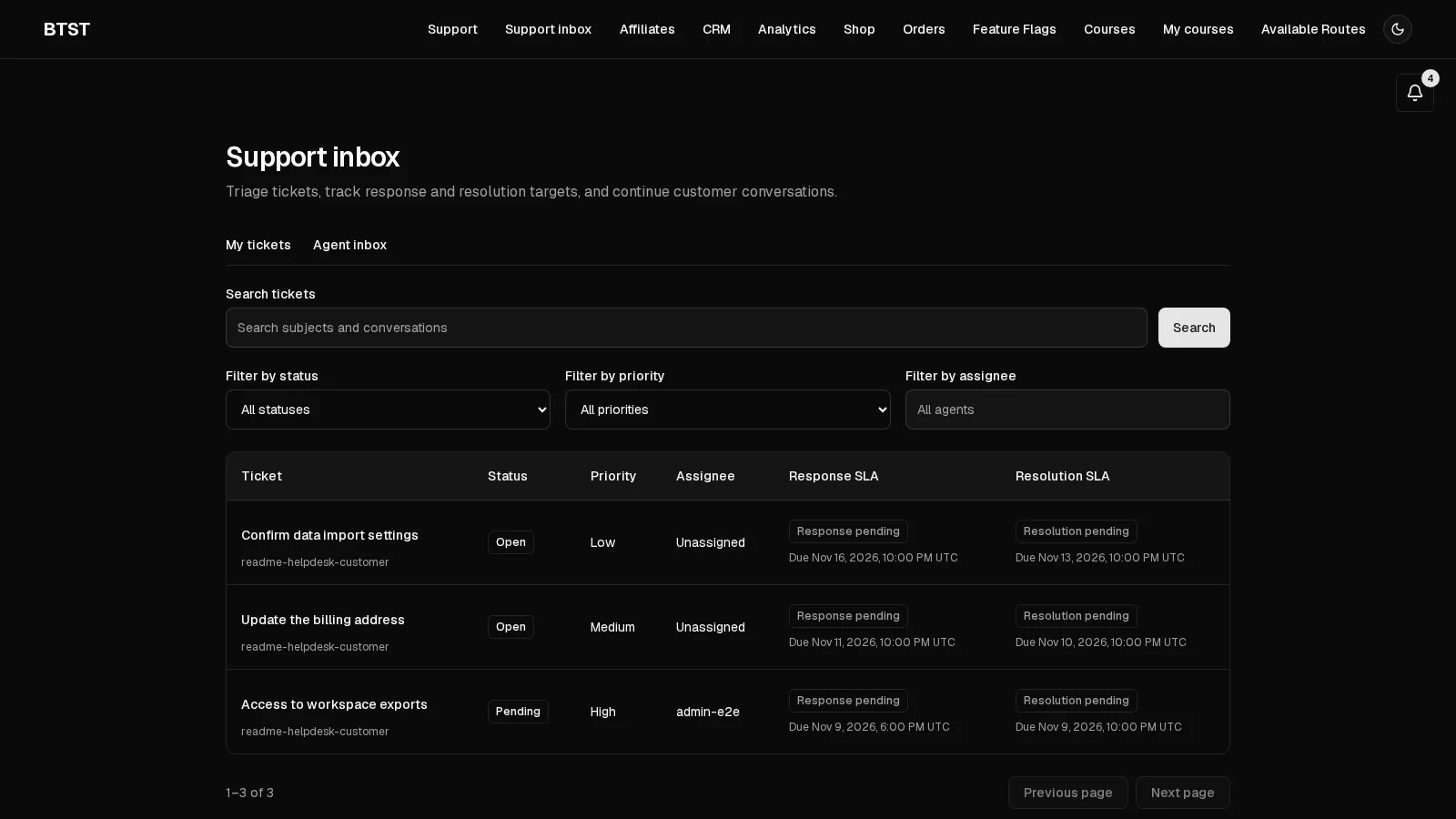
/pages/helpdesk/inbox | Search agent queue with status, priority, assignee filters and SLA badges |
/pages/helpdesk/inbox/:id | Agent conversation, assignment, status, priority, canned replies and internal notes |
API paths are relative to api.basePath:
| Method | Path | Purpose |
|---|---|---|
| GET, POST | /helpdesk/tickets | List/search own tickets or create a ticket with { subject, body, priority } |
| GET | /helpdesk/tickets/:id | Own ticket and public messages |
| POST | /helpdesk/tickets/:id/replies | Customer public reply with { body, attachmentIds? } |
| GET | /helpdesk/inbox | Agent queue, optionally filtered by search, status, priority and assigneeId |
| GET, PUT | /helpdesk/inbox/:id | Agent detail or update { status, priority, assigneeId } |
| POST | /helpdesk/inbox/:id/replies | Agent reply with { body, isInternalNote, attachmentIds? } |
| GET, POST | /helpdesk/canned-replies | List or create reusable { title, body } replies |
| PUT, DELETE | /helpdesk/canned-replies/:id | Update or delete a canned reply |
Lists accept limit (1–100) and offset. Status is open, pending, resolved,
or closed; priority is low, medium, high, or urgent. Set assigneeId to
null to clear assignment. The inbox detail form separates Public reply and
Internal note, and selecting a canned reply inserts editable text.
Protected message attachments
Attachments are optional and disabled until the application provides private
storage. Helpdesk does not depend on Media or require it in the CLI installation.
The CLI leaves attachments unconfigured; add attachments.storage to the
existing backend registration after configuring authentication and permissions:
helpdesk: helpdeskBackendPlugin({
  attachments: {
    storage: {
      // Implement these against a private bucket or authenticated object store.
      put: async ({ key, file }) => privateFiles.put(key, file),
      get: async ({ key }) => privateFiles.get(key), // Blob | null
      delete: async ({ key }) => { await privateFiles.delete(key) },
    },
  },
}),
privateFiles represents application-owned storage. put receives a File and
a server-generated opaque key; get returns a Blob or null. Never put these
objects in a public directory or publicly readable bucket. Storage callbacks
receive keys chosen by Helpdesk, never a customer URL or Media asset ID.
A Media bridge is appropriate only when the application's adapter stores the
object privately and implements this same contract. The default public Media URL
is not protected delivery and must not be used as the attachment download URL.
Selecting Media and Helpdesk together does not automatically enable attachments.
The limits are 10 MiB per file, five files per message, and 24 hours
for an unsubmitted upload. Allowed declared MIME types are image/png,
image/jpeg, image/webp, image/gif, application/pdf, and text/plain.
The server validates filename, type, actual byte size, and attachment references.
Filenames must contain 1–255 characters after trimming, without path separators
or control characters.
MIME allowlisting is not malware scanning or proof of file contents; applications
can inspect or scan the File in put and reject it before the upload becomes
available to a message.
Message text remains required. Open the ticket before attaching files to a reply.
| Method | Path | Purpose |
|---|---|---|
| POST | /helpdesk/tickets/:id/attachments | Upload customer reply file as multipart { file } |
| POST | /helpdesk/inbox/:id/attachments | Upload agent file as multipart { file, isInternalNote: "true" | "false" } |
| GET | /helpdesk/tickets/:id/attachments/:attachmentId | Authenticated customer download of a public message attachment |
| GET | /helpdesk/inbox/:id/attachments/:attachmentId | Authenticated agent download |
| DELETE | Either attachment detail path | Remove the current uploader's unsubmitted file |
Upload returns { id, filename, mimeType, size }. Submit only these returned IDs
as attachmentIds on the corresponding reply. The server binds each upload to
its uploader, ticket, and public/internal audience, and attaches it to one message
inside the ticket transaction. Another customer's file, another agent's pending
upload, an already submitted reference, or an audience mismatch cannot be reused.
Arbitrary URLs and Media asset IDs do not confer access or trigger URL fetching.
Downloads recheck current ticket permissions and the associated message's
visibility on every request. They return private bytes with forced attachment
disposition; the API never returns a public storage URL. Customer projections
omit internal notes entirely, including their attachment names, counts, IDs, and
URLs. Links render filenames as text and never execute uploaded HTML.
Custom Conversation replacements must preserve these guarantees when rendering
messages[].attachments.
Enable the built-in file controls with helpdeskClientPlugin({ attachments: true })
after configuring backend storage. Text-only installations keep their current
composer. The built-in customer and agent reply composers show upload progress,
errors and retry controls. Remove a file before sending with its Remove button. Sending
is disabled until all remaining uploads succeed. Changing the agent reply's
visibility clears its pending files so an internal file cannot accidentally be
sent as a public reply. Downloads use the configured API credentials and headers.
Custom composers can import useReplyAttachments and useAttachmentTransport
from @btst/plugin-helpdesk/client/hooks to reuse the upload queue and authorized
API transport.
Migration, cleanup, and retention
Apply the new helpdeskAttachment model through your adapter's schema migration
workflow before upgrading the backend, even if file controls remain disabled:
conversation reads use this table for attachment projections. Existing message rows remain valid and
serialize with an empty attachment list. Deploy the schema before the backend
and client changes; rolling back code leaves the added table available.
Schedule the exported cleanupAbandonedHelpdeskAttachments(adapter, storage)
server helper from @btst/plugin-helpdesk/api to remove unsubmitted uploads older
than 24 hours. It must receive the same private storage implementation and
Helpdesk database adapter. Removing a pending file explicitly also deletes its
private object. Browser closure, navigation, interrupted uploads, or a failed
submission can leave abandoned uploads; expiry prevents later attachment, and
the scheduled cleanup reclaims them. Configure a storage lifecycle rule as an
additional safeguard for objects left by storage/database failures, taking care
not to expire retained message objects.
Submitted files stay with their message until the application's retention policy deletes them. Helpdesk does not schedule retention or erase private storage objects merely because a ticket is resolved or closed. When deleting tickets or messages directly, delete their private objects as part of the same application workflow: a database cascade cannot remove bytes from an external object store. Keep storage deletion idempotent and reconcile failures before deleting the metadata needed to retry. Back up and restore attachment metadata and private objects together.
Ticket and conversation search
Both list endpoints and the listCustomerTickets / listAgentTickets request
operations accept search. For example:
const page = await myStack.forRequest(request).operations.helpdesk.listAgentTickets({
  search: "invoice",
  status: "pending",
  priority: "urgent",
  assigneeId: "support-agent",
  limit: 20,
  offset: 0,
})
Search matches a literal substring in the ticket subject or a conversation
message. Text is normalized to Unicode NFC and lowercased with JavaScript's
toLowerCase(); matching is case-insensitive but does not remove accents, stem
words, or interpret regular expressions, SQL wildcards, or HTML. Queries are
trimmed, normalized, and limited to 200 UTF-16 code units. A blank query behaves
like an omitted query. Encode HTTP query values with URLSearchParams.
Customer search first restricts tickets to the authenticated owner and messages
to the public customer projection. Internal notes and other customers' tickets
cannot affect matches, totals, or pages. Agent search includes internal notes and
requires the existing helpdesk.ticket.list authorization. Caller-supplied
customer or author IDs cannot expand request visibility. Returned items retain
their existing customer or agent projection; search does not return snippets.
Search composes with existing status, priority, assignee, limit, and offset
filters; customer lists continue to ignore agent assignment filters. Totals count
matching tickets once, even when several messages match. Results use creation
time descending, then ticket ID descending for ties, before pagination.
The portal and inbox keep search and filters in the URL, reset the page when a filter changes, and preserve them across reload and browser navigation. Search is part of the existing customer/agent and identity-partitioned query keys. On an initial page request, the views hydrate the authorized default list before applying URL filters in the browser.
No external search engine or full-text index is required. The adapter reads filtered tickets in batches, orders them in application memory, and scans their eligible conversation text when searching. Work grows with the number of filtered tickets plus scanned message text; there is no silent result cap. Pagination limits returned items, not scan cost. Hosts with large queues should measure this workload before relying on this implementation at that scale.
Response and resolution SLAs
slaTargets configures first-response minutes per priority. Without the new
options below, targets keep their existing elapsed-time behavior: creating a
ticket computes slaDueAt from creation time, and changing priority recomputes
that deadline against creation time using the application's current targets.
Opt in to a business calendar, resolution targets, or both:
helpdeskBackendPlugin({
  slaTargets: { low: 2880, medium: 1440, high: 240, urgent: 60 },
  resolutionTargets: { low: 4800, medium: 2400, high: 480, urgent: 120 },
  businessCalendar: {
    timeZone: "America/New_York",
    workingIntervals: [1, 2, 3, 4, 5].map((dayOfWeek) => ({
      dayOfWeek: dayOfWeek as 1 | 2 | 3 | 4 | 5,
      start: "09:00",
      end: "17:00",
    })),
    holidays: ["2026-12-25"],
  },
})
businessCalendar.timeZone is an IANA timezone identifier. Working intervals use
dayOfWeek from 0 (Sunday) through 6 (Saturday) and local HH:mm times. An end
of 24:00 means midnight at the end of that day. Intervals must have a start
before their end and cannot overlap on the same weekday; split overnight shifts
across two days. At least one working interval is required. Holidays are valid
YYYY-MM-DD dates that close the whole local date. Invalid configuration fails
when constructing the backend plugin.
Both targets count only actual elapsed minutes inside working intervals when a calendar is configured. Weekends or other unscheduled days and holidays do not count. Tickets created outside working hours start counting at the next working interval. The configured timezone determines local dates and working hours across daylight-saving transitions: repeated working minutes count twice, and missing minutes count zero. Each configured target must be positive, finite, and at most 5,256,000 minutes. Calendar deadline calculation rejects targets that cannot fit within 100 calendar years, which bounds work for sparse calendars. Without a calendar, resolution targets also count elapsed minutes. Omitted resolution priorities have no resolution target.
The first public agent reply sets firstRespondedAt; internal notes, resolving,
and closing never satisfy that response target. Entering resolved or closed
sets resolvedAt; moving between those two states preserves it. Reopening to
open or pending, including a customer reply that reopens a resolved ticket,
clears resolvedAt and retains the existing resolution deadline. Resolving again
records a new completion time against that deadline. Pending does not pause
either clock.
Tickets created with either new option store an internal snapshot of their response targets, resolution targets, and calendar. Later application configuration changes do not change these tickets. Priority changes recompute outstanding deadlines from original creation time using that snapshot; completed target deadlines stay fixed. Assignment and status changes do not reset targets. For records created before opt-in, legacy response reprioritization remains in place and resolution targets are not applied retroactively.
Agent list and detail responses retain slaDueAt and add resolutionDueAt
(UTC ISO string or null). Agent inbox and detail views show separate response
and resolution pending, met, and breached states; completion after a deadline
stays breached. No configured resolution target is shown as No resolution
target. Customer projections continue to omit deadlines, policy snapshots,
and assignment details.
Existing installations must add nullable helpdeskTicket.resolutionDueAt (date)
and helpdeskTicket.slaPolicy (string containing JSON) fields using their adapter's
schema migration workflow. Existing rows need no backfill. Policy changes belong
in application-owned backend configuration; ticket update input cannot supply a
calendar, targets, policy snapshot, or deadlines and remains agent-authorized.
SLAStatusBadge from @btst/plugin-helpdesk/client/components accepts
{ ticket, target?: "response" | "resolution" }; target defaults to "response".
The plugin does not run a scheduler. Applications own email delivery, escalation jobs, and the staff identity directory. The optional Notifications lifecycle bridge connects assignment, replies, and resolution to recipient preferences. SLAs do not require Notifications.
Server lifecycle hooks
helpdeskBackendPlugin({ hooks }) accepts onAfterUpdateTicket(ticket, previous)
and onAfterCreateMessage(ticket, message). They run after the authorized write
commits and receive authoritative agent ticket data; customer HTTP responses
still use the public projection. The message context contains authorType and
isInternalNote, without the message body. Hook errors propagate after the write.
Custom integrations must exclude isInternalNote: true from requester delivery;
the Notifications bridge enforces this exclusion.
Customization and public entries
Import hooks from @btst/plugin-helpdesk/client/hooks, components from
@btst/plugin-helpdesk/client/components, query factories from
@btst/plugin-helpdesk/query-keys, types from @btst/plugin-helpdesk/types, and
permission descriptors from @btst/plugin-helpdesk/permissions.
helpdeskClientPlugin({ pageComponents }) accepts portal, ticket, inbox,
and inboxTicket replacements. Eject the view layer with the btst-helpdesk
shadcn registry item while keeping data hooks in the package. The provider's
helpdesk.renderTicketSidebar({ ticket }) override adds application-owned
context beside the agent conversation.
Page-scoped presentation
overrides.helpdesk.pageOverrides on StackProvider supports helpdeskTicket.Conversation and helpdeskInboxTicket.Conversation. Each receives { messages: (CustomerMessage | HelpdeskMessage)[] }. Customer pages continue to receive the public message projection; agent pages receive the authorized agent projection, including internal notes.
overrides={{
  helpdesk: {
    pageOverrides: {
      helpdeskTicket: { Conversation: MyCustomerConversation },
    },
  },
}}
This changes customer ticket conversations while the agent ticket keeps its built-in presentation. Missing components use the built-in conversation. Standalone conversations receive no page scope. The portal and inbox list have no conversation slot. Reply forms, permission checks, whole-page replacements, and the existing renderTicketSidebar content slot retain their behavior.
Optional CRM and AI bridges
Selecting Helpdesk and CRM in @btst/codegen wires a contact summary into
renderTicketSidebar, guarded by CRM contact-read authorization. Request-bound
creation derives requesterEmail from the authenticated server-owned identity.email,
validates it as an email address, and ignores caller-supplied requesterEmail.
Expose the user's verified email in the server authorization identity schema and
resolver to enable matching; without it no contact is linked. Matching uses the
complete address without case, rather than a search substring. Trusted jobs without
a request can supply requesterEmail explicitly and own its provenance. Agent
responses include the address; customer responses omit it. Existing installations
must add the nullable helpdeskTicket.requesterEmail column using their database
migration workflow.
helpdeskBackendPlugin({ hooks }) accepts onAfterCreateTicket(ticket, { request })
and onAfterResolveTicket(ticket, { request }). Both receive the agent ticket
projection after persistence. Resolution fires when entering resolved or closed
from an unresolved state, including resolving again after reopening. The generated
CRM bridge records a note with the ticket ID and subject on the matching contact's
activity timeline. It uses trusted system operations for these server-owned notes;
customers do not receive CRM read access. Hook failures happen after the ticket has
been committed, so applications must handle external integration failures without
blindly retrying ticket creation.
When AI Chat is present, the agent reply composer registers draftTicketReply
on route helpdesk-inbox-ticket. The tool accepts { ticketId, body }, inserts an
editable public draft, and never sends it. It is available only while the agent
can reply and the ticket is not closed. Grounding contains recent public messages
and the authorized canned-reply page; internal notes are excluded. To fit AI Chat's
16,000-character page context, conversation reference text is limited to the latest
11,000 characters and canned-reply reference text to 4,000 characters, with explicit
truncation markers. Agents must review drafts before sending them.
Enable enablePageTools in the AI Chat backend and put PageAIContextProvider
above the stack provider. The CLI adds these when both plugins are selected.
Helpdesk imports only Core's page-context API, so it remains installable without
AI Chat or CRM.