Comments Plugin
Threaded comments with moderation, likes, replies, and embeddable CommentThread component
Best for
Teams that need comments on posts, tasks, content records, or a custom resource without adopting a hosted discussion service.
Attach threaded discussion and moderation to a resource your application already owns.
BTST supplies
- Threaded comment and reaction data models with typed APIs and lifecycle hooks
- Embeddable CommentThread and CommentCount components
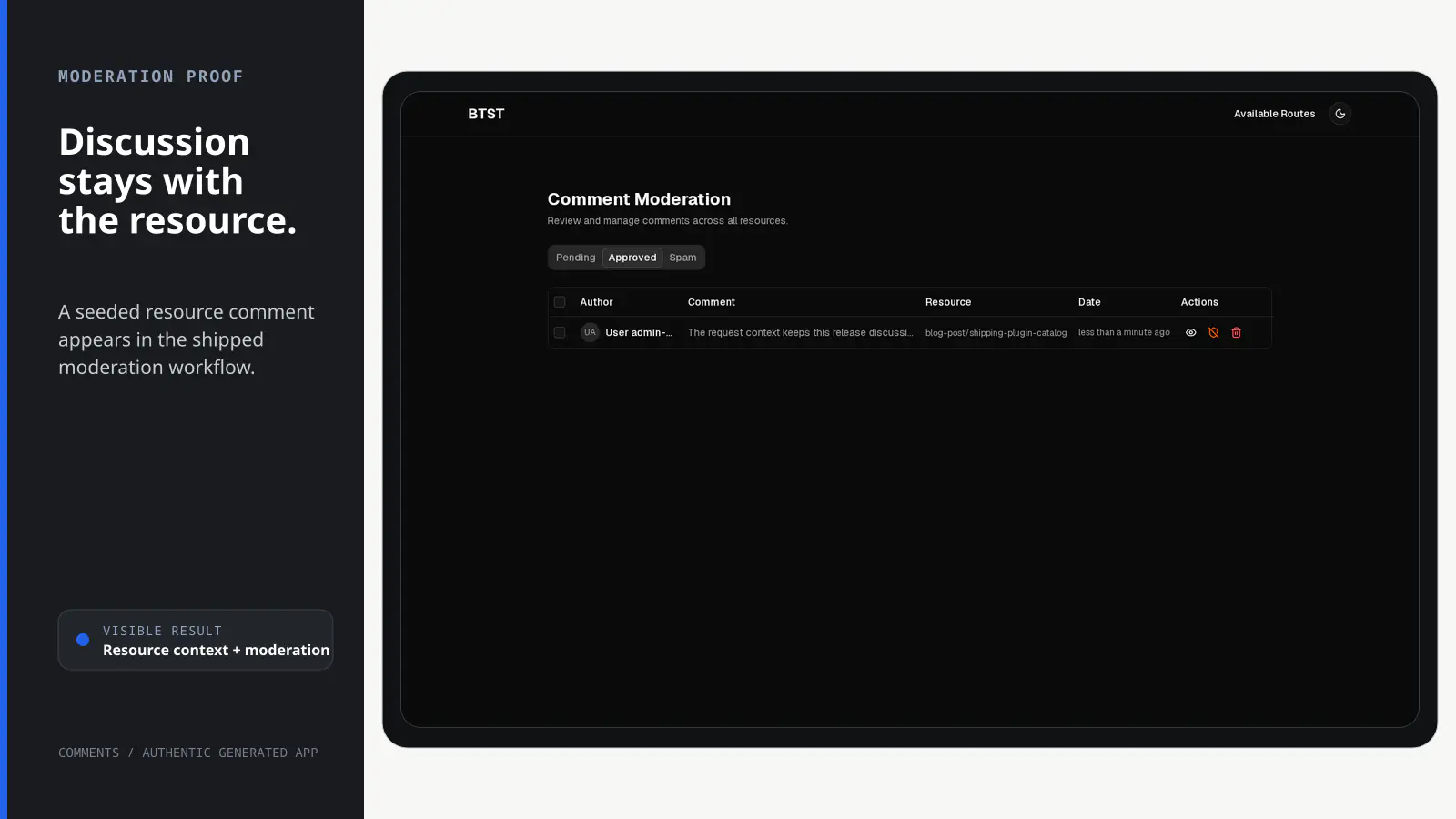
- A moderation route for pending, approved, and spam comments
- Customizable hooks and ejectable moderation UI
You supply
- A BTST database adapter
- The resource type and identifier that each thread belongs to
- Authorization rules and authoritative request identity when access is protected
- A user resolver when author names and avatars should be displayed
You own and customize
Comments and reactions stay in your database. You define resource identity, access rules, and author resolution; the moderation page can be ejected.
Compatibility and dependencies
Maintained: Next.js 15+ App Router, React Router v7, TanStack Start.
Requires: A BTST database adapter; An adopter-owned host resource.
External services: None required.
Installation
Ensure you followed the general framework installation guide first.
1. Add Plugin to Backend API
Register the Comments plugin and the generic server authorization adapter in
your stack.ts file. The adapter can wrap any session/authentication library;
Comments has no dependency on it.
import { createBackendStack } from "@btst/stack/api"
import { commentsBackendPlugin } from "@btst/stack/plugins/comments/api"
import { serverAuth } from "./authorization.server"

const { handler, dbSchema } = createBackendStack({
  basePath: "/api/data",
  auth: serverAuth,
  plugins: {
    comments: commentsBackendPlugin({
      autoApprove: false,
      resolveUser: async (authorId) => {
        const user = await db.users.findById(authorId)
        return user
          ? { name: user.displayName, avatarUrl: user.avatarUrl }
          : null
      },
      hooks: {
        onAfterApproveComment: async (comment, ctx) => {
          await sendApprovalEmail(comment.authorId)
        },
      },
    })
  },
  adapter: (db) => createMemoryAdapter(db)({})
})

export { handler, dbSchema }
Lifecycle hooks run after authorization. Use them for domain invariants, logging, and side effects; the shared rule below owns ordinary authentication, ownership, and moderation decisions.
2. Add Plugin to Client
Register the comments client plugin in your stack-client.tsx file:
import { createClientStack } from "@btst/stack/client"
import { commentsClientPlugin } from "@btst/stack/plugins/comments/client"
import { QueryClient } from "@tanstack/react-query"

function getBaseURL(serverOrigin?: string) {
  if (typeof window !== "undefined") return window.location.origin
  return (
    serverOrigin ||
    process.env.BTST_SITE_URL ||
    process.env.BASE_URL ||
    "http://localhost:3000"
  )
}

export const getStackClient = (
  queryClient: QueryClient,
  options?: { headers?: Headers; origin?: string },
) => {
  const baseURL = getBaseURL(options?.origin)
  return createClientStack({
    api: {
      baseURL,
      basePath: "/api/data",
      ...(options?.headers ? { headers: options.headers } : {}),
    },
    site: { baseURL, basePath: "/pages" },
    queryClient,
    plugins: {
      comments: commentsClientPlugin({
        // optional loader lifecycle hooks:
        // hooks: {
        //   beforeLoadModeration: async (ctx) => { ... },
        //   beforeLoadUserComments: async (ctx) => { ... },
        //   onErrorLoad: async (error, ctx) => { ... },
        // },
      }),
    },
  })
}
Create a request-specific stack with request headers for SSR and a separate
browser stack without them. StackProvider consumes the browser stack, so SSR
loaders, metadata, hydration, browser hooks, and mutations share one resolved
Comments endpoint and query client. Do not repeat transport or identity values
in CommentsPluginOverrides or component props.
3. Add CSS Import
@import "@btst/stack/plugins/comments/css";@import "@btst/stack/plugins/comments/css";@import "@btst/stack/plugins/comments/css";4. Configure the Provider
Comments reads its resolved API and query client from the registered client
stack. StackProvider adds framework routing and authorization; its inferred
plugin override is only for Comments-specific presentation and behavior:
import { clientAuth } from "@/lib/authorization.client"

<StackProvider
  stack={clientStack}
  router={frameworkRouter}
  auth={clientAuth}
  initialIdentity={initialIdentity}
  overrides={{
    comments: {
      resourceLinks: {
        "blog-post": (slug) => `/pages/blog/${slug}`,
      },
    },
  }}
>
  {children}
</StackProvider>
The framework layout helpers can resolve initialIdentity on the server and
hydrate it here. That avoids a duplicate identity request and keeps the server
render and first browser render on the same rule result. See the
authorization guide.
Authorization
Comments publishes a browser-safe, schema-backed catalog from
@btst/stack/plugins/comments/permissions. Register it once and use the same
rules in the browser and BTST backend:
import { defineAuthorization } from "@btst/stack/authorization"
import { commentsPermissions } from "@btst/stack/plugins/comments/permissions"
import { z } from "zod"

export const authorization = defineAuthorization({
  identity: z.object({
    id: z.string(),
    role: z.enum(["user", "moderator"]),
  }),
  permissions: [commentsPermissions] as const,
  rules: ({ comments }) => [
    comments.thread.read.when(({ identity, facts }) => {
      if (facts.scope === "public") return true
      if (facts.scope === "own")
        return identity?.id === facts.authorId || identity?.role === "moderator"
      return identity?.role === "moderator"
    }),
    comments.thread.createComment.when(({ identity }) => identity !== null),
    comments.comment.edit.when(({ identity, facts }) =>
      identity?.id === facts.authorId || identity?.role === "moderator"
    ),
    comments.comment.delete.when(({ identity, facts }) =>
      identity?.id === facts.authorId || identity?.role === "moderator"
    ),
    comments.comment.react.when(({ identity, facts }) =>
      identity !== null && facts.status === "approved"
    ),
    comments.comment.moderate.when(({ identity, facts }) =>
      identity?.role === "moderator" && facts.currentStatus !== facts.nextStatus
    ),
  ],
})"use client"
import { createClientAuth } from "@btst/stack/authorization/client"
import { authorization } from "./authorization"
export const clientAuth = createClientAuth({
authorization,
getIdentity: () => browserSession?.user ?? null,
loginPath: "/login",
})import "server-only"
import { createServerAuth } from "@btst/stack/authorization/server"
import { authorization } from "./authorization"
export const serverAuth = createServerAuth({
authorization,
getIdentityFromHeaders: async ({ headers }) => {
const session = await auth.api.getSession({ headers })
return session?.user ?? null
},
})The public rule is deliberate: anonymous users can read approved threads and approved counts. Authenticated authors additionally see only their own pending comments in those threads. The own-history and moderation scopes are protected. Those row/status filters execute only on the server; boolean rules decide the coarse scope and never return query filters.
Browser facts are presentation-only. Before editing, deleting, reacting, or
moderating, the backend reloads the comment's authoritative author, status,
resource, and thread facts. Request authorship and like identity always come
from the server adapter, even if an old RC caller sends an authorId. A
security-relevant state change during evaluation returns HTTP 409
(COMMENT_STATE_CHANGED) instead of mutating with stale facts. Edit,
reaction, moderation, and delete writes condition on the ownership, status,
and resource facts their rule authorized, so overlapping changes cannot bypass
the rule.
Once authorization is installed, a missing Comments rule denies that action.
Omitting createBackendStack({ auth }) preserves permissive server behavior for applications
that do not configure authorization. Use createServerAuth() to enable exact
descriptor enforcement and default-deny missing rules. Client gates use the
matching createClientAuth() adapter and exact descriptors shown above.
Embedding Comments
The CommentThread component can be embedded anywhere — below a blog post, inside a Kanban task dialog, or on a custom page.
Data requests use the resolved endpoint of the registered comments plugin;
identity and sign-in behavior use the auth service from the nearest
StackProvider.
import { CommentThread } from "@btst/stack/plugins/comments/client/components"

<CommentThread
  resourceId={post.slug}          // Unique identifier for the resource being commented on
  resourceType="blog-post"        // Namespace — avoids ID collisions across resource types
  loginHref={`/sign-in?redirectTo=${encodeURIComponent(`/blog/${post.slug}#comments`)}`}
  components={{
    // Optional: replace the plain textarea with a rich editor
    Input: MarkdownEditor,
    // Optional: replace plain text rendering with markdown
    Renderer: MarkdownContent,
  }}
/>
CommentThread uses the published descriptors for the thread, create/reply,
edit, delete, and react controls. These local checks avoid rendering controls
the browser identity cannot use. They are not security boundaries: every HTTP
and request-scoped backend call derives trusted facts and evaluates the same
rule again.
Props
| Prop | Type | Required | Description |
|---|---|---|---|
resourceId | string | ✓ | Identifier for the resource (e.g. post slug, task ID) |
resourceType | string | ✓ | Type of resource ("blog-post", "kanban-task", etc.) |
loginHref | string | — | Sign-in URL for unauthenticated users in this thread. Overrides the loginPath from the nearest StackProvider, which is useful for preserving a resource-specific return URL. |
pageSize | number | — | Comments per page. Falls back to defaultCommentPageSize from overrides, then 100. A "Load more" button appears when there are additional pages. |
sort | "asc" | "desc" | — | Sort direction for top-level comments by createdAt. Defaults to defaultCommentSort from overrides, then "desc" (newest first). Replies inside each thread always render chronologically and are unaffected. |
components.Input | ComponentType | — | Custom input component (default: <textarea>) |
components.Renderer | ComponentType | — | Custom renderer for comment body (default: <p>) |
Blog Post Integration
The blog plugin exposes a postBottomSlot override that renders below every post:
import { CommentThread } from "@btst/stack/plugins/comments/client/components"

overrides={{
  blog: {
    postBottomSlot: (post) => (
      <CommentThread
        resourceId={post.slug}
        resourceType="blog-post"
      />
    ),
  }
}}
Kanban Task Integration
The Kanban plugin exposes a taskDetailBottomSlot override that renders at the bottom of the task detail dialog:
import { CommentThread } from "@btst/stack/plugins/comments/client/components"

overrides={{
  kanban: {
    taskDetailBottomSlot: (task) => (
      <CommentThread
        resourceId={task.id}
        resourceType="kanban-task"
      />
    ),
  }
}}
Comment Count Badge
Use CommentCount to show the number of approved comments anywhere (e.g., in a post listing):
import { CommentCount } from "@btst/stack/plugins/comments/client/components"

<CommentCount
  resourceId={post.slug}
  resourceType="blog-post"
/>
Moderation Dashboard
The comments plugin adds a /comments/moderation admin route with:
- Tabbed views — Pending, Approved, Spam
- Bulk actions — Approve, Mark as spam, Delete
- Comment detail dialog — View full body and metadata
- Per-row actions — Approve, spam, delete from the table row
Each selected queue is controlled by its exact
comments.thread.read({ scope: "moderation", status, ... }) descriptor. Status
still scopes the server query; the boolean rule only decides whether that scope
is allowed. Each row and bulk action additionally evaluates exact
comment.moderate or comment.delete facts. Moderation facts include both
currentStatus and the requested nextStatus so an app can distinguish
approval from marking spam.
Backend Configuration
commentsBackendPlugin Options
| Option | Type | Default | Description |
|---|---|---|---|
autoApprove | boolean | false | Automatically approve new comments |
allowPosting | boolean | true | When false, the POST /comments endpoint is not registered (read-only comments mode). |
allowEditing | boolean | true | When false, the PATCH /comments/:id edit endpoint is not registered. |
resolveUser | (authorId: string) => Promise<{ name: string; avatarUrl?: string } | null> | — | Map author IDs to display info; returns null → shows "[deleted]" |
hooks | CommentsBackendHooks | — | Post-authorization domain lifecycle callbacks. |
Pass lifecycle callbacks inside the hooks option:
CommentsBackendHooks field | Description |
|---|---|
onBeforeListComments | Called after authorization and before a list query. |
onBeforeCountComments | Called after authorization and before a count query. |
onBeforeListCommentsByAuthor | Called after the own-history rule allows an author-scoped query. |
onBeforeCreateComment | Called after authorization and before a comment is saved. Request identity is authoritative when server authorization is configured. |
onAfterCreateComment | Called after a comment is saved. |
onBeforeUpdateComment | Called after authorization and before a comment body is updated. |
onAfterUpdateComment | Called after a comment body is updated. |
onBeforeToggleCommentReaction | Called after authorization and before the request identity's reaction is toggled. |
onBeforeModerateComment | Called after authorization and before moderation status changes. |
onAfterApproveComment | Called after a comment is approved. |
onBeforeDeleteComment | Called after authorization and before a comment is deleted. |
onAfterDeleteComment | Called after a comment is deleted. |
Comments lifecycle names use the action-first onBefore<Action><Entity> and
onAfter<Action><Entity> grammar. Approval remains a distinct moderation event;
it is not flattened into a generic update callback.
| Removed name | Canonical name |
|---|---|
onBeforeList | onBeforeListComments |
onBeforeCount | onBeforeCountComments |
onBeforeListByAuthor | onBeforeListCommentsByAuthor |
onBeforePost | onBeforeCreateComment |
onAfterPost | onAfterCreateComment |
onBeforeEdit | onBeforeUpdateComment |
onAfterEdit | onAfterUpdateComment |
onBeforeLike | onBeforeToggleCommentReaction |
onBeforeStatusChange | onBeforeModerateComment |
onAfterApprove | onAfterApproveComment |
onBeforeDelete | onBeforeDeleteComment |
onAfterDelete | onAfterDeleteComment |
All lifecycle hooks receive validated input, server-derived facts, resolved
identity, and request in a deeply readonly context. Authorization runs first;
denied requests cannot invoke hooks. Move earlier v3 RC role, ownership, and
session checks into the shared rule. Hook return values never select request
authorship. Request operations use the resolved identity; trusted and
no-auth callers must provide an explicit authorId input instead.
After-hooks now receive JSON-safe serialized comments (ISO date strings), not
mutable database rows containing Date instances. onBeforeCountComments is the
count-specific lifecycle; onBeforeListComments remains list-specific.
Prop
Type
Prop
Type
Prop
Type
Request and trusted operations
Use the request-scoped API for application server code acting on behalf of a request. It runs the same validation, trusted fact loader, rule, lifecycle, and domain execution as HTTP:
const comments = app.forRequest(request).operations.comments

await comments.updateComment({
  id: commentId,
  data: { body: "Corrected text" },
})
Trusted jobs use the explicit trusted namespace. It skips user authorization
only; validation, authoritative fact derivation, hooks, and domain behavior
still run. Trusted creates must provide trusted authorship:
await app.trusted.comments.createComment({
  resourceId: "release-42",
  resourceType: "release",
  body: "Generated by the release job",
  authorId: "release-bot",
})
Trusted server calls
Comments has no raw stack.raw.comments business namespace. Use app.trusted.comments for explicitly trusted jobs that should keep operation validation and lifecycle hooks. Standalone getter exports remain lower-level adapter primitives for plugin internals and migrations.
React Hooks
Import hooks from @btst/stack/plugins/comments/client/hooks:
import {
  useComments,
  useCommentCount,
  usePostComment,
  useUpdateComment,
  useDeleteComment,
  useToggleLike,
  useUpdateCommentStatus,
} from "@btst/stack/plugins/comments/client/hooks"

// Fetch approved comments for a resource
const { data, isLoading } = useComments({
  resourceId: "my-post",
  resourceType: "blog-post",
  status: "approved",
})

// Post a new comment (includes optimistic update)
const { mutate: postComment } = usePostComment({
  resourceId: "my-post",
  resourceType: "blog-post",
})
postComment({
  body: "Great post!",
})

// Toggle like (one per user; optimistic update)
const { mutate: toggleLike } = useToggleLike({
  resourceId: "my-post",
  resourceType: "blog-post",
  parentId: null,
})
toggleLike({ commentId: "comment-id" })

// Moderate a comment
const { mutate: updateStatus } = useUpdateCommentStatus()
updateStatus({ id: "comment-id", status: "approved" })
User Comments Page
The comments plugin registers a /comments route that shows the current user's full comment history — all statuses (approved, pending, spam) in a single paginated table, newest first.
Features:
- All comment statuses visible to the owner in one list, each with an inline status badge
- Prev / Next pagination (20 per page)
- Resource link column — click through to the original resource when
resourceLinksis configured (links automatically include#commentsso the page scrolls to the comment thread) - Delete button with confirmation dialog — calls
DELETE /comments/:id(governed byonBeforeDeleteComment) - Login prompt when the top-level auth provider resolves no identity
Setup
Pass the resolved browser stack and keep only Comments-specific overrides in your layout:
<StackProvider
  stack={clientStack}
  auth={clientAuth}
  initialIdentity={initialIdentity}
  overrides={{
    comments: {

      // Map resource types to URLs so comments link back to their resource
      resourceLinks: {
        "blog-post": (slug) => `/pages/blog/${slug}`,
        "kanban-task": (id) => `/pages/kanban?task=${id}`,
      },

    },
  }}
>
  {children}
</StackProvider>
The route requests comments.thread.read({ scope: "own", authorId }). The
backend evaluates that scope against request identity and applies the author
filter itself; the browser cannot reveal another user's history by changing a
query parameter.
API Reference
Client Plugin Factory
commentsClientPlugin(config?) accepts only Comments-specific loader hooks.
Shared runtime belongs to createClientStack.
| Field | Type | Required | Description |
|---|---|---|---|
hooks.beforeLoadModeration | (context) => Promise<void> | void | — | Called before moderation page loader logic runs. Throw to cancel. |
hooks.beforeLoadUserComments | (context) => Promise<void> | void | — | Called before User Comments page loader logic runs. Throw to cancel. Optionally set context.currentUserId so SSR prefetch/error-seeding uses the same user-scoped cache key as the page query. |
hooks.onErrorLoad | (error, context) => Promise<void> | void | — | Reports a loader failure once. Reporter errors are contained so SSR loaders do not reject. |
Client Plugin Overrides
Configure the comments plugin behavior from your layout:
CommentsPluginOverrides
| Field | Type | Description |
|---|---|---|
localization | Partial<CommentsLocalization> | Override any UI string in the plugin. Import COMMENTS_LOCALIZATION from @btst/stack/plugins/comments/client to see all available keys. |
showAttribution | boolean | Show/hide the "Powered by BTST" attribution on plugin pages (defaults to true). |
defaultCommentPageSize | number | Default number of top-level comments per page for all CommentThread instances. Overridden per-instance by the pageSize prop. Defaults to 100 when not set. |
defaultCommentSort | "asc" | "desc" | Default sort direction for top-level comments in all CommentThread instances. Overridden per-instance by the sort prop. Defaults to "desc" (newest first). |
allowPosting | boolean | Hide/show comment form and reply actions globally in CommentThread instances (defaults to true). |
allowEditing | boolean | Hide/show edit affordances globally in CommentThread instances (defaults to true). |
resourceLinks | Record<string, (id: string) => string> | Per-resource-type URL builders for linking comments back to their resource on the User Comments page (e.g. { "blog-post": (slug) => "/pages/blog/" + slug }). The plugin appends #comments automatically so the page scrolls to the thread. |
onRouteRender | (routeName, context) => void | Promise<void> | Called when a comments route renders. |
onRouteError | (routeName, error, context) => void | Promise<void> | Called when a comments route hits an error. |
HTTP Endpoints
Every maintained HTTP endpoint is an adapter over the operation with the same
name in forRequest(request).operations.comments and trusted.comments:
| Method | Path | Operation | Permission |
|---|---|---|---|
GET | /comments | listComments | comments:thread.read |
POST | /comments | createComment | comments:thread.createComment |
PATCH | /comments/:id | updateComment | comments:comment.edit |
GET | /comments/count | getCommentCount | comments:thread.read |
POST | /comments/:id/like | toggleLike | comments:comment.react |
PATCH | /comments/:id/status | updateCommentStatus | comments:comment.moderate |
DELETE | /comments/:id | deleteComment | comments:comment.delete |
SerializedComment
Comments returned by the API include resolved author information:
| Field | Type | Description |
|---|---|---|
id | string | Comment ID |
resourceId | string | Resource identifier |
resourceType | string | Resource type |
parentId | string | null | Parent comment ID for replies |
authorId | string | Author user ID |
resolvedAuthorName | string | Display name from resolveUser, or "[deleted]" |
resolvedAvatarUrl | string | null | Avatar URL from resolveUser |
body | string | Comment body |
status | "pending" | "approved" | "spam" | Moderation status |
likes | number | Denormalized like count |
isLikedByCurrentUser | boolean | Whether the requesting user has liked this comment |
editedAt | string | null | ISO date string if the comment was edited |
createdAt | string | ISO date string |
updatedAt | string | ISO date string |
From registration to result
A semantic workflow, not a setup shortcut
Mount CommentThread with the resource type and identifier owned by your app.
Connect request identity, typed authorization rules, and optional author profiles.
Create replies and reactions through the supplied typed APIs and UI.
Review pending, approved, and spam comments on the built-in route.