How It Works
Understand the architecture and key concepts behind BTST.
Here's a high-level overview of how BTST works:
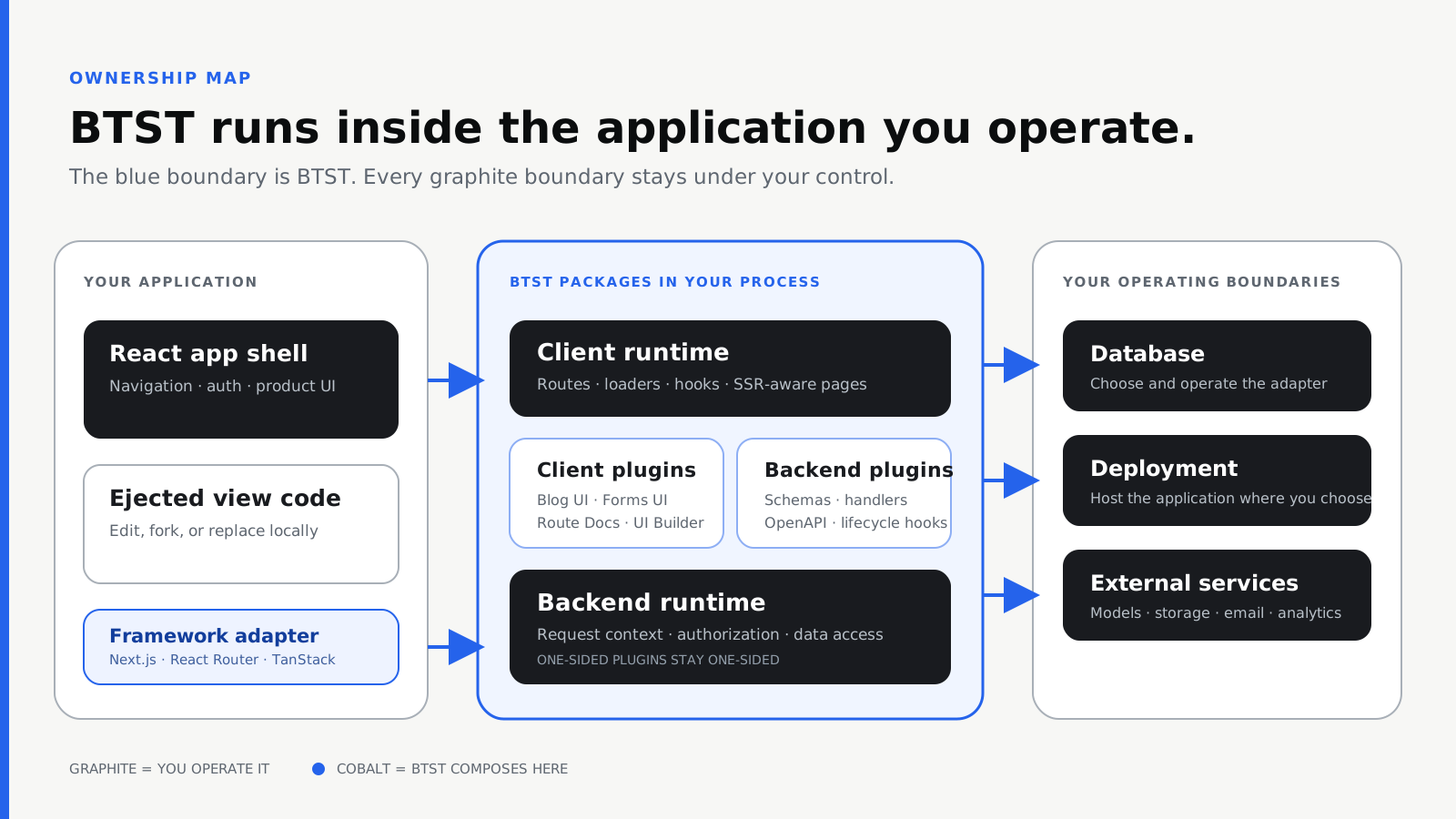
BTST composes client and backend plugins inside your application. Your app shell, ejected views, database, deployment, and external services remain yours.
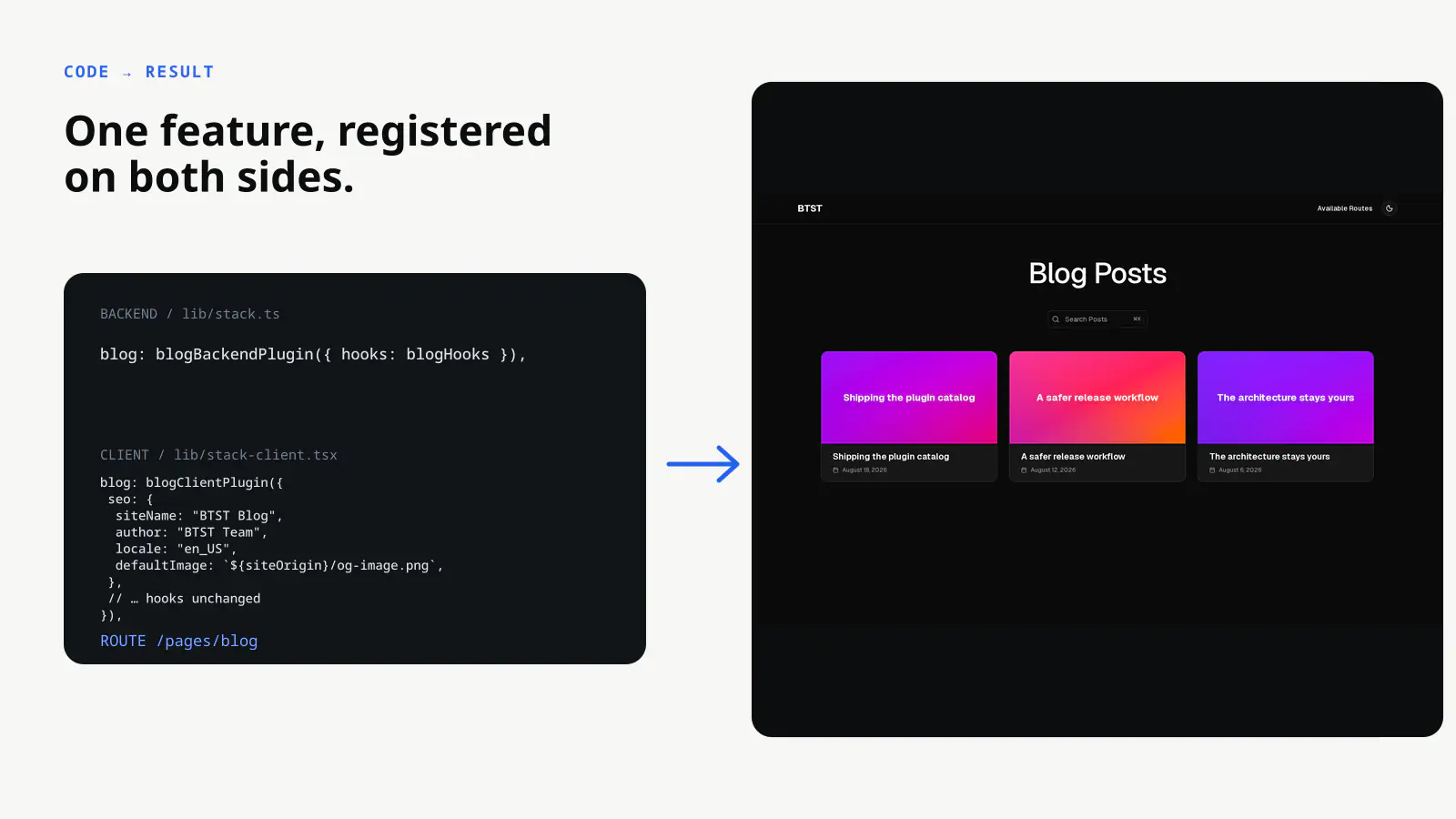
Register Blog with the backend and client stacks, then inspect the resulting route at /pages/blog.
Server Side
The server handles database operations, API endpoints, data prefetching, routing, and server-side rendering.
createBackendStack manages the backend layer:
- API Router: Routes incoming requests to the appropriate plugin handlers. Returns a handler function that you mount at your API path.
- DB Adapter: Translates BTST's database operations to your ORM (Prisma, Drizzle, Kysely, MongoDB). Plugins define schemas that get merged and passed to the adapter.
createClientStack manages the rendering layer:
- Data Fetching: Plugins can prefetch data server-side into React Query cache before rendering, enabling instant page loads with hydrated state.
- Page Router: Matches URLs to plugin routes and returns the appropriate page component, loader, and metadata.
- SSR: Server-side renders pages with prefetched data, then hydrates on the client.
Client Side
After server-side rendering, the client takes over for interactivity.
React Hydration
Server-rendered HTML is hydrated with client-side React. The React Query cache—prefetched during SSR—transfers seamlessly, so components render instantly without loading states or refetching.
SPA Navigation (If using in an SPA)
After the initial page load, the framework router preset on StackProvider
handles client-side navigation. React Query fetches data in the background
while the UI updates.
State Management
First party plugins use React Query under the hood for all data operations:
- Queries: Hooks like
usePosts(),usePost(slug), anduseTags()(examples from the blog plugin) fetch and cache data with automatic background refetching - Mutations: Hooks like
useCreatePost(),useUpdatePost(), anduseDeletePost()(examples from the blog plugin) handle writes with automatic cache invalidation - Suspense: Suspense variants (
useSuspensePosts,useSuspensePost) integrate with React Suspense boundaries for streaming SSR and other advanced features
Note: 3rd party plugins may use a different state management library.
Context & Overrides
The StackProvider wraps your pages with a resolved client stack plus
browser-only router and auth services. API, site, QueryClient, and plugin
endpoint values come from createClientStack(); plugin components read that
projection and router services such as Link, Image, and navigate through
useStack(). usePluginOverrides() is reserved for genuinely plugin-specific
customization.
Plugins
Plugins are the building blocks of BTST. Full-stack features such as Blog ship separate backend and client definitions that you register independently:
// Backend: lib/stack.ts
import { createBackendStack } from "@btst/stack/api"
import { blogBackendPlugin } from "@btst/stack/plugins/blog/api"

const { handler } = createBackendStack({
  plugins: {
    blog: blogBackendPlugin({ /* config */ })
  },
  // ...
})

// Client: lib/stack-client.tsx
import { createClientStack } from "@btst/stack/client"
import { blogClientPlugin } from "@btst/stack/plugins/blog/client"
import { QueryClient } from "@tanstack/react-query"

const queryClient = new QueryClient()
const stackClient = createClientStack({
  api: { baseURL: "https://example.com", basePath: "/api/data" },
  site: { baseURL: "https://example.com", basePath: "/pages" },
  queryClient,
  plugins: {
    blog: blogClientPlugin({ /* config */ })
  }
})
Backend plugins (registered in createBackendStack):
- Define database schemas (tables, columns, relations)
- Register API route handlers for CRUD operations
- Provide post-authorization domain lifecycle hooks
Client plugins (registered in createClientStack):
- Define page routes and components
- Provide loaders for server-side data prefetching
- Export components, hooks, and utilities for state management
- Generate SEO metadata and sitemaps
This separation keeps server-only code (database schemas, API handlers) out of your client bundle, and allows each plugin to be configured independently for its context.
One-sided plugins are intentional: OpenAPI is backend-only, Route Docs is client-only, and UI Builder is client-only over the CMS backend/client contract. Register only the side that exists; do not add a placeholder half.
Resolved Client Runtime and Provider Services
Configure shared runtime once and pass the resolved result to the provider:
const clientStack = createClientStack({
  api,
  site,
  queryClient,
  plugins: { blog: blogClientPlugin() },
})

<StackProvider
  stack={clientStack}
  router={nextRouter()}
  auth={clientAuth}
  overrides={{ blog: { uploadImage } }}
>
  {children}
</StackProvider>-
stack: Supplies the API and site locations, QueryClient, browser-safe per-plugin endpoints, and exact plugin map. That map also infers validoverrideskeys and values. -
router: UsenextRouter(),reactRouter(), ortanstackRouter()for links, images, navigation, refresh, and URL search state. -
auth: Resolve identity, provide a login path, and evaluate exact schema-backed permission descriptors.
Keep stack and overrides referentially stable across unrelated renders.
BTST preserves its context values while these inputs and the router services are
unchanged. Recreating override objects or callbacks can notify a lazy page during
hydration and reveal its loading fallback even when its data was prefetched.
For values created inside a provider component, memoize them with their actual dependencies:
import type { ClientStackOverrides } from "@btst/stack/context"

const overrides = useMemo<ClientStackOverrides<typeof clientStack>>(
  () => ({ blog: { uploadImage } }),
  [uploadImage],
)
ClientStackOverrides infers the available overrides from your resolved client
stack. Pass overrides={overrides} to StackProvider. Module-level constants are also
appropriate for configuration that does not depend on component state. Changed
identities, runtime values, and callbacks remain synchronous; memoization does
not retain a previous permission decision or callback after its inputs change.
The overrides object is only for plugin-specific customization such as
upload functions, component slots, localization, and route analytics. SSR
loader hooks, page choices, and metadata customization remain plugin-specific
factory options; their shared transport and cache runtime arrives through the
resolved stack.