Route Docs Plugin
Auto-generated client route documentation with interactive navigation
Best for
Teams that want route paths, parameters, sitemap entries, and navigation context visible inside a development or protected application surface.
Generate an explorable reference for the client routes already registered in your BTST stack.
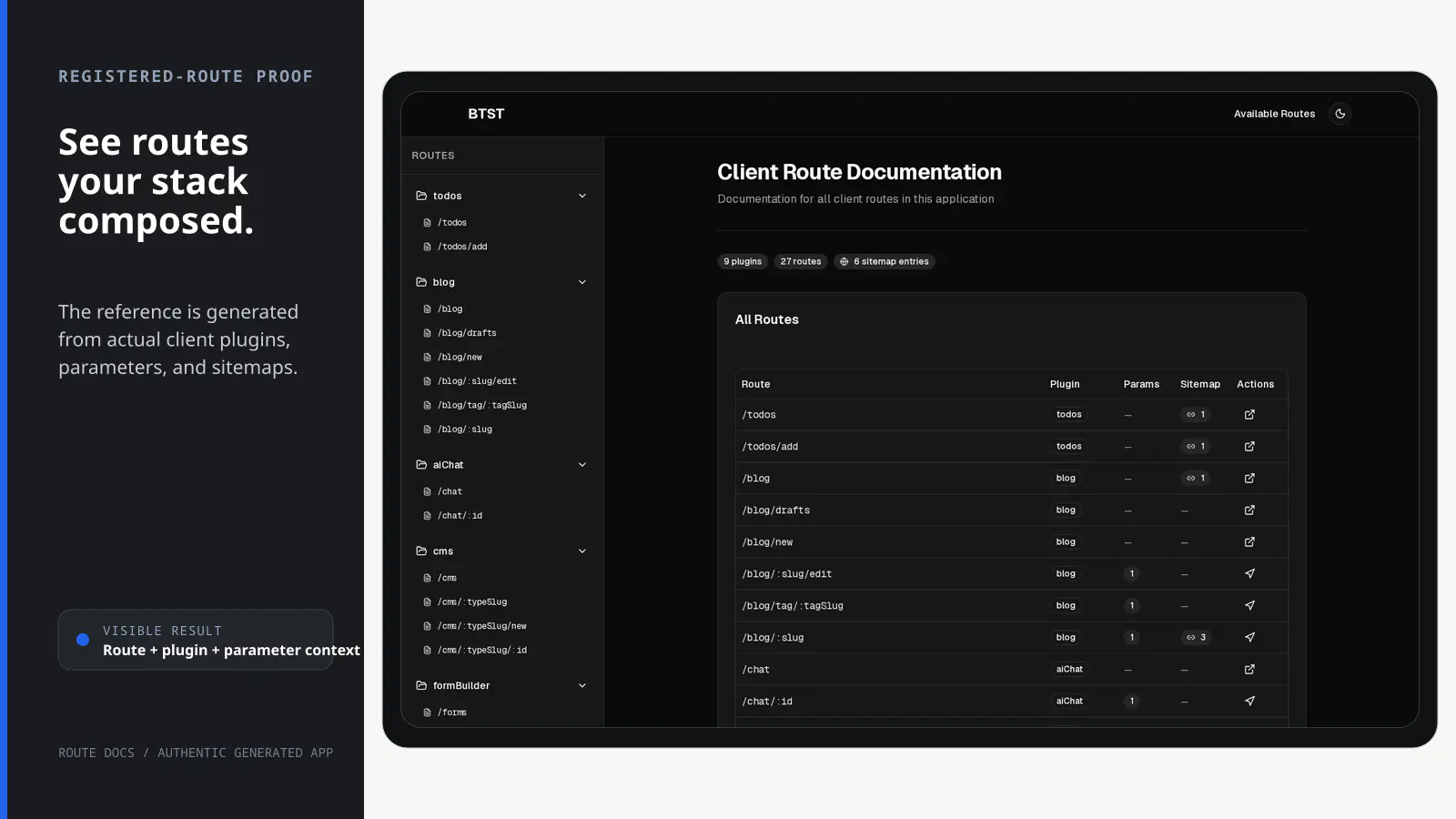
BTST supplies
- A generated route-reference page for registered BTST client plugins
- Route paths, path and query parameters, sitemap entries, and plugin context
- Parameter-aware navigation to routes in the adopter's application
- An ejectable Route Docs page over the packaged introspection runtime
You supply
- Registered BTST client plugins whose routes can be inspected
- A deployment-level access boundary when route details should be private
- Concrete parameter values before navigating to a dynamic route
- The application shell and resolved site location
You own and customize
The reference is derived from your registered client stack and served by your app. You control which routes exist, who can see the page, and whether to eject its UI.
Compatibility and dependencies
Maintained: Next.js 15+ App Router, React Router v7, TanStack Start.
Requires: Registered BTST client routes to inspect.
External services: None required.
From registration to result
A semantic workflow, not a setup shortcut
- 1Register routes
Compose the client plugins whose route definitions should appear.
- 2Inspect
Read route paths, typed parameters, metadata, and sitemap declarations.
- 3Generate
Render the route inventory with its owning plugin and dynamic context.
- 4Navigate
Supply concrete parameters and open a resolved route in your application.
Installation
Ensure you followed the general framework installation guide first.
Add Plugin to Client
Import and register the Route Docs client plugin in your client configuration:
import { createClientStack } from "@btst/stack/client"
import { routeDocsClientPlugin } from "@btst/stack/plugins/route-docs/client"
import type { QueryClient } from "@tanstack/react-query"

export const getStackClient = (
  queryClient: QueryClient,
  baseURL: string,
) =>
  createClientStack({
    api: { baseURL, basePath: "/api/data" },
    site: { baseURL, basePath: "/pages" },
    queryClient,
    plugins: {
      // Keep your other client plugin entries here. Route Docs introspects them.
      routeDocs: routeDocsClientPlugin({
        title: "Client Route Documentation",
        description: "Documentation for all client routes in this application",
      }),
    },
  })
The Route Docs plugin is client-only. There is no backend plugin required.
Route Docs consumes only the resolved query client, site location, and registered client definitions it needs for introspection. It does not call a Route Docs API, require a fake backend plugin, or accept transport configuration for symmetry.
Render it under the standard layout from the installation guide
by passing the resolved stack to StackProvider. No Route Docs override block
is required:
<StackProvider stack={stack} router={frameworkRouter}>
  {children}
</StackProvider>
Inside StackProvider, useRegisteredRoutes() is automatically bound to that
stack, so multiple stacks cannot leak route definitions into one another. Pass
the resolved stack explicitly when the hook is rendered outside the provider:
import { useRegisteredRoutes } from "@btst/stack/plugins/route-docs/client"

const routes = useRegisteredRoutes()
const explicitRoutes = useRegisteredRoutes(stack)
Accessing the Documentation
Once configured, navigate to your route docs page:
| Route | Description |
|---|---|
/pages/route-docs | Interactive route documentation page |
Replace /pages with your configured siteBasePath.
Configuration Options
routeDocsClientPlugin({
  // Custom title for the documentation page
  title: "Client Route Documentation",

  // Description shown on the page
  description: "Documentation for all client routes",
})
The canonical programmatic ID is routeDocs; the npm package and route keep
the route-docs slug. Site-origin and mount-path replacements belong to the
stack endpoint map and drive metadata plus every rendered Visit link together:
createClientStack({
  api,
  site,
  queryClient,
  plugins: { routeDocs: routeDocsClientPlugin() },
  endpoints: {
    routeDocs: {
      site: { baseURL: "https://docs.example.com", basePath: "/" },
    },
  },
})
Shadcn Registry
Eject the Route Docs view layer while keeping route introspection and cache
behavior inside @btst/stack:
npx shadcn@latest add https://github.com/better-stack-ai/better-stack/blob/main/packages/stack/registry/btst-route-docs.jsonThen pass the ejected page back to the client plugin. Route Docs remains client-only; do not add a matching backend plugin.
import { routeDocsClientPlugin } from "@btst/stack/plugins/route-docs/client"
import { DocsPageComponent } from "@/components/btst/route-docs/client/components/pages/docs-page"

routeDocsClientPlugin({
  pageComponents: {
    docs: DocsPageComponent,
  },
})
Page Layout
The documentation page includes several sections:
All Routes Table
An overview table showing all routes at a glance with:
- Route path with highlighted parameters
- Plugin name
- Parameter count
- Sitemap entry count
- Quick actions (visit or scroll to details)
Route Details
For each route, detailed documentation includes:
- Route Path - The route pattern with parameters highlighted
- Navigate to Route - Interactive form to fill in parameters and visit the route
- Path Parameters - Table of path parameters with name, type, required status
- Query Parameters - Table of query parameters with defaults and descriptions
- Sitemap Entries - URLs that match this route pattern
How It Works
The Route Docs plugin introspects all registered client plugins:
- Context Access - BTST passes a context object containing all plugins
- Route Traversal - The plugin iterates over all client plugins and their routes
- Metadata Extraction - Route metadata including path, parameters, and meta tags are collected
- Sitemap Collection - Each plugin's sitemap entries are gathered and matched to routes
- Schema Generation - A complete documentation schema is generated and cached
Security Considerations
The Route Docs page exposes your application's route structure. Consider these measures:
- Development Only - Consider only enabling in development environments
- Access Control - Add authentication middleware to protect the route
- Sensitive Routes - Be aware that all registered routes will be documented
// Example: only register Route Docs in development
const routeDocs =
  process.env.NODE_ENV === "development"
    ? {
        routeDocs: routeDocsClientPlugin(),
      }
    : {}

createClientStack({
  api,
  site,
  queryClient,
  plugins: {
    // ...your other client plugins,
    ...routeDocs,
  },
})