Newsletter Plugin
Subscriber lists, newsletter campaigns, and email analytics using your own sending provider
Install @btst/plugin-newsletter@1.2.0 alongside @btst/stack@6.2.0. Newsletter includes its Markdown editor and does not require Blog, AI Chat, or @btst/components. Import @btst/plugin-newsletter/css once in your application stylesheet.
The rich editor uses Milkdown. CommonJS browser bundlers must allow the upstream import condition for Milkdown Kit's import-only subpaths (for Vite, resolve.conditions: ["module", "browser", "production", "import"]). BTST still ships actual CommonJS modules and declarations. Server-safe client definitions and backend APIs remain separate from CSS-bearing browser UI; native Node does not load the editor's CSS.
Best for
Teams that publish a blog or email updates and want to use their own sending provider.
Manage subscribers and send newsletters from your existing application.
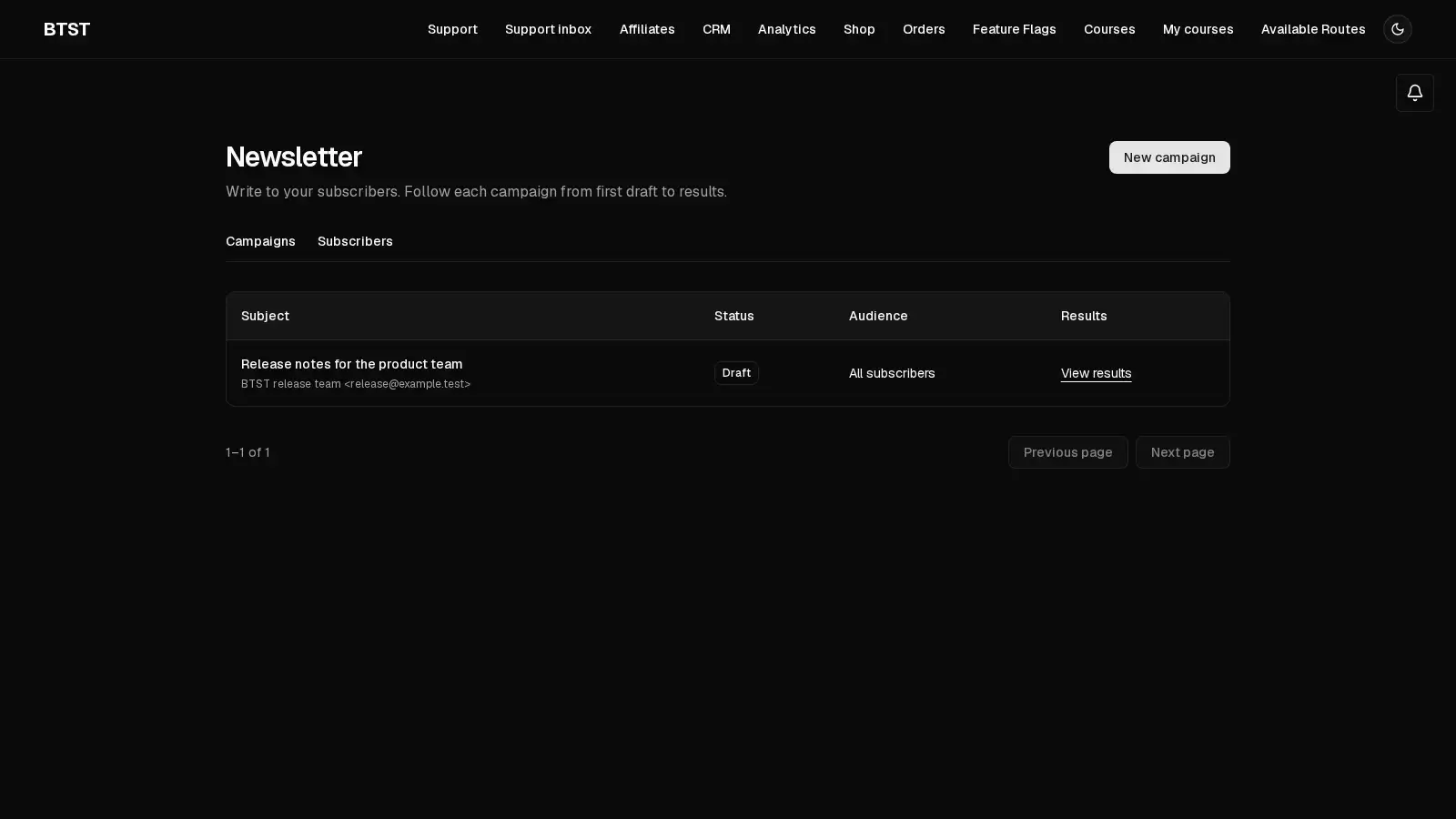
BTST supplies
- Subscriber lists, tags, CSV import and export
- Campaign authoring, scheduling, test sends, and blog integration
- Token-protected opt-in, unsubscribe, open and click tracking
You supply
- An email adapter and provider credentials
- A public origin for email links
- Newsletter authorization rules
- A recurring server job to dispatch scheduled campaigns
You own and customize
Subscribers, campaigns, and engagement records stay in your database. Your application owns sending credentials, authorization, and scheduled dispatch.
Compatibility and dependencies
Maintained: Next.js 15+ App Router, React Router v7, TanStack Start.
Requires: A BTST database adapter.
External services: The adopter-selected email provider sends messages.
The Newsletter plugin manages subscribers, tags, campaigns, and engagement records
in your database. Send through Resend, Mailgun, or an EmailAdapter you provide.
Campaigns support Markdown and HTML, test sends, scheduling, and creation from a
Blog post.
Setup
Follow the framework installation guide, then register the plugin
with the canonical newsletter key:
import { createBackendStack } from "@btst/stack/api"
import { newsletterBackendPlugin, resendAdapter } from "@btst/plugin-newsletter/api"

export const myStack = createBackendStack({
  basePath: "/api/data",
  adapter,
  auth: serverAuth,
  plugins: {
    newsletter: newsletterBackendPlugin({
      emailAdapter: resendAdapter(process.env.RESEND_API_KEY!),
      unsubscribeBaseURL: "https://example.com/api/data/newsletter",
    }),
  },
})
unsubscribeBaseURL is the absolute public API namespace, including the stack
base path and /newsletter. Confirmation, unsubscribe, and tracking links use
this origin. Keep provider credentials on the server.
import { createClientStack } from "@btst/stack/client"
import { newsletterClientPlugin } from "@btst/plugin-newsletter/client"

export function getStackClient(queryClient, origin: string) {
  return createClientStack({
    api: { baseURL: origin, basePath: "/api/data" },
    site: { baseURL: origin, basePath: "/pages" },
    queryClient,
    plugins: { newsletter: newsletterClientPlugin() },
  })
}@import "@btst/plugin-newsletter/css";Mount the resolved stack with StackProvider and your framework router. The
plugin inherits the application's theme and shared stack runtime.
Authorization
Register newsletterPermissions from
@btst/plugin-newsletter/permissions in your shared authorization contract.
Allow only your application's newsletter managers to use subscriber management,
campaign management, analytics, transactional sending, and scheduler operations.
For an identity containing an administrator role, a rule looks like this:
newsletter.campaign.send.when(({ identity }) => identity?.role === "admin")Management permissions are subscriber.read, create, update, delete,
import, and export; campaign.read, create, update, delete, send,
test, and schedule; analytics.read; transactional.send; and
scheduler.run. Public subscription and secret-token confirmation,
unsubscription, and tracking endpoints validate their own inputs and tokens.
Apply rate limiting to public subscription endpoints in your application.
Email adapters
Resend and Mailgun adapters are thin HTTP wrappers:
import { resendAdapter, mailgunAdapter } from "@btst/plugin-newsletter/api"

const resend = resendAdapter(process.env.RESEND_API_KEY!)
const mailgun = mailgunAdapter(process.env.MAILGUN_API_KEY!, "mail.example.com")
Bring another provider or SMTP transport by implementing EmailAdapter. The
plugin does not add an SMTP client dependency:
import type { EmailAdapter } from "@btst/plugin-newsletter/api"

const emailAdapter: EmailAdapter = {
  async send(options) {
    const result = await smtpTransport.sendMail(options)
    return { messageId: result.messageId }
  },
}
send receives to, subject, html, from, optional replyTo, and a stable
per-recipient idempotencyKey. Forward that key when your provider supports it.
Campaign delivery counts mean the provider accepted the message, rather than
confirmation of inbox delivery. Provider bounce webhooks remain application-owned.
An ordinary thrown error means acceptance is uncertain, including network timeouts
and interrupted responses. Throw EmailDeliveryError (exported from
@btst/plugin-newsletter/api) only when the provider definitively rejected the
message and the original request can no longer succeed. These failures are safe
to retry; ambiguous requests require reconciliation or an explicit manager decision.
Custom adapters can implement reconcile({ idempotencyKey, messageId }), returning
{ status: "delivered", messageId? }, { status: "failed" }, or
{ status: "uncertain" }. Return failed only with terminal provider evidence;
a missing search result does not establish that an in-flight request failed.
Reconciliation must inspect receipts without sending another message.
| Adapter | Idempotency | Receipt reconciliation |
|---|---|---|
| Resend | Forwards Idempotency-Key; provider retention limits apply | Not built in; inspect provider records or supply a custom adapter |
| Mailgun | No provider idempotency guarantee in this wrapper | Not built in; inspect provider records or supply a custom adapter |
| Custom | Depends on your transport | Optional reconcile implementation |
The plugin does not promise exactly-once delivery. A provider that cannot establish an uncertain outcome requires an explicit resolution before a retry.
Subscribers and opt-in
The subscribers page supports creating, editing, removing, and filtering
subscribers, managing tags, and CSV import/export. Subscriber statuses are
subscribed, unsubscribed, and bounced. Campaign tags select the audience;
an empty selection sends to all eligible subscribers.
Embed the public form on any page:
import { SubscribeForm } from "@btst/plugin-newsletter/client"

<SubscribeForm
  apiBaseURL="https://example.com"
  apiBasePath="/api/data"
  tags={["blog-sidebar"]}
  onSuccess={() => console.log("Subscription received")}
/>
Enable double opt-in to require a confirmation before campaign delivery:
newsletterBackendPlugin({
  emailAdapter,
  unsubscribeBaseURL: "https://example.com/api/data/newsletter",
  doubleOptIn: true,
  confirmationFrom: { name: "Example", email: "updates@example.com" },
})
The adapter sends a confirmation email. Alternatively, use
hooks.onConfirmationRequired({ email, url }) to send it yourself. Confirmation
uses an expiring secret token. Subscriber list responses never expose secret
management tokens. Outgoing campaign emails include a subscriber-specific
unsubscribe link, and unsubscribed or bounced addresses are excluded from sends.
Campaigns and scheduling
| Route | Purpose |
|---|---|
/newsletter/subscribers | Subscriber management and CSV tools |
/newsletter/campaigns | Campaign list |
/newsletter/campaigns/new | Create a draft |
/newsletter/campaigns/:id | Edit, test, send, or schedule |
/newsletter/campaigns/:id/stats | Campaign analytics |
Routes are relative to the stack's site base path. Write the subject, sender,
reply-to, optional preview text, and body, then save a draft. Send a test to a single address before
sending to the selected audience. Scheduled campaigns move through
draft → scheduled → sending → sent.
previewText is an optional campaign input (up to 500 characters). It is persisted with the draft and rendered as an escaped hidden email preheader for both HTML and Markdown campaigns. Omitting it during an update preserves the existing value; an empty string clears it. Existing campaigns without the field serialize it as null.
When upgrading to Newsletter 1.1, migrate persistent adapters to add the nullable string previewText field to newsletterCampaign before using the updated API. No backfill is required. The memory adapter needs no migration.
With the core PageAIContextProvider and AI Chat page tools enabled, fillCampaignForm drafts subject, preview text, and Markdown body in editable campaigns. It preserves sender details and leaves save, test, schedule, and send explicit.
A campaign saves its original audience before dispatch. Existing newsletterSend
records retain recipient outcomes, attempts, stable idempotency keys, and tracking
links. Resuming does not add new subscribers or replace an original address after
an email change. Before each new attempt, the plugin rechecks subscription,
bounce, and double opt-in eligibility.
Recover an interrupted campaign
Open a sending or sent campaign to inspect Delivery recovery. Managers with
campaign.send permission can check provider receipts, resolve uncertain
recipients, and resume eligible recipients. Inspection, reconciliation, explicit
resolution, and resume all use campaign.send. If your rules restrict this
permission by campaign status, authorize sending and sent for recovery.
Recovery responses omit secret tracking tokens and rendered email payloads.
- Select Check provider receipts to reconcile requests when the configured adapter supports receipt lookup. Accepted messages are never resent.
- For an unresolved recipient, select Resolve outcome and verify the provider records before confirming acceptance, definitive failure, or skipping without resending. Marking a message failed allows a future retry and can duplicate mail if that decision is wrong.
- Select Resume eligible recipients to send only unattempted and definitively failed recipients that remain eligible. This is a separate action from resolution.
pending means not attempted; dispatching means a request may still be active;
uncertain means the call ended without definitive acceptance or rejection.
delivered, failed, skipped, and bounced record durable outcomes. Campaign
counts come from those records. sent means every original recipient has been
accepted, skipped, or bounced. Failed or unresolved recipients keep a campaign
sending until recovery completes.
Concurrent resume calls claim each recipient atomically. An old dispatching
request is never reclaimed just because time passed: the worker may still be
active. It can be reconciled as accepted or explicitly marked accepted or skipped,
but it cannot be marked failed for retry, even through provider reconciliation:
the worker might have paused before making its request. Only a settled uncertain
request can become retryable after definitive provider evidence or an explicit
manager decision. A custom adapter must not report a terminal rejection while its
original request could still be accepted.
Request endpoints are relative to the newsletter API namespace:
| Method | Path | Purpose |
|---|---|---|
| GET | /campaigns/:id/recovery | Inspect recipient outcomes and counts |
| POST | /campaigns/:id/reconcile | Check provider receipts without sending |
| POST | /campaigns/:id/recipients/:sendId/resolve | Record resolution as delivered, failed, or skipped |
| POST | /campaigns/:id/resume | Retry eligible recipients from the saved audience |
The same operations are available through forRequest(request).operations.newsletter
and trusted.newsletter: getCampaignRecovery, reconcileCampaign,
resolveCampaignRecipient, and resumeCampaign. Trusted jobs remain server-only.
Recovery schema upgrade
Before deploying recovery support with a persistent database adapter, migrate
newsletterCampaign to add nullable string audience, and newsletterSend to
add numeric attemptCount (default 0) plus nullable strings attemptId,
lastError, and html. Allow the new send statuses dispatching, uncertain,
and skipped if your database constrains status values. Preserve existing send
rows and tokens. Token lookup columns remain hashed, but the saved html contains
raw secret recipient links so retries can use the exact original payload. Keep
this payload server-only and restrict access to the database and its backups.
Recovery responses omit it.
The memory adapter needs no migration. Existing campaigns without a saved
audience cannot be resumed automatically because their original audience cannot
be reconstructed reliably. Existing pending or failed records may represent an
interrupted request and are shown as in progress (dispatching) until resolved.
Inspect provider records before handling legacy campaigns manually. Do not reset a
legacy campaign to draft or resend its entire audience.
Scheduling stores the intended send time. Your scheduler must call the trusted dispatcher periodically; the plugin does not keep a process-local timer running:
await myStack.trusted.newsletter.sendScheduledCampaigns({})Use a server cron job or durable scheduled job. Do not expose the trusted stack in a public browser bundle. For a one-off transactional message:
await myStack.trusted.newsletter.sendTransactionalEmail({
  to: "reader@example.com",
  from: "Example <updates@example.com>",
  subject: "Your receipt",
  html: "<p>Thank you for your order.</p>",
})
Transactional sends append an unsubscribe link. A previously unknown address is recorded as unsubscribed and is not enrolled in newsletter campaigns.
Recipients can later join through the public SubscribeForm; explicit opt-outs
remain protected.
Optional Media integration
NewsletterPluginOverrides accepts uploadFile, imagePicker and
imageInputField without depending on Media. uploadFile takes precedence over
the existing uploadImage callback in the rich-text editor. imagePicker
receives onSelect(url) and inserts the image into the current Markdown or rich
body; imageInputField (value, onChange(url)) is its fallback. These image
controls are hidden for HTML campaigns, previews and sent campaigns.
Selecting media with newsletter in the CLI wires Media's picker and uploader
automatically. The uploader uses the resolved client stack's Media API origin,
mount path, browser-safe headers and credentials. Omitting the overrides keeps
the standalone editor unchanged. Custom callbacks must return a stored,
percent-encoded URL.
Blog integration
Install @btst/plugin-blog@1.1.0 and @btst/plugin-newsletter@1.2.0 with Core 6.2.0. Blog is an optional peer of Newsletter; only this explicit integration entry loads Blog hooks.
Register both Blog and Newsletter on the client stack, then configure their optional presentation integration in your client layout. The CLI does this when both plugins are selected:
import { NewsletterAction, BlogCampaignSource } from "@btst/plugin-newsletter/client/blog-integration"

<StackProvider
  stack={clientStack}
  overrides={{
    blog: { uploadImage, editPostAction: NewsletterAction },
    newsletter: { CampaignSource: BlogCampaignSource },
  }}
>
  {children}
</StackProvider>
Merge these values with your other plugin overrides. The Blog editor exposes Send as newsletter, opening a new campaign populated from the post's title and content. Review the sender, audience, and email body before sending. Either plugin works independently when these optional overrides are omitted. The source loader still checks the post ID and uses the Blog API's authorization policy; the action requires permission to create a campaign.
Analytics
Campaign statistics show recipient, delivery, open, click, bounce, and failure counts, plus open and click rates. Open tracking uses a pixel; click tracking uses secret-token redirects to links captured from the campaign body. Counts represent unique recipients. Email clients can block pixels or prefetch links, so engagement metrics are estimates. The subscribers page also shows cumulative subscriber growth by date.
Lifecycle hooks and types
Hooks run after validation and authorization. Use onBeforeSubscribe to reject
an opt-in, onAfterSubscribe to react to one, onBeforeUnsubscribe and
onAfterUnsubscribe for subscription changes, and onAfterSend after campaign
sending. Authorization belongs in shared permission rules.
Prop
Type
Prop
Type
Prop
Type
Page-scoped presentation components
Configure pageOverrides under this plugin’s StackProvider overrides. Page keys
use the client plugin’s route vocabulary. Unknown page keys, slot names, and
incompatible component props are rejected by TypeScript.
subscribers, campaigns, newCampaign, editCampaign, and campaignStats each support Header. Props are title, optional description, and optional action (NewsletterHeaderProps). Render action to retain the page’s existing permission-gated buttons. Navigation and page content remain outside the header; shared CampaignSource, image integrations, localization, and pageComponents are unchanged.
<StackProvider
  stack={clientStack}
  overrides={{
    newsletter: {
      pageOverrides: {
        campaigns: {
          Header: ({ title, description, action }) => <header><h1>{title}</h1><p>{description}</p>{action}</header>,
        },
      },
    },
  }}
>
  {children}
</StackProvider>
This changes the campaign-list heading while subscriber and campaign-editor headings retain their built-in presentation.
These slots have no equivalent shared component override, so an omitted or empty
page entry falls back directly to the built-in component. Built-in pages supply
scope explicitly; reusable components rendered without a page scope retain their
existing default behavior. Whole-page pageComponents, styling, localization,
content slots, loading/error boundaries, and data loading are unchanged.