CRM
Contacts, companies, Kanban deal pipelines, and activity timelines
Best for
Teams adding a lightweight sales or relationship workflow to an existing React application.
Track contacts, deal pipelines, and follow-ups inside your application.
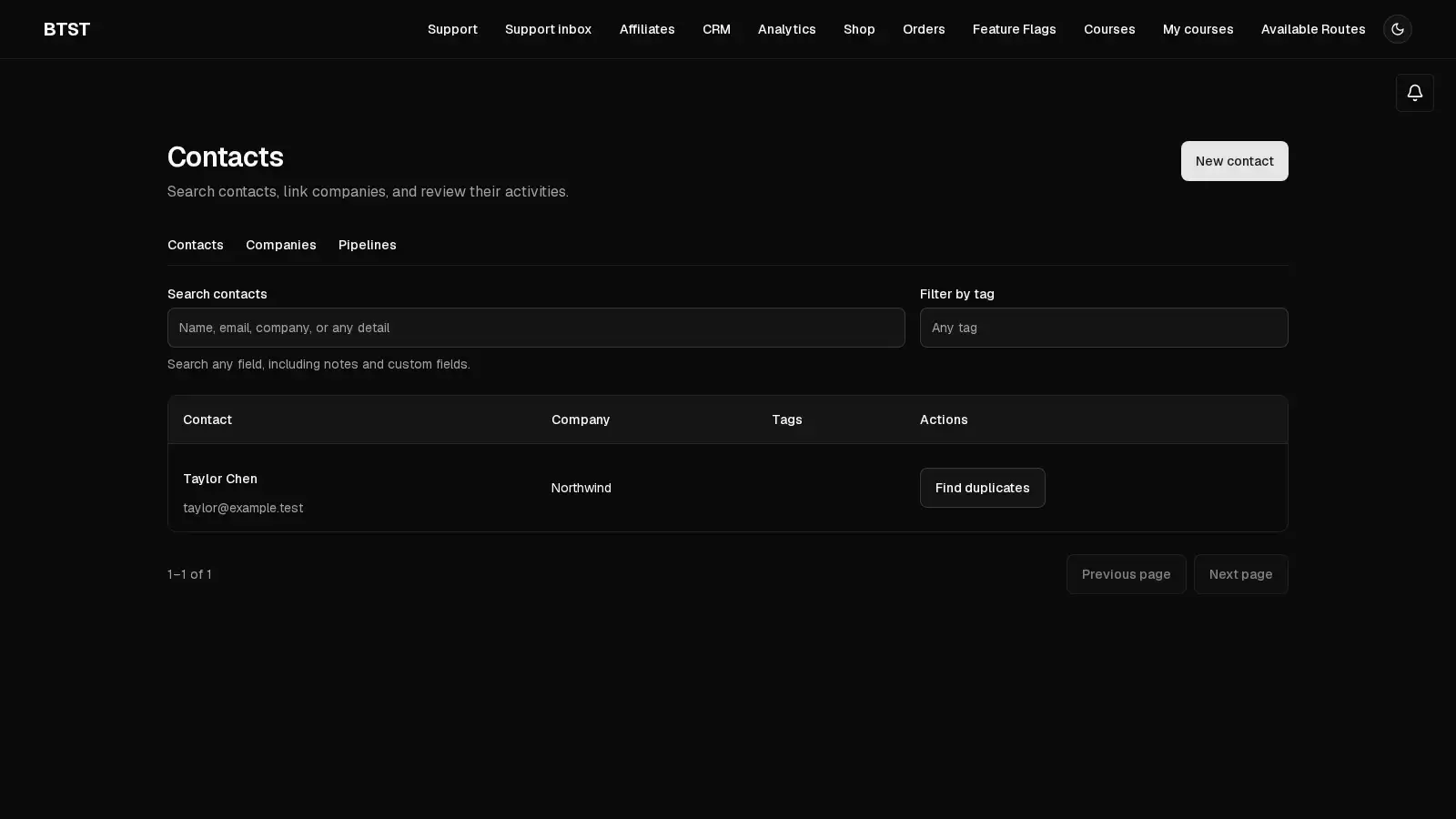
BTST supplies
- Contact and company records, custom fields, tags, and activity timelines
- Deal pipelines backed by Kanban boards, columns, and cards
- Follow-up reminder hooks, Form Builder lead capture, and AI page tools
You supply
- A database adapter with isolated transaction support and the Kanban plugin
- Authenticated identities and CRM authorization rules
- A reminder delivery hook and recurring job when reminders are enabled
- Form Builder and AI Chat registration when those integrations are used
You own and customize
Contacts, companies, deals, and activities stay in your database. Your application owns authentication, authorization, and reminder delivery.
Compatibility and dependencies
Maintained: Next.js 15+ App Router, React Router v7, TanStack Start.
Requires: Kanban plugin; A BTST database adapter.
External services: None required.
From registration to result
A semantic workflow, not a setup shortcut
- 1Capture a contact
Create a contact with tags and custom fields, or connect a lead capture form.
- 2Progress a deal
Move deals through Kanban stages and keep their linked contacts in view.
- 3Follow up
Log interactions, set due dates, and deliver reminders through a lifecycle hook.
The CRM plugin manages contacts and companies, tracks deals through multiple pipelines, and records notes, calls, emails, and meetings. Pipelines reuse Kanban boards, columns, and cards. Form Builder and AI Chat are optional integrations.
Setup
Register CRM and Kanban under their canonical keys. CRM reuses Kanban's board, column, and task model for pipelines and deals.
import { createBackendStack } from "@btst/stack/api"
import { crmBackendPlugin } from "@btst/plugin-crm/api"
import { kanbanBackendPlugin } from "@btst/plugin-kanban/api"

export const myStack = createBackendStack({
  adapter,
  auth: serverAuth,
  basePath: "/api/data",
  plugins: {
    kanban: kanbanBackendPlugin(),
    crm: crmBackendPlugin(),
  },
})
Create the client stack with the same shared API and site paths used by your application:
import { createClientStack } from "@btst/stack/client"
import { crmClientPlugin } from "@btst/plugin-crm/client"
import { kanbanClientPlugin } from "@btst/plugin-kanban/client"

export function getStackClient(queryClient) {
  return createClientStack({
    queryClient,
    api: { baseURL: "https://example.com", basePath: "/api/data" },
    site: { baseURL: "https://example.com", basePath: "/pages" },
    plugins: {
      kanban: kanbanClientPlugin(),
      crm: crmClientPlugin(),
    },
  })
}@import "@btst/plugin-kanban/css";
@import "@btst/plugin-crm/css";btst init --plugins crm automatically includes Kanban. Supply your database
adapter, authentication provider, and authorization rules before using the
private CRM routes.
Authorization
Register crmPermissions from @btst/plugin-crm/permissions in your
shared authorization contract. CRM request operations require explicit grants;
unauthenticated or unconfigured requests cannot read CRM data.
CRM requires configured stack authorization at setup. Reading pipelines also
requires crm.deal.read, because pipeline responses include their deal metadata.
Permissions cover contact, company, deal, owner, pipeline, activity, and
reminder. For example, an application can restrict CRM management to admins:
crm.contact.read.when(({ identity }) => identity?.role === "admin")
crm.contact.create.when(({ identity }) => identity?.role === "admin")
crm.deal.move.when(({ identity }) => identity?.role === "admin")
Apply equivalent rules for the remaining operations your application enables. CRM records are workspace-wide. Deal ownership is assignment metadata; it does not isolate rows between users or tenants. Grant access only to the intended workspace or CRM administrators, and use a separate data boundary when tenants must be isolated. CRM does not provide a multi-user role management interface. Trusted jobs deliberately bypass request authorization.
Contacts and companies
Contacts support first and last name, email, phone, company, title, notes, tags,
and string custom fields. Link a contact to a company record with companyId.
Companies have a name, domain, phone, and notes.
const crm = myStack.forRequest(request).operations.crm
const contact = await crm.createContact({
  firstName: "Avery",
  lastName: "Chen",
  email: "avery@example.com",
  tags: ["enterprise"],
  customFields: { region: "North America" },
})
const contacts = await crm.listContacts({ tag: "enterprise" })
const detail = await crm.getContactById({ id: contact.id })
Contact search includes ordinary fields, tags, and custom fields. List results
use { items, total }.
Contact and deal relation fields search the server beyond the initial results while retaining the selected contact or company when the search changes.
Duplicate review and record merging
The contacts and companies screens provide a manager review workflow for possible duplicates. Matching values are suggestions, not proof that two records describe the same person or company. A manager must choose the surviving record, review the affected fields and relationships, and explicitly resolve conflicting fields before merging. Names and unverified inbound messages never trigger a merge. Creating contacts, importing contacts, and capturing form leads continue to allow multiple contacts with the same email address.
Contact suggestions compare email addresses after trimming surrounding
whitespace and lowercasing the whole address. They do not remove + suffixes,
remove dots, infer email-provider rules, or match names. Company normalization
parses an HTTP(S) URL, adding https:// when no scheme is supplied, and compares
its lowercase hostname after removing a leading www. and trailing DNS dot.
Paths and ports do not affect the hostname. Invalid URLs, non-HTTP(S) schemes,
and URLs containing credentials provide no match key.
Suggestions are paginated with limit (1–200, default 50) and offset; select an
existing record to review its matches. Responses include items, total, the
normalizedValue, and identityVerified: false.
const crm = myStack.forRequest(request).operations.crm
const suggestions = await crm.listContactDuplicates({
  id: contact.id,
  limit: 20,
  offset: 0,
})
const preview = await crm.previewContactMerge({
  survivorId: contact.id,
  sourceId: duplicate.id,
})

// Populate choices from the manager's explicit selections in the preview.
await crm.mergeContacts({
  survivorId: contact.id,
  sourceId: duplicate.id,
  versions: preview.versions,
  choices: managerChoices,
})
The company operations are listCompanyDuplicates, previewCompanyMerge, and
mergeCompanies, with the same IDs, pagination, version, and choice structure.
Each conflicting field requires a "survivor" or "source" choice. Obtain a new
preview after a source or survivor changes; do not automatically retry a stale
merge with the old choices. Self-merges and merges involving removed or already
merged records are rejected.
Tags are combined without duplicates. Custom-field keys present on only one
record are retained, while conflicting values require a choice. Existing limits
still apply to the combined record, including 100 tags and 100 custom fields;
the preview lists exceeded limits in blockers, and the manager UI disables the
merge action while blockers remain. Edit the records to reconcile those limits,
then request a fresh preview. Direct merge operations enforce the same limits
before making any writes. Tags and custom-field keys are never silently dropped
to fit the limits.
Merging preserves linked deals and activity history. Activities remain separate records even when their bodies or dates match; matching text does not establish that two historical events are the same event. A company merge also repoints its linked contacts. The discarded record is removed only after the merge's declared relationship updates succeed.
Authorization and transactions
Duplicate suggestions require entity read access and update access to the
selected contact or company. Preview and execution require entity read access,
update access to the survivor, delete access to the source, and that entity's
explicit merge permission. The merge authorization facts identify both records
as { survivorId, sourceId };
grant this capability only to the same workspace managers who may consolidate
CRM data. Configure rules for both crm.contact.merge and crm.company.merge
when exposing both workflows. Trusted operations bypass request authorization
and should be reserved for application-owned jobs.
Merge execution requires an adapter with native, isolated transactions and enforced foreign keys. The ordinary memory adapter does not provide the required isolation and cannot execute merges; its ordinary CRM create/read/update operations remain available. A transaction method that simply invokes its callback does not satisfy this contract. The adapter must prevent concurrent relationship writes from introducing references to a source being merged.
Execution revalidates both record versions inside the transaction and claims their revisions before moving relationships. A conflict or failed relationship write rolls back the record, relationship, and audit writes together. Keep application integrations on that same transaction boundary; post-commit callbacks cannot provide atomic updates to another database or service.
Apply your adapter's schema migration before deploying this backend: contacts
gain normalizedEmail, companies gain normalizedDomain, both gain a revision
field, and CRM gains the crmMerge audit model. Backfill revision values for
existing records with distinct UUIDs, and populate the normalized fields using
normalizeCrmEmail and normalizeCrmDomain from @btst/plugin-crm/api.
For a populated table, add revision as nullable, backfill every row, then apply
the required constraint. The schema's UUID default runs in application code; it
is not a database default that fills existing rows during an ADD COLUMN.
Normalized fields are indexed, not unique; preserve existing
duplicate records. The audit retains the pre-merge record snapshots, field
choices, email aliases, and survivor relationship. Include it in your backup,
access, retention, and data-erasure policies.
Records without a revision cannot be previewed for merging until the backfill is
complete; records without a normalized key do not produce duplicate suggestions.
Integration boundaries
The built-in relationship inventory is:
| Merge | Relationships moved to the survivor |
|---|---|
| Contact | crmDeal.contactId, crmActivity.contactId |
| Company | crmContact.companyId, crmDeal.companyId |
The generated Helpdesk bridge stores ticket lifecycle notes as CRM activities,
so moving crmActivity.contactId retains those notes. Helpdesk tickets store the
verified requesterEmail, not a CRM contact foreign key. The sidebar and future
lifecycle notes resolve their CRM contact through the email filter. A merge does
not alter ticket ownership, requester identity, or the audience of its messages.
The merge audit retains the discarded contact's normalized email as an alias, so
email-filtered lookup can still find its surviving contact. This alias is created
by an authorized merge, not by an incoming message. It does not prove the sender's
identity or grant CRM access.
Declare application-owned scalar foreign keys on the backend:
crmBackendPlugin({
  mergeRelations: [
    { entity: "contact", model: "customerRequest", field: "crmContactId" },
    { entity: "company", model: "customerAccount", field: "crmCompanyId" },
  ],
})
The models must exist in the stack's adapter schema, and each declared field must hold the CRM record ID. The preview includes these relationships and the merge repoints them transactionally. This does not deduplicate application records; applications with uniqueness rules or other relationship semantics must validate their own merge policy before granting the operation.
The Form Builder lead-capture example below creates a contact after validating submission data; it does not persist a CRM ID in a built-in relationship. If your application stores a CRM ID in submission JSON, a custom database model, an external system, or a cached URL, that reference belongs to your application. Audit those references before enabling merges. Declare supported database references in the CRM merge configuration so they move within the same transaction. Reconcile JSON and external references through your application's own migration workflow before allowing a merge; they are not discovered or rewritten automatically.
Kanban composition
A pipeline is a Kanban board, a stage is one of its columns, and a deal links to a Kanban task. CRM projects a deal's title, stage, and pipeline from that task, so moving the same card through Kanban keeps CRM reads consistent.
const crm = myStack.trusted.crm
const pipeline = await crm.createPipeline({
  name: "Sales",
  slug: "sales",
})
const deal = await crm.createDeal({
  title: "Annual support plan",
  pipelineId: pipeline.id,
  stage: pipeline.columns[0].id,
  value: 12000,
  currency: "USD",
  contactId: contact.id,
})
await crm.moveDeal({ id: deal.id, stage: pipeline.columns[1].id })
Create additional pipelines for onboarding, support, or other workflows. Deal
records also support company links, close dates, and open, won, or lost
status. The pipeline view reuses Kanban's drag-and-drop interaction. Its CRM-aware
wrapper uses KanbanBoard's optional renderColumn callback to provide deal
links and values while the shared board owns drag-and-drop behavior.
Deal ownership
Deal.ownerId projects the associated Kanban task's assigneeId. There is one
stored assignment: a CRM reassignment updates that task, and both representations
return the same owner. The pipeline board's ownerId describes the board itself
and is independent of deal ownership.
Supply the assignable staff directory from trusted application membership data:
crmBackendPlugin({
  staffDirectory: async ({ request }) => {
    const workspace = await requireWorkspace(request)
    const members = await listActiveSalesStaff(workspace.id)
    return members.map((member) => ({ id: member.userId, name: member.name }))
  },
})
These application functions must verify the session and workspace on the server. Do not populate the directory from browser-submitted identities. Directory entries are the allowed assignment targets, rather than a new user or role database. Trusted jobs call the same directory without a request; handle that case explicitly if your jobs assign owners. Without a directory, new staff assignments are disabled.
Grant crm.owner.read to expose directory choices and crm.deal.assign to allow
assignment. These are separate from crm.deal.update:
crm.owner.read.when(({ identity }) => identity?.role === "admin")
crm.deal.assign.when(({ identity, facts }) =>
  identity?.role === "admin" || (
    facts.currentOwnerId === null &&
    identity?.id === facts.proposedOwnerId
  ),
)
The assignment permission receives id, taskId, pipelineId,
currentOwnerId, and proposedOwnerId. The server derives these facts and
rejects assignment if the task changes before the write. Contact and company
relationships are not assignment facts; they can change independently of ownership.
Deal update, delete, and move permission facts also include ownerId and taskId.
Generic deal creation and updates do not accept an owner; use the explicit
assignment operation:
const crm = myStack.forRequest(request).operations.crm
const deal = await crm.getDealById({ id: dealId })
await crm.assignDealOwner({
  id: deal.id,
  ownerId: staffUserId,
  expectedOwnerId: deal.ownerId,
})
Set ownerId: null to clear ownership, with the same assignment permission.
expectedOwnerId is the value displayed when editing. A competing reassignment
returns HTTP 409 rather than overwriting the new owner; reload before retrying.
Membership is validated on every assignment. Removing staff from the directory
prevents new assignments to them and preserves historical assignments until an
authorized user clears or reassigns them. The UI retains the removed user's ID
when their name is unavailable.
The owner selector appears on the deal detail page. Pipeline and deal-list filters support all owners, unassigned, a staff member, and the signed-in user. The server resolves the current user from the authenticated identity:
await crm.listDeals({ ownerId: staffUserId })
await crm.listDeals({ owner: "unassigned" })
await crm.listDeals({ owner: "current" })
await crm.getPipeline({ id: pipelineId, owner: "current" })
Filtered totals and stage counts describe the matching deals. Filters narrow a workspace query; they grant no additional access and do not restrict an otherwise authorized user from choosing another filter. Dragging is disabled while an owner filter is active, preserving the full pipeline's task order. Clear the filter to drag, or change stages from deal details.
Access policies and direct Kanban paths
Assignment permission governs who can change ownership. Read, update, move, and delete permissions remain separate. Granting assignment to a user does not grant these operations, and granting reads does not restrict results to their deals. This plugin does not enable an owner-only row policy. Such a policy needs a separate application data boundary covering CRM lists, counts, pipelines, detail, activities and mutations, plus the corresponding Kanban board/task list, detail, update, move, reorder and deletion paths. A browser owner filter or a single assignment rule cannot implement that boundary.
While CRM is registered, changing a linked task's assignee through generic Kanban
task updates is rejected. Use assignDealOwner so directory validation and
assignment authorization run. Ordinary Kanban tasks retain their existing behavior.
Direct adapter writes and lower-level mutation helpers are trusted primitives;
application code using them owns validation and authorization.
Additive migration
No duplicate CRM owner column or destructive backfill is needed: existing
kanbanTask.assigneeId storage is reused. Upgrade CRM and Kanban together, register
the directory and new permission rules, then enable the selector. Existing deals
without an assignee return ownerId: null; assigned tasks keep their IDs even if
the staff directory no longer contains them. Existing deal create/update callers
continue to work. Move any application code that reassigns CRM-linked Kanban
tasks to assignDealOwner before enabling the new integration.
Activities and reminders
Log a note, call, email, or meeting against a contact, a deal, or both:
await myStack.trusted.crm.logActivity({
  type: "call",
  body: "Reviewed the support requirements; send the proposal next week.",
  contactId: contact.id,
  dueAt: "2026-12-01T10:00:00.000Z",
})
Set completedAt when the follow-up is complete. Reminder dates are stored in
the database. Configure delivery through onActivityReminder and call
sendDueReminders from your scheduler:
crmBackendPlugin({
  hooks: {
    onActivityReminder: async (activity) => {
      await deliverReminder(activity)
    },
  },
})

// In your application's recurring server job:
await myStack.trusted.crm.sendDueReminders({})
Successful deliveries are marked so later runs do not resend the same reminder. CRM does not schedule the recurring job or send email itself.
Form Builder lead capture
Use Form Builder's onAfterSubmission lifecycle hook. Check the form identity
and validate its saved JSON data before creating a contact:
import { z } from "zod"
import { formBuilderBackendPlugin } from "@btst/plugin-form-builder/api"

const leadSchema = z.object({
  name: z.string().trim().min(1),
  email: z.email(),
})

formBuilderBackendPlugin({
  hooks: {
    onAfterSubmission: async (submission, form) => {
      if (form.slug !== "sales-enquiry") return
      const lead = leadSchema.parse(JSON.parse(submission.data))
      await myStack.trusted.crm.createContact({
        firstName: lead.name,
        email: lead.email,
        tags: ["website-lead"],
      })
    },
  },
})
The trusted operation is appropriate here because the application selected the
form and validated the lead. For a request-driven CRM action, use
myStack.forRequest(request).operations.crm instead.
AI Chat integration
CRM contact and deal pages register page descriptions and recent activities with AI Chat. Suggested prompts summarize history and draft follow-ups. The registered client tools query contacts and log activities through the same CRM API and authorization checks as the visible interface.
Mount PageAIContextProvider above the application's StackProvider instances
and enable AI Chat as described in AI Chat. CRM does
not require an AI provider for its ordinary contact, deal, or activity screens.
Routes
Paths below are relative to the client stack's site base path.
| Route key | Path | Purpose |
|---|---|---|
contacts | /crm/contacts | Search and filter contacts |
contactDetail | /crm/contacts/:id | Contact details and activity timeline |
editContact | /crm/contacts/:id/edit | Edit contact fields |
newContact | /crm/contacts/new | Create a contact |
companies | /crm/companies | Manage company records |
pipelines | /crm/pipelines | Create and choose pipelines |
pipeline | /crm/pipeline/:pipelineId | Kanban deal pipeline |
dealDetail | /crm/deals/:id | Deal details and activities |
CRM data is private and request-dependent. Do not statically generate CRM
pages. Next.js catch-all pages serving CRM should use
export const dynamic = "force-dynamic".
Configuration and schema reference
Shared API URLs, site paths, and the QueryClient belong on createClientStack,
not plugin overrides. The client config exposes plugin-specific page components,
loader hooks, and the request identity partition used for SSR hydration.
Prop
Type
Prop
Type
Prop
Type
Prop
Type
Prop
Type
Prop
Type
Prop
Type
Page-scoped presentation components
Configure pageOverrides under this plugin’s StackProvider overrides. Page keys
use the client plugin’s route vocabulary. Unknown page keys, slot names, and
incompatible component props are rejected by TypeScript.
contactDetail.ActivitySummary and dealDetail.ActivitySummary receive a typed activity. Only its metadata/body presentation is replaced: logging, completion, deletion, permissions, and timeline pagination stay in the built-in timeline. Contact forms, lists, companies, and pipeline controls retain their existing behavior.
<StackProvider
  stack={clientStack}
  overrides={{
    crm: {
      pageOverrides: {
        contactDetail: {
          ActivitySummary: ({ activity }) => <div><strong>{activity.type}</strong><p>{activity.body}</p></div>,
        },
      },
    },
  }}
>
  {children}
</StackProvider>
This changes contact activity summaries while deal activity summaries retain their built-in presentation.
These slots have no equivalent shared component override, so an omitted or empty
page entry falls back directly to the built-in component. Built-in pages supply
scope explicitly; reusable components rendered without a page scope retain their
existing default behavior. Whole-page pageComponents, styling, localization,
content slots, loading/error boundaries, and data loading are unchanged.
Helpdesk contact matching
Contact lists accept an optional email filter through HTTP, server operations,
and useContacts. It matches the complete address without case, before pagination.
For example, listContacts({ email: "customer@example.com", limit: 1 }) finds that
contact without matching a similar address or a mention in another contact's notes.
When CRM and Helpdesk are selected in the CLI, the agent ticket sidebar displays
the matched contact under CRM read authorization. Server-owned lifecycle notes
record ticket creation and resolution in that contact's activity timeline.
Request-bound tickets derive requesterEmail from the authenticated server-owned
identity.email; caller-provided addresses are ignored. The host must resolve a
verified email and include it in its authorization identity schema. Without one,
no contact is matched. Trusted import jobs own the provenance of supplied addresses.
The bridge adds no Helpdesk dependency to CRM.