CMS Plugin
Headless CMS with code-defined content types, dynamic forms, and agency-friendly workflows
Best for
Teams that want developers to own content models while editors manage records through an in-app admin interface.
Define structured content in TypeScript and give operators generated forms for managing it.
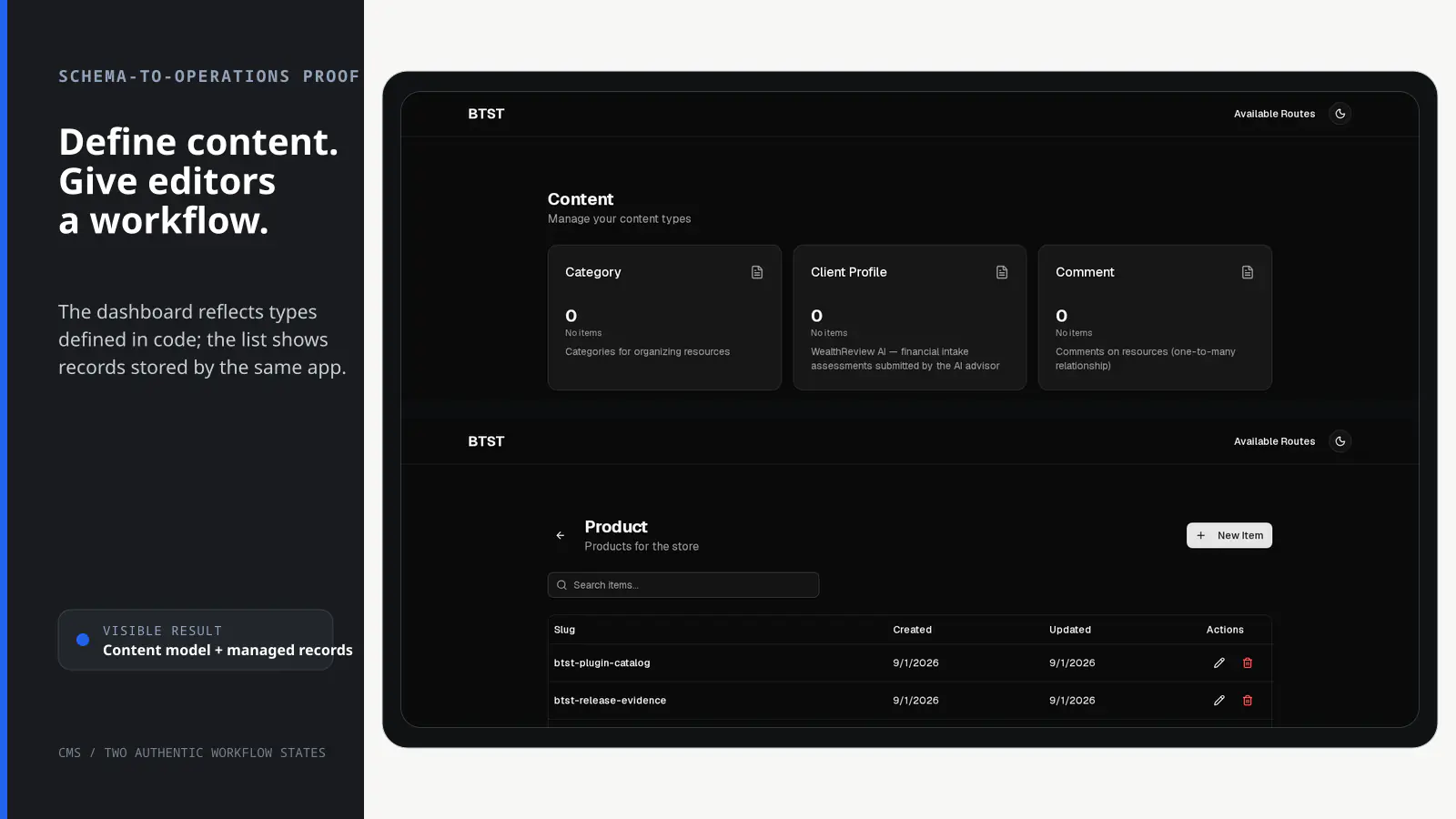
BTST supplies
- Content-type and content-item data models with typed CRUD APIs and lifecycle hooks
- Admin routes for content-type lists, entries, creation, and editing
- Schema-driven forms generated from adopter-defined Zod content types
- Client hooks plus customizable and ejectable admin pages
You supply
- Code-defined Zod content types and application-owned public rendering
- A BTST database adapter
- An image upload implementation when file fields are enabled
- Authorization rules when content operations are protected
You own and customize
Content models live in your code and records stay in your database. You own public rendering and uploads; the packaged admin pages can be overridden or ejected.
Compatibility and dependencies
Maintained: Next.js 15+ App Router, React Router v7, TanStack Start.
Requires: A BTST database adapter; Code-defined Zod content types.
External services: None required.
From registration to result
A semantic workflow, not a setup shortcut
- 1Model
Define each content type as a shared Zod schema in your app.
- 2Generate forms
Turn schema fields and metadata into validated operator-facing forms.
- 3Manage
Create and edit typed content records through the admin routes.
- 4Render
Load records with packaged hooks and present them on application-owned routes.
Installation
Ensure you followed the general framework installation guide first.
1. Define Content Types
Create your content types as Zod schemas in a shared file. This allows you to use the schemas on both server (for validation) and client (for type-safe hooks). Use .meta() to add descriptions and placeholders that appear in the admin UI:
import type { ContentTypeConfig } from "@btst/stack/plugins/cms/api"
import { z } from "zod";

// ========== Product Schema ==========
// Use .meta({ fieldType: "..." }) to customize how fields render in the admin UI
export const ProductSchema = z.object({
  name: z.string().min(1).meta({
    description: "Product display name",
    placeholder: "Enter product name..."
  }),
  description: z.string().meta({
    description: "Full product description",
    placeholder: "Describe this product...",
    fieldType: "textarea", // Renders as a textarea
  }),
  price: z.coerce.number().min(0).meta({ placeholder: "0.00" }),
  featured: z.boolean().default(false).meta({
    description: "Show on homepage featured section",
    fieldType: "switch", // Renders as a toggle switch
  }),
  category: z.enum(["Electronics", "Clothing", "Home", "Sports"]),
  image: z.string().optional().meta({
    description: "Product image",
    fieldType: "file", // Renders as file upload (uses uploadImage override)
  }),
});

// ========== Testimonial Schema ==========
export const TestimonialSchema = z.object({
  author: z.string().min(1).meta({ placeholder: "Customer name" }),
  company: z.string().optional().meta({ placeholder: "Company (optional)" }),
  quote: z.string().meta({
    description: "Customer testimonial text",
    placeholder: "What did they say?",
    fieldType: "textarea",
  }),
  rating: z.coerce.number().min(1).max(5).meta({
    description: "Rating out of 5 stars"
  }),
});

// One application-owned declaration can configure both CMS factories.
export const contentTypes = [
  {
    name: "Product",
    slug: "product",
    description: "Products for the store",
    schema: ProductSchema,
  },
  {
    name: "Testimonial",
    slug: "testimonial",
    description: "Customer testimonials",
    schema: TestimonialSchema,
  },
] satisfies ContentTypeConfig[];

// ========== Type Exports for Client Hooks ==========

/** Inferred type for Product data */
export type ProductData = z.infer<typeof ProductSchema>;

/** Inferred type for Testimonial data */
export type TestimonialData = z.infer<typeof TestimonialSchema>;

/**
 * Type map for all CMS content types.
 * Use this with CMS hooks for type-safe parsedData.
 */
export type CMSTypes = {
  product: ProductData;
  testimonial: TestimonialData;
};
2. Add Plugin to Backend API
Register the CMS backend plugin with your content types:
On the first CMS operation or prefetch in each plugin instance, BTST synchronizes
the configured content types. Unchanged definitions do not write to the database
or change updatedAt. Changes to the name, description, schema, legacy field
configuration, or form version still update the stored definition. JSON object
metadata key order and whitespace do not count as schema changes. Array order
and schema properties order are preserved, since property order controls the
CMS form field order.
import { createBackendStack } from "@btst/stack/api"
import { cmsBackendPlugin } from "@btst/stack/plugins/cms/api"
import { contentTypes } from "./cms-schemas"

const { handler, dbSchema } = createBackendStack({
  basePath: "/api/data",
  plugins: {
    cms: cmsBackendPlugin({ contentTypes })
  },
  adapter: (db) => createMemoryAdapter(db)({})
})

export { handler, dbSchema }
3. Add Plugin to Client
Register the CMS client plugin:
import { createClientStack } from "@btst/stack/client"
import { cmsClientPlugin } from "@btst/stack/plugins/cms/client"
import { QueryClient } from "@tanstack/react-query"
import { contentTypes } from "./cms-schemas"

function getBaseURL(serverOrigin?: string) {
  if (typeof window !== "undefined") return window.location.origin
  return (
    serverOrigin ||
    process.env.BTST_SITE_URL ||
    process.env.BASE_URL ||
    "http://localhost:3000"
  )
}

export const getStackClient = (
  queryClient: QueryClient,
  options?: { headers?: Headers; origin?: string },
) => {
  const baseURL = getBaseURL(options?.origin)
  return createClientStack({
    api: {
      baseURL,
      basePath: "/api/data",
      ...(options?.headers ? { headers: options.headers } : {}),
    },
    site: { baseURL, basePath: "/pages" },
    queryClient,
    plugins: {
      cms: cmsClientPlugin({ contentTypes })
    }
  })
}
The backend HTTP catalog remains authoritative for content data. Passing the
shared declaration to cmsClientPlugin() preserves your application-defined
content-type order in the admin UI. Omit it when a managed or separately
deployed backend owns the catalog.
4. Configure the Provider
Pass the resolved client stack to the provider. Override inference comes from the registered CMS definition, so no manual override map or provider generic is needed:
import { nextRouter } from "@btst/stack/next"

const stack = getStackClient(queryClient, clientOrigins)

<StackProvider
  stack={stack}
  router={nextRouter()}
  overrides={{
    cms: {
      uploadImage: async (file) => {
        // Your image upload logic
        return "https://example.com/image.png"
      },
    }
  }}
>
  {children}
</StackProvider>
5. Import CSS
Add the CMS styles to your global CSS:
@import "@btst/stack/plugins/cms/css";Supported Field Types
The CMS uses AutoForm to automatically render forms from Zod schemas. Use .meta({ fieldType: "..." }) on any field to customize its rendering:
| Zod Type | Default Handler | With fieldType Override |
|---|---|---|
z.string() | Input (text) | "textarea", "file" |
z.coerce.number() | Number input | - |
z.boolean() | Checkbox | "switch" |
z.coerce.date() | Date picker | - |
z.enum([...]) | Select dropdown | "radio" |
Adding UI Customization
Use .meta() to customize how fields appear and render. All field configuration is done directly in the Zod schema:
const ProductSchema = z.object({
  name: z.string().min(1).meta({
    description: "Product display name",  // Shows as help text
    placeholder: "Enter name..."          // Input placeholder
  }),
  bio: z.string().meta({
    description: "About this product",
    fieldType: "textarea",  // Renders as a multi-line textarea
  }),
  featured: z.boolean().default(false).meta({
    fieldType: "switch",  // Renders as a toggle switch instead of checkbox
  }),
  category: z.enum(["A", "B", "C"]).meta({
    fieldType: "radio",  // Renders as radio buttons instead of select
  }),
});
Image Upload Fields
To add an image upload field to your content type:
- Add an optional string field with
fieldType: "file"in your schema:
const ProductSchema = z.object({
  name: z.string().min(1),
  image: z.string().optional().meta({
    description: "Product image URL",
    fieldType: "file",  // Renders as file upload
  }),
  // ...other fields
});- Provide
uploadImagein your StackProvider overrides:
// In your StackProvider overrides
cms: {
  uploadImage: async (file: File) => {
    // Upload to S3, Cloudinary, etc. and return the URL
    const formData = new FormData();
    formData.append("file", file);
    const res = await fetch("/api/upload", { method: "POST", body: formData });
    const { url } = await res.json();
    return url;
  },
  // ...other overrides
}
The built-in file component will use your uploadImage function to upload files and store the returned URL.
Repeating Groups (Arrays of Objects)
You can model repeating sub-records — variants, line items, blend components, FAQ entries, etc. — with z.array(z.object({...})). The admin renders each item as a sub-form inside an accordion with Add and Remove buttons, and useFieldArray from react-hook-form drives the row state.
.meta() placeholders, fieldType overrides, and custom fieldComponents (including "file" and "relation") are propagated into the array items, so you can build rich nested forms without writing a custom field component.
const ProductSchema = z.object({
  name: z.string().min(1),
  variants: z
    .array(
      z.object({
        sku: z.string().meta({ placeholder: "SKU-001" }),
        price: z.coerce.number().min(0).meta({ placeholder: "0.00" }),
        notes: z.string().optional().meta({ fieldType: "textarea" }),
        // Nested file uploads work when `uploadImage` is provided in overrides.
        image: z.string().optional().meta({ fieldType: "file" }),
        // Nested belongsTo relations render the searchable picker inside the row.
        categoryId: z
          .object({ id: z.string() })
          .optional()
          .meta({
            fieldType: "relation",
            relation: {
              type: "belongsTo",
              targetType: "category",
              displayField: "name",
            },
          }),
      }),
    )
    .default([])
    .meta({ description: "Product variants" }),
});
A few rules worth remembering:
- New rows are created with
append({})— fields with no default render empty until the user fills them in. - Inside item objects, do not name properties using reserved
FieldConfigItemkeys (label,description,inputProps,fieldType,renderParent,order). The admin will warn and skip those properties to avoid clobbering the array's own metadata. - Validation, defaults, and required-vs-optional behavior follow the inner Zod schema as usual.
Admin Routes
The CMS plugin provides these admin routes:
| Route | Description |
|---|---|
/cms | Dashboard - Grid of content types with item counts |
/cms/:typeSlug | Content list - Paginated table of items |
/cms/:typeSlug/new | Create new item |
/cms/:typeSlug/:id | Edit existing item |
Admin routes are automatically set to noindex for SEO. Don't include them in your public sitemap.
Page Component Overrides
You can replace any built-in admin page with your own React component using the optional pageComponents field in cmsClientPlugin(config). The built-in component is used as the fallback whenever an override is not provided. Overrides for parameterized routes receive the route context ({ params }) as props.
cmsClientPlugin({
  // ... other config
  pageComponents: {
    // Replace the CMS dashboard page
    dashboard: MyCustomDashboard,
    // Replace the content list page — receives the route context as props
    contentList: ({ params }) => (
      <MyCustomContentList typeSlug={params.typeSlug} />
    ),
    // Replace the new content page — receives the route context as props
    newContent: ({ params }) => <MyCustomNewContent typeSlug={params.typeSlug} />,
    // Replace the edit content page — receives the route context as props
    editContent: ({ params }) => (
      <MyCustomEditContent typeSlug={params.typeSlug} id={params.id} />
    ),
  },
})
Client Hooks
Fetch content data in your frontend pages using the provided hooks. All hooks support optional type generics for full type safety on parsedData.
Available Hooks
Query Hooks
| Hook | Description | Returns |
|---|---|---|
useContentTypes() | List all content types | { contentTypes, isLoading, error, refetch } |
useContentType(slug) | Get single content type by slug | { contentType, isLoading, error, refetch } |
useContent(typeSlug, options?) | List paginated items with infinite loading | { items, total, hasMore, loadMore, isLoadingMore, isLoading, error, refetch } |
useContentItem(typeSlug, id) | Get item by ID | { item, isLoading, error, refetch } |
useContentItemBySlug(typeSlug, slug) | Get item by slug | { item, isLoading, error, refetch } |
useContentItemPopulated(typeSlug, id) | Get item with relations populated | { item, isLoading, error, refetch } |
useContentByRelation(typeSlug, field, targetId) | Filter items by relation | { items, total, hasMore, loadMore, isLoadingMore, isLoading, error, refetch } |
Suspense Hooks
All query hooks have suspense variants for use with React Suspense:
| Hook | Description | Returns |
|---|---|---|
useSuspenseContentTypes() | List all content types (suspense) | { contentTypes, refetch } |
useSuspenseContent(typeSlug, options?) | List paginated items (suspense) | { items, total, hasMore, loadMore, isLoadingMore, refetch } |
useSuspenseContentItem(typeSlug, id) | Get item by ID (suspense) | { item, refetch } |
useSuspenseContentItemPopulated(typeSlug, id) | Get item with relations (suspense) | { item, refetch } |
useSuspenseContentByRelation(typeSlug, field, targetId) | Filter by relation (suspense) | { items, total, hasMore, loadMore, isLoadingMore, refetch } |
Mutation Hooks
| Hook | Description | Returns |
|---|---|---|
useCreateContent(typeSlug) | Create mutation | React Query mutation |
useUpdateContent(typeSlug) | Update mutation | React Query mutation |
useDeleteContent(typeSlug) | Delete mutation | React Query mutation |
Basic Usage (Without Type Safety)
import {
  useContentTypes,
  useContent,
  useContentItem,
  useContentItemBySlug
} from "@btst/stack/plugins/cms/client/hooks"

// List all content types
function ContentTypesGrid() {
  const { contentTypes, isLoading } = useContentTypes()
  // ...
}

// List paginated content items
function ProductList() {
  const { items, total, hasMore } = useContent("product", { limit: 20 })
  // items[0].parsedData is Record<string, unknown>
}
Type-Safe Usage (Recommended)
Import your CMSTypes type map and pass it to the hooks for full type inference on parsedData:
import { useContent, useContentItem, useContentItemBySlug } from "@btst/stack/plugins/cms/client/hooks"
import type { CMSTypes } from "@/lib/cms-schemas"

// List products with type-safe parsedData
function ProductList() {
  const { items, total, hasMore } = useContent<CMSTypes, "product">("product", {
    limit: 20
  })

  return (
    <ul>
      {items.map((item) => (
        <li key={item.id}>
          {/* All fields are fully typed! */}
          <h3>{item.parsedData.name}</h3>
          <p>${item.parsedData.price}</p>
          <span>{item.parsedData.category}</span>
          {item.parsedData.featured && <Badge>Featured</Badge>}
        </li>
      ))}
    </ul>
  )
}

// Get single item by ID with type safety
function ProductDetail({ id }: { id: string }) {
  const { item, isLoading } = useContentItem<CMSTypes, "product">("product", id)

  if (isLoading || !item) return <Skeleton />

  return (
    <div>
      <h1>{item.parsedData.name}</h1>
      <p>{item.parsedData.description}</p>
    </div>
  )
}

// Get single item by slug with type safety
function ProductPage({ slug }: { slug: string }) {
  const { item } = useContentItemBySlug<CMSTypes, "product">("product", slug)
  // item.parsedData.price is typed as number
}
The type generics are optional for backward compatibility. Without them, parsedData defaults to Record<string, unknown>.
Mutations
Mutation hooks also support type generics for type-safe input data:
import {
  useCreateContent,
  useUpdateContent,
  useDeleteContent
} from "@btst/stack/plugins/cms/client/hooks"
import type { ProductData } from "@/lib/cms-schemas"

function CreateProductForm() {
  // Type-safe mutation - TypeScript enforces correct data shape
  const createProduct = useCreateContent<ProductData>("product")

  const handleSubmit = async () => {
    await createProduct.mutateAsync({
      slug: "my-product",
      data: {
        name: "New Product",
        description: "A great product",
        price: 29.99,
        featured: false,
        category: "Electronics", // TypeScript autocompletes enum values!
      }
    })
  }
}

function UpdateProductForm({ id }: { id: string }) {
  const updateProduct = useUpdateContent<ProductData>("product")

  const handleUpdate = async () => {
    await updateProduct.mutateAsync({
      id,
      data: { data: { name: "Updated Name", price: 39.99 } }
    })
  }
}
Backend Hooks
Customize CMS behavior with backend hooks:
cmsBackendPlugin({
  contentTypes: [...],
  hooks: {
    onBeforeCreateContent: async (data, context) => {
      console.log("Creating item in", context.typeSlug)
      // `data` is validated and canonical. Throw to deny.
    },
    onAfterCreateContent: async (item, context) => {
      console.log("Created:", item.slug)
      // Trigger webhooks, notifications, etc.
    },
    onBeforeUpdateContent: async (id, data, context) => {
      // `data` is the complete merged, validated record. Throw to deny.
    },
    onAfterUpdateContent: async (item, context) => {
      // ...
    },
    onBeforeDeleteContent: async (id, context) => {
      // Throw to deny: throw new Error("Cannot delete published content")
    },
    onAfterDeleteContent: async (id, context) => {
      // ...
    },
    onErrorExecuteContentOperation: async (error, operation, context) => {
      console.error(`CMS ${operation} error:`, error.message)
    },
  },
})
A plain error thrown by onBeforeCreateContent, onBeforeUpdateContent, or
onBeforeDeleteContent denies the request with HTTP 403. Create and update hooks run
before the parent or any inline related record is written, and no mutation is
committed when a before hook denies the operation.
CMS lifecycle names use the action-first onBefore<Action><Entity>,
onAfter<Action><Entity>, and onError<Action><Entity> grammar. The existing
aggregate error phase remains one callback; its operation argument identifies
the failed create, update, delete, list, or get operation.
| Removed name | Canonical name |
|---|---|
onBeforeCreate | onBeforeCreateContent |
onAfterCreate | onAfterCreateContent |
onBeforeUpdate | onBeforeUpdateContent |
onAfterUpdate | onAfterUpdateContent |
onBeforeDelete | onBeforeDeleteContent |
onAfterDelete | onAfterDeleteContent |
onError | onErrorExecuteContentOperation |
Type Safety
The CMS plugin provides end-to-end type safety from schema definition to frontend rendering:
1. Schema Definition → Backend Validation
Zod schemas defined in cms-schemas.ts are used by the backend to validate all content operations:
// lib/cms-schemas.ts
export const ProductSchema = z.object({
  name: z.string().min(1),
  price: z.coerce.number().min(0),
});
2. Type Map → Client Hooks
Export inferred types and a type map for client-side type safety:
// lib/cms-schemas.ts
export type ProductData = z.infer<typeof ProductSchema>;
export type CMSTypes = { product: ProductData };
3. Type-Safe Data Access
Use the type map with hooks to get fully typed parsedData:
import { useContent } from "@btst/stack/plugins/cms/client/hooks"
import type { CMSTypes } from "@/lib/cms-schemas"

function ProductList() {
  const { items } = useContent<CMSTypes, "product">("product")

  // ✅ TypeScript knows all field types
  items[0].parsedData.name   // string
  items[0].parsedData.price  // number

  // ❌ TypeScript error: Property 'invalid' does not exist
  items[0].parsedData.invalid
}
4. Schema Changes Trigger Compile Errors
When you update a schema, TypeScript shows errors everywhere the types are used:
// Adding a new required field to ProductSchema...
const ProductSchema = z.object({
  name: z.string(),
  price: z.number(),
  sku: z.string(), // New field
});

// ...triggers TypeScript errors in components
<span>{item.parsedData.sku}</span> // ✅ Now works
createProduct.mutate({
  slug: "x",
  data: { name: "X", price: 10 } // ❌ Error: missing 'sku'
})
This ensures developers catch schema changes at compile time rather than in production.
API Endpoints
The CMS plugin exposes these REST endpoints:
| Endpoint | Method | Description |
|---|---|---|
/content-types | GET | List all content types with item counts |
/content-types/:slug | GET | Get single content type by slug |
/content/:typeSlug | GET | List items (query: slug, limit, offset) |
/content/:typeSlug | POST | Create item |
/content/:typeSlug/:id | GET | Get single item |
/content/:typeSlug/:id | PUT | Update item |
/content/:typeSlug/:id | DELETE | Delete item |
/content/:typeSlug/:id/populated | GET | Get item with relations populated |
/content/:typeSlug/by-relation | GET | Filter by relation (query: field, targetId) |
/content-types/:slug/inverse-relations | GET | Inspect inverse relation definitions |
/content-types/:slug/inverse-relations/:sourceType | GET | List inverse relation items |
Authorization & Lifecycle Hooks
CMS owns a browser-safe, schema-backed permission catalog. Define one rule set against that catalog, then bind it to a server identity adapter and a browser identity adapter. The built-in CMS routes and the backend operations use the same descriptors—there is no second list of resource/action strings to keep in sync.
import { z } from "zod"
import { defineAuthorization } from "@btst/stack/authorization"
import { cmsPermissions } from "@btst/stack/plugins/cms/permissions"

export const authorization = defineAuthorization({
  identity: z.object({
    id: z.string(),
    role: z.enum(["editor", "admin"]),
  }),
  permissions: [cmsPermissions] as const,
  rules: ({ cms }) => [
    // Public record responses embed their content-type schema, so both reads
    // must be declared public. Omit either rule to deny that response.
    cms.record.read.allow(),
    cms.contentType.read.allow(),
    cms.record.create.when(({ identity }) => identity !== null),
    cms.record.update.when(
      ({ identity, facts }) =>
        identity?.role === "admin" || identity?.id === facts.authorId,
    ),
    cms.record.delete.when(
      ({ identity, facts }) =>
        identity?.role === "admin" || identity?.id === facts.authorId,
    ),
  ],
})
Bind the same value on the backend. HTTP routes and request-scoped calls resolve the identity, derive trusted facts from the database, evaluate the rule, and only then enter CMS lifecycle hooks and mutation code.
import { createServerAuth } from "@btst/stack/authorization/server"
import { authorization } from "./authorization"

const auth = createServerAuth({
  authorization,
  getIdentity: async ({ request }) => {
    const session = await getSession(request.headers)
    return session?.user ?? null
  },
})

export const myStack = createBackendStack({
  basePath: "/api/data",
  plugins: { cms: cmsBackendPlugin({ contentTypes }) },
  adapter: (db) => createMemoryAdapter(db)({}),
  auth,
})
The exact cmsPermissions descriptors are evaluated before lifecycle hooks. Compound inline-create, existing-relation, populated-record, and inverse-relation checks evaluate every server-derived target or source separately, so a secondary record cannot be exposed or mutated through a permitted primary record. Record responses embed their content-type schema, so
record list, detail, create, update, populated, and relation-list operations
also require cms.contentType.read for every embedded type. Relation filters
derive the target type from the configured relation field and authorize the
authoritative target record before reading junction rows.
Bind it in the browser for immediate presentation checks. Browser facts only control what is shown; they are never trusted by the backend.
import { createClientAuth } from "@btst/stack/authorization/client"
import { authorization } from "@/lib/authorization"

const auth = createClientAuth({
  authorization,
  getIdentity: () => getBrowserSession()?.user ?? null,
})

<StackProvider
  stack={stack}
  auth={auth}
  initialIdentity={initialIdentity}
  // router, overrides, ...
>
  {children}
</StackProvider>
CMS permission catalog
| Descriptor | Facts | Backend operations |
|---|---|---|
cms.contentType.read | contentType? | List content types, get a content type, inspect inverse relation definitions |
cms.record.read | contentType, scope: "collection" | "record", recordId?, authorId? | List, get, populate, and relation reads |
cms.record.create | contentType | Create a record |
cms.record.update | contentType, recordId, authorId? | Update a record |
cms.record.delete | contentType, recordId, authorId? | Delete a record |
The backend reloads the content type and record before it derives
contentType, scope, recordId, and authorId; client-supplied ownership,
lookup scope, or type claims cannot authorize a write. A by-slug lookup uses
scope: "record" even when no matching record exists, so an explicitly public
detail rule can return a not-found result without exposing the collection.
Rules are boolean operation checks. If your
application needs tenant or row filtering, scope the backend query itself
rather than treating a boolean rule as a data filter.
The content-type catalog includes itemCount, so listing it also authorizes a
collection-scoped cms.record.read for every counted content type. If any
collection is denied, the operation fails without returning partial counts.
Server operation surfaces
The same operation pipeline backs all authoritative application surfaces:
// Identity comes from this request; authorization is enforced.
await myStack.forRequest(request).operations.cms.updateContentItem({
  typeSlug: "product",
  id: productId,
  body: { data: { name: "Updated" } },
})

// Trusted application code skips only user authorization. Validation,
// fact derivation, execution, and lifecycle hooks still run.
await myStack.trusted.cms.deleteContentItem({
  typeSlug: "product",
  id: productId,
})
myStack.raw.cms contains only the SSG prefetchForRoute helper. Use forRequest(request).operations.cms for request work and trusted.cms for explicitly trusted jobs; both retain validation and lifecycle behavior.
Inline _new relation values are compound writes. Request-scoped create and
update operations authorize cms.record.create for every server-derived target
content type before hooks run, then commit the parent, related records, and
relation rows atomically. Existing { id } relation values are resolved against
the configured target content type and require cms.record.read for the
authoritative target facts. The operation rejects wrong-type IDs and rechecks
target ownership before the transaction writes a relation. Trusted
trusted.cms calls skip those user checks but keep the same validation and
transaction lifecycle.
Compound reads fail closed too. A populated-record operation authorizes every
related target record before returning it, and inverse-relation metadata
authorizes each referring source content type before exposing its name or
fields. When inverse metadata includes counts for an itemId, it also
authorizes that target record and each counted source collection before reading
relation rows. Listing the records for an inverse relation likewise authorizes
the source collection and target record, and rederives the requested relation
field from the current content-type schemas.
Loader hooks may still prepare data and report failures, but they are not an
authorization boundary. onErrorLoad is reporting-only: callback errors are
contained and the loader never rejects, so it cannot perform throwing framework
redirects. Use onRouteRender and onRouteError for presentation lifecycle and
reporting.
Custom Field Components
You can provide custom field components via the fieldComponents override. This allows you to:
- Override built-in types (like "file") with custom implementations
- Add custom field types for specialized inputs (rich text editors, color pickers, etc.)
Using fieldComponents Override
The fieldComponents property maps field type names to React components:
import type { CMSPluginOverrides, AutoFormInputComponentProps } from "@btst/stack/plugins/cms/client"

// Define a custom component
function MyColorPicker({ field, label, isRequired, fieldConfigItem }: AutoFormInputComponentProps) {
  return (
    <div className="space-y-2">
      <label className="text-sm font-medium">
        {label}
        {isRequired && <span className="text-destructive"> *</span>}
      </label>
      <input
        type="color"
        value={field.value || "#000000"}
        onChange={(e) => field.onChange(e.target.value)}
        className="h-10 w-full cursor-pointer"
      />
      {fieldConfigItem?.description && (
        <p className="text-sm text-muted-foreground">{String(fieldConfigItem.description)}</p>
      )}
    </div>
  )
}

// In your StackProvider overrides:
cms: {
  fieldComponents: {
    // Override the built-in "file" type
    file: ({ field, label, isRequired }) => (
      <MyCustomFileUpload
        value={field.value}
        onChange={field.onChange}
        label={label}
        required={isRequired}
      />
    ),
    // Add a custom "color" type
    color: MyColorPicker,
    // Add a custom "richText" type
    richText: ({ field, label }) => (
      <MyRichTextEditor value={field.value} onChange={field.onChange} label={label} />
    ),
  },
  // ...other overrides
}
Registering Custom Field Types
To use a custom field type, add it to your Zod schema with .meta({ fieldType: "..." }):
// In your schema definition
const ProductSchema = z.object({
  name: z.string().min(1),
  primaryColor: z.string().optional().meta({
    description: "Brand color",
    fieldType: "color",     // Uses custom "color" component from fieldComponents
  }),
  longDescription: z.string().optional().meta({
    description: "Rich text content",
    fieldType: "richText",  // Uses custom "richText" component from fieldComponents
  }),
});
AutoFormInputComponentProps
Custom components receive these props:
| Prop | Type | Description |
|---|---|---|
field | ControllerRenderProps | React Hook Form field controller with value and onChange |
label | string | The field label (derived from schema key) |
isRequired | boolean | Whether the field is required |
fieldConfigItem | FieldConfigItem | Field config including description, inputProps, etc. |
fieldProps | object | Additional props from inputProps in fieldConfig |
zodItem | ZodAny | The Zod schema for this field |
Using the Built-in CMSFileUpload
The plugin exports CMSFileUpload for consumers who want to use or extend the default file upload:
import { CMSFileUpload } from "@btst/stack/plugins/cms/client"

// In your fieldComponents override
cms: {
  fieldComponents: {
    // Use the built-in component with your upload function
    file: (props) => (
      <CMSFileUpload {...props} uploadImage={myUploadFn} />
    ),
    // Or create a wrapper with custom styling
    customImage: (props) => (
      <div className="my-custom-wrapper">
        <CMSFileUpload {...props} uploadImage={myUploadFn} />
      </div>
    ),
  },
}
When a custom component is provided for a field type via fieldComponents, it takes precedence over the built-in component. This allows you to completely customize how any field type is rendered.
Data Relationships
The CMS plugin supports relationships between content types, enabling you to build directories, blogs with tags, or any relational data structure. Relationships are defined in your Zod schemas using .meta({ fieldType: "relation", relation: {...} }).
Defining Relationships
Add a relation field to your schema:
import { z } from "zod";

// Category schema (the target of the relation)
export const CategorySchema = z.object({
  name: z.string().min(1).meta({
    description: "Category name",
    placeholder: "Enter category name...",
  }),
  description: z.string().optional().meta({
    description: "Optional category description",
    fieldType: "textarea",
  }),
  color: z.string().optional().meta({
    description: "Category color (hex code)",
    placeholder: "#3b82f6",
  }),
});

// Resource schema with a manyToMany relation to categories
export const ResourceSchema = z.object({
  name: z.string().min(1).meta({
    description: "Resource name",
    placeholder: "Enter resource name...",
  }),
  description: z.string().meta({
    description: "Full resource description",
    fieldType: "textarea",
  }),
  website: z.string().url().optional().meta({
    description: "Website URL",
    placeholder: "https://example.com",
  }),
  // Relation field - manyToMany with categories
  categoryIds: z
    .array(z.object({ id: z.string() }))
    .default([])
    .meta({
      fieldType: "relation",
      relation: {
        type: "manyToMany",
        targetType: "category",    // Slug of the target content type
        displayField: "name",      // Field to display in the selector
        creatable: true,           // Allow creating new categories inline
      },
    }),
});

export type CategoryData = z.infer<typeof CategorySchema>;
export type ResourceData = z.infer<typeof ResourceSchema>;

export type CMSTypes = {
  category: CategoryData;
  resource: ResourceData;
};
Relationship Types
| Type | Description | Schema Format | Use Case |
|---|---|---|---|
belongsTo | Single reference to another item | z.object({ id: z.string() }).optional() | Comment → Resource (one-to-many inverse) |
hasMany | Multiple references | z.array(z.object({ id: z.string() })) | Author → Posts |
manyToMany | Many-to-many via junction table | z.array(z.object({ id: z.string() })) | Resource ↔ Categories |
belongsTo vs manyToMany: Use belongsTo when an item references a single parent (e.g., a Comment belongs to one Resource). Use manyToMany when items can have multiple relationships (e.g., a Resource can have many Categories).
belongsTo Example (One-to-Many)
For one-to-many relationships, the "many" side uses belongsTo to reference the "one" side:
// Resource Schema - the "one" side
export const ResourceSchema = z.object({
  name: z.string().min(1),
  description: z.string(),
  // ... other fields
});

// Comment Schema - the "many" side (belongs to Resource)
export const CommentSchema = z.object({
  author: z.string().min(1).meta({
    description: "Comment author name",
    placeholder: "Your name...",
  }),
  content: z.string().min(1).meta({
    description: "Comment content",
    placeholder: "Write your comment...",
    fieldType: "textarea",
  }),
  // belongsTo relation - links to a single Resource
  // Unlike manyToMany (array), belongsTo stores a single { id: string }
  resourceId: z.object({ id: z.string() }).optional().meta({
    fieldType: "relation",
    relation: {
      type: "belongsTo",
      targetType: "resource",
      displayField: "name",
    },
  }),
});
The admin UI renders belongsTo fields as a single-select dropdown instead of a multi-select.
RelationConfig Properties
| Property | Type | Description |
|---|---|---|
type | "belongsTo" | "hasMany" | "manyToMany" | The relationship type |
targetType | string | Slug of the target content type |
displayField | string | Field to show in the selector (e.g., "name", "title") |
creatable | boolean | Allow creating new related items inline (optional, default: false) |
Relation Hooks
Use these hooks to fetch content with populated relations:
import {
  useContentItemPopulated,
  useContentByRelation
} from "@btst/stack/plugins/cms/client/hooks"
import type { CMSTypes } from "@/lib/cms-schemas"

// Get a single resource with its related categories populated
function ResourceDetail({ id }: { id: string }) {
  const { item, isLoading } = useContentItemPopulated<CMSTypes, "resource">(
    "resource",
    id
  )

  if (isLoading || !item) return <Skeleton />

  return (
    <div>
      <h1>{item.parsedData.name}</h1>
      <p>{item.parsedData.description}</p>

      {/* Related categories are populated in _relations */}
      <div className="flex gap-2">
        {item._relations?.categoryIds?.map((category) => (
          <span key={category.id} className="badge">
            {category.parsedData.name}
          </span>
        ))}
      </div>
    </div>
  )
}

// Get resources filtered by a specific category
function CategoryResources({ categoryId }: { categoryId: string }) {
  const { items, isLoading } = useContentByRelation<CMSTypes, "resource">(
    "resource",
    "categoryIds",  // Field name containing the relation
    categoryId      // ID of the related category
  )

  return (
    <ul>
      {items.map((resource) => (
        <li key={resource.id}>{resource.parsedData.name}</li>
      ))}
    </ul>
  )
}
Inline Creation
When creatable: true is set in the relation config, users can create new related items directly from the relation selector. A modal form will appear allowing them to create a new item (e.g., a new category) without leaving the current form.
categoryIds: z
  .array(z.object({ id: z.string() }))
  .default([])
  .meta({
    fieldType: "relation",
    relation: {
      type: "manyToMany",
      targetType: "category",
      displayField: "name",
      creatable: true,  // Shows "Create new..." option in selector
    },
  }),
Inverse Relations Panel
When editing content in the CMS admin, an Inverse Relations Panel automatically appears below the form. This panel shows all items that reference the current item via belongsTo relations.
For example, when editing a Resource, the panel displays all Comments that belong to that Resource:
┌─────────────────────────────────────────────┐
│ 📝 Comments (3)                         [▼] │
├─────────────────────────────────────────────┤
│ • "Great resource!" by John     [Edit] [🗑] │
│ • "Very helpful" by Jane        [Edit] [🗑] │
│ • "Thanks!" by Bob              [Edit] [🗑] │
│                                             │
│ [+ Add Comment]                             │
└─────────────────────────────────────────────┘
The panel:
- Auto-discovers content types with
belongsTorelations pointing to the current type - Shows a count and list of related items with edit/delete links
- Provides an "Add" button to create new related items with the relation pre-filled
Relation API Endpoints
| Endpoint | Method | Description |
|---|---|---|
/content/:typeSlug/:id/populated | GET | Get item with relations populated |
/content/:typeSlug/populated | GET | List items with relations populated |
/content/:typeSlug/by-relation | GET | Filter by relation (query: field, targetId) |
/content-types/:slug/inverse-relations | GET | Get content types that reference this type (query: itemId optional) |
/content-types/:slug/inverse-relations/:sourceType | GET | Get items referencing this item (query: itemId, fieldName) |
Example API calls:
# Get resource with populated categories
curl /api/data/content/resource/abc123/populated

# Get all resources linked to a specific category
curl /api/data/content/resource/by-relation?field=categoryIds&targetId=cat456

# Get inverse relations for a resource (what types reference it)
curl /api/data/content-types/resource/inverse-relations?itemId=abc123

# Get all comments for a specific resource
curl /api/data/content-types/resource/inverse-relations/comment?itemId=abc123&fieldName=resourceId
Creating Items with Relations via API
When creating content items via API, pass relation values based on the relation type:
manyToMany / hasMany Relations (Array)
// Link to existing categories (array format)
await fetch("/api/data/content/resource", {
  method: "POST",
  headers: { "Content-Type": "application/json" },
  body: JSON.stringify({
    slug: "my-resource",
    data: {
      name: "My Resource",
      description: "A great resource",
      categoryIds: [
        { id: "existing-category-id-1" },
        { id: "existing-category-id-2" },
      ],
    },
  }),
});

// Create new categories inline using _new flag
await fetch("/api/data/content/resource", {
  method: "POST",
  headers: { "Content-Type": "application/json" },
  body: JSON.stringify({
    slug: "my-resource",
    data: {
      name: "My Resource",
      description: "A great resource",
      categoryIds: [
        { id: "existing-category-id" },
        { _new: true, data: { name: "New Category", color: "#10b981" } },
      ],
    },
  }),
});
_new is strict creation, not an upsert or an alternate way to reference an
existing record. BTST derives a slug from the inline data; if that slug already
exists for the target content type or occurs twice in the same request, the
operation returns HTTP 409 with code RELATED_RECORD_SLUG_CONFLICT. Pass
{ id: "existing-record-id" } when you intend to link an existing record.
belongsTo Relations (Single Object)
// Create comment linked to a resource (single object format)
await fetch("/api/data/content/comment", {
  method: "POST",
  headers: { "Content-Type": "application/json" },
  body: JSON.stringify({
    slug: "my-comment",
    data: {
      author: "John Doe",
      content: "Great resource!",
      resourceId: { id: "existing-resource-id" },  // Single object, not array
    },
  }),
});
Building a Directory
Here's a complete example of building a resource directory with categories:
"use client"
import { useContent } from "@btst/stack/plugins/cms/client/hooks"
import type { CMSTypes } from "@/lib/cms-schemas"

export default function DirectoryPage() {
  const { items: resources } = useContent<CMSTypes, "resource">("resource")
  const { items: categories } = useContent<CMSTypes, "category">("category")
  const [search, setSearch] = useState("")

  const filteredResources = resources.filter((r) =>
    r.parsedData.name.toLowerCase().includes(search.toLowerCase())
  )

  return (
    <div className="flex gap-8">
      {/* Sidebar with categories */}
      <aside className="w-64">
        <h3>Categories</h3>
        <ul>
          {categories.map((cat) => (
            <li key={cat.id}>
              <Link href={`/directory/category/${cat.id}`}>
                {cat.parsedData.name}
              </Link>
            </li>
          ))}
        </ul>
      </aside>

      {/* Main content */}
      <main className="flex-1">
        <input
          type="text"
          placeholder="Search resources..."
          value={search}
          onChange={(e) => setSearch(e.target.value)}
        />

        <div className="grid grid-cols-3 gap-4">
          {filteredResources.map((resource) => (
            <Link key={resource.id} href={`/directory/${resource.id}`}>
              <h3>{resource.parsedData.name}</h3>
              <p>{resource.parsedData.description}</p>
            </Link>
          ))}
        </div>
      </main>
    </div>
  )
}
API Reference
Backend (@btst/stack/plugins/cms/api)
CMSBackendConfig
Prop
Type
CMSBackendHooks
Prop
Type
CMSCreateOperationContext
Prop
Type
CMSUpdateOperationContext
Prop
Type
CMSDeleteOperationContext
Prop
Type
Client (@btst/stack/plugins/cms/client)
cmsClientPlugin
Prop
Type
CMSClientConfig
Prop
Type
CMSClientHooks
Customize framework-side data loading, analytics, and error reporting with
lifecycle hooks. The shared CMS operation rules remain the authorization
boundary. onErrorLoad is an observer: exceptions from the callback are
contained and never reject the loader.
Prop
Type
Example usage:
cms: cmsClientPlugin({
  hooks: {
    beforeLoadDashboard: async (context) => {
      await warmDashboardDependencies(context.headers)
    },
    beforeLoadContentList: async (typeSlug, context) => {
      await recordContentListLoad(typeSlug, context.headers)
    },
    beforeLoadContentEditor: async (typeSlug, id, context) => {
      await recordEditorLoad(typeSlug, id, context.headers)
    },
    onErrorLoad(error, context) {
      reportCMSLoaderError(error, context)
    },
  }
})
LoaderContext
Prop
Type
CMSPluginOverrides
Configure CMS-specific overrides and route lifecycle hooks:
Prop
Type
Use classNames in StackProvider.overrides.cms to style built-in UI slots. Classes merge with the defaults; conflicting Tailwind utilities use your override. Omitting a slot preserves its default styling.
overrides={{
  cms: {
    classNames: { contentTypeCard: "shadow-lg", tableRow: "hover:bg-muted" },
  },
}}
Schema Converter Utilities (@btst/stack/plugins/cms/client)
The CMS plugin re-exports schema converter utilities for converting between Zod schemas and JSON Schema. These are useful when working with content types programmatically:
zodToFormSchema
Convert a Zod schema to JSON Schema with proper handling for dates, steps metadata, and date constraints:
Prop
Type
Example:
import { zodToFormSchema } from "@btst/stack/plugins/cms/client"

const jsonSchema = zodToFormSchema(ProductSchema, {
  steps: [
    { id: "basic", title: "Basic Info" },
    { id: "details", title: "Details" }
  ],
  stepGroupMap: {
    name: 0,
    price: 0,
    description: 1
  }
})
formSchemaToZod
Convert JSON Schema back to a Zod schema with proper handling for date fields, constraints, and steps metadata:
Prop
Type
Example:
import { formSchemaToZod } from "@btst/stack/plugins/cms/client"

// Convert JSON Schema from database to Zod for validation
const zodSchema = formSchemaToZod(jsonSchema)
const result = zodSchema.safeParse(data)
Utility Functions
Prop
Type
Prop
Type
Prop
Type
Types
Prop
Type
Prop
Type
Server-side Data Access
Use the operation surfaces for application business calls:
const types = await myStack.trusted.cms.listContentTypes({})
const items = await myStack.trusted.cms.listContentItems({
  typeSlug: "posts",
  query: { limit: 10 },
})
await myStack.forRequest(request).operations.cms.createContentItem({
  typeSlug: "client-profile",
  body: { slug, data },
})
forRequest(request).operations.cms enforces authorization. trusted.cms is the explicit trusted surface and still runs validation, authoritative fact derivation, relation planning, transactions, and lifecycle hooks. myStack.raw.cms is reserved for prefetchForRoute.
Standalone getters and createCMSContentItem(adapter, ...) remain lower-level adapter primitives for plugin internals and migrations whose caller intentionally owns validation and lifecycle composition.
Static Site Generation (SSG)
route.loader() makes HTTP requests to the API resolved by createClientStack(), which silently fails during next build because no dev server is running. Use prefetchForRoute() instead — it reads directly from the database and pre-populates the React Query cache before rendering.
prefetchForRoute(routeKey, queryClient, params?)
| Route key | Params required | Data prefetched |
|---|---|---|
"dashboard" | — | All content types (with item counts) |
"contentList" | { typeSlug: string } | Content types + first page of items |
"newContent" | — | All content types |
"editContent" | { typeSlug: string; id: string } | Content types + specific item |
prefetchForRoute calls ensureSynced(adapter) internally before any DB query. This function is idempotent — concurrent calls during generateStaticParams + generateMetadata + page all share the same Promise and the schema sync runs exactly once.
Next.js example
import { dehydrate, HydrationBoundary } from "@tanstack/react-query"
import { getOrCreateQueryClient } from "@/lib/query-client"
import { getStackClient } from "@/lib/stack-client"
import { myStack } from "@/lib/stack"
import { metaElementsToObject, normalizePath } from "@btst/stack/client"
import type { Metadata } from "next"

// Generate one static page per content type slug
export async function generateStaticParams() {
  const types = await myStack.trusted.cms.listContentTypes({})
  return types.map((t) => ({ typeSlug: t.slug }))
}

export async function generateMetadata(
  { params }: { params: { typeSlug: string } }
): Promise<Metadata> {
  const queryClient = getOrCreateQueryClient()
  const stackClient = getStackClient(queryClient)
  const route = stackClient.router.getRoute(normalizePath(["cms", params.typeSlug]))
  if (!route) return { title: "Content" }
  await myStack.raw.cms.prefetchForRoute("contentList", queryClient, { typeSlug: params.typeSlug })
  return metaElementsToObject(route.meta?.() ?? []) satisfies Metadata
}

export default async function ContentListPage({ params }: { params: { typeSlug: string } }) {
  const queryClient = getOrCreateQueryClient()
  const stackClient = getStackClient(queryClient)
  const route = stackClient.router.getRoute(normalizePath(["cms", params.typeSlug]))
  if (!route) return null
  await myStack.raw.cms.prefetchForRoute("contentList", queryClient, { typeSlug: params.typeSlug })
  return (
    <HydrationBoundary state={dehydrate(queryClient)}>
      <route.PageComponent />
    </HydrationBoundary>
  )
}
ISR cache invalidation
If you use Incremental Static Regeneration, call revalidatePath inside the backend lifecycle hooks so Next.js regenerates the page on the next request:
import { revalidatePath } from "next/cache"
import { cmsBackendPlugin } from "@btst/stack/plugins/cms/api"

cmsBackendPlugin({
  contentTypes: { ... },
  hooks: {
    onAfterCreateContent: async (item, context) => {
      revalidatePath(`/cms/${context.typeSlug}`, "page")
    },
    onAfterUpdateContent: async (item, context) => {
      revalidatePath(`/cms/${context.typeSlug}`, "page")
    },
    onAfterDeleteContent: async (id, context) => {
      revalidatePath(`/cms/${context.typeSlug}`, "page")
    },
  },
})
Query key consistency
prefetchForRoute uses the same query key shapes as createCMSQueryKeys (the HTTP client). The shared constants live in @btst/stack/plugins/cms/api as CMS_QUERY_KEYS and contentListDiscriminator, so the two paths can never drift silently.
Shadcn Registry
The CMS plugin UI layer is distributed as a shadcn registry block. Use the registry to eject and fully customize the page components while keeping all data-fetching and API logic from @btst/stack.
The registry installs only the view layer. Hooks and data-fetching continue to come from @btst/stack/plugins/cms/client/hooks.
npx shadcn@latest add https://github.com/better-stack-ai/better-stack/blob/main/packages/stack/registry/btst-cms.jsonpnpx shadcn@latest add https://github.com/better-stack-ai/better-stack/blob/main/packages/stack/registry/btst-cms.jsonbunx shadcn@latest add https://github.com/better-stack-ai/better-stack/blob/main/packages/stack/registry/btst-cms.jsonThis copies the page components into src/components/btst/cms/client/ in your project. All relative imports remain valid and you can edit the files freely — the plugin's data layer stays intact.
Using ejected components
After installing, wire your custom components into the plugin via the pageComponents option in your client plugin config:
import { cmsClientPlugin } from "@btst/stack/plugins/cms/client"
// Import your ejected (and customized) page components
import { DashboardPageComponent } from "@/components/btst/cms/client/components/pages/dashboard-page"
import { ContentListPageComponent } from "@/components/btst/cms/client/components/pages/content-list-page"

cmsClientPlugin({
  pageComponents: {
    dashboard: DashboardPageComponent,          // replaces the CMS dashboard page
    // Param routes receive the route context ({ params }) as props
    contentList: ({ params }) => (
      <ContentListPageComponent typeSlug={params.typeSlug} />
    ),
    // newContent, editContent — omit to keep built-in defaults
  },
})
Any key you omit falls back to the built-in default, so you can override just the pages you want to change.