Form Builder Plugin
Visual drag-and-drop form builder with JSON Schema storage and public form rendering
Best for
Product teams that need runtime-created forms rather than developer-defined CMS content models.
Let operators design forms visually, publish them inside your app, and collect validated submissions.
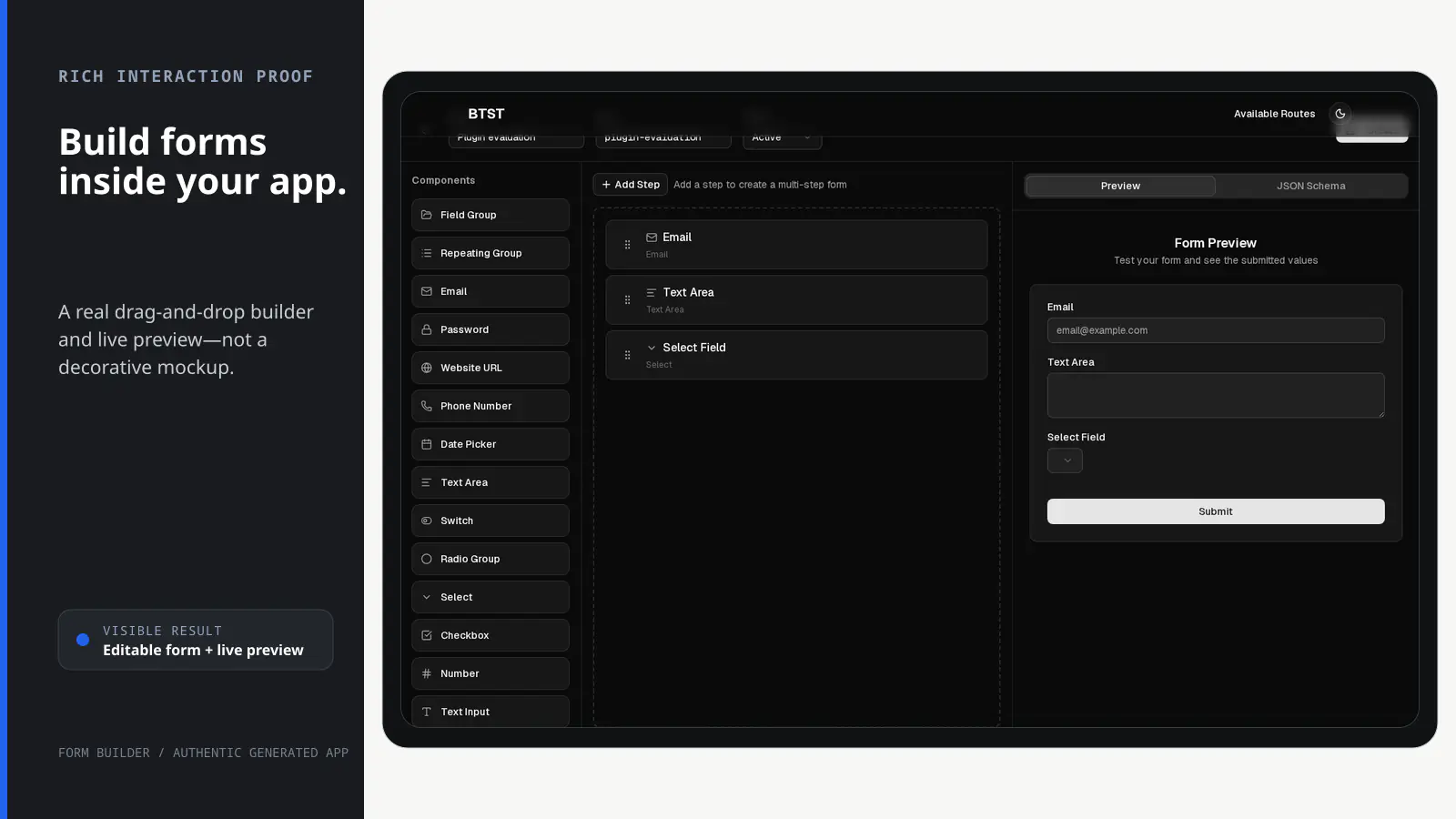
BTST supplies
- Drag-and-drop editor with live preview and JSON Schema output
- Form and submission data models with typed APIs and lifecycle hooks
- Admin routes for forms, editing, and submission review
- A FormRenderer component for adopter-owned public routes
You supply
- A database adapter with isolated transaction support
- The public application route that mounts FormRenderer
- Authorization rules for admin operations when authorization is enabled
- An explicit public-access or permission policy for form reads and submissions when authorization is enabled
You own and customize
Form schemas and submissions stay in your database; public rendering, field overrides, hooks, and deployment remain in your application.
Compatibility and dependencies
Maintained: Next.js 15+ App Router, React Router v7, TanStack Start.
Requires: A database adapter with isolated transaction support.
External services: None required.
From registration to result
A semantic workflow, not a setup shortcut
- 1Build
Arrange fields in the visual editor and check the live preview.
- 2Store schema
Save the generated JSON Schema with the form record.
- 3Render
Mount FormRenderer on a public route owned by your app.
- 4Collect
Validate submitted data against the schema and store the record.
Installation
Ensure you followed the general framework installation guide first.
1. Add Plugin to Backend API
Register the Form Builder backend plugin:
import { createBackendStack } from "@btst/stack/api"
import { createPrismaAdapter } from "@btst/adapter-prisma"
import { formBuilderBackendPlugin } from "@btst/stack/plugins/form-builder/api"
import { PrismaClient } from "@prisma/client"

const prisma = new PrismaClient()

const { handler, dbSchema } = createBackendStack({
  basePath: "/api/data",
  plugins: {
    formBuilder: formBuilderBackendPlugin({
      hooks: {
        // Rate limiting for public submissions
        onBeforeSubmission: async (formSlug, data, ctx) => {
          // Check rate limit by IP
          const isAllowed = await checkRateLimit(ctx.ipAddress, formSlug)
          if (!isAllowed) throw new Error("Rate limit exceeded")
          return data
        },
        // Post-submission actions
        onAfterSubmission: async (submission, form, ctx) => {
          // Send notification email
          await sendEmail({
            to: "admin@example.com",
            subject: `New submission: ${form.name}`,
            body: JSON.stringify(JSON.parse(submission.data), null, 2),
          })
          // CRM integration
          await updateCRM(submission.data)
        },
      },
    })
  },
  adapter: (db) => createPrismaAdapter(prisma, db, {
    provider: "postgresql",
    transaction: true,
  })({})
})

export { handler, dbSchema }
2. Add Plugin to Client
Register the Form Builder client plugin:
import { createClientStack } from "@btst/stack/client"
import { formBuilderClientPlugin } from "@btst/stack/plugins/form-builder/client"
import { QueryClient } from "@tanstack/react-query"

function getBaseURL(serverOrigin?: string) {
  if (typeof window !== "undefined") return window.location.origin
  return (
    serverOrigin ||
    process.env.BTST_SITE_URL ||
    process.env.BASE_URL ||
    "http://localhost:3000"
  )
}

export const getStackClient = (
  queryClient: QueryClient,
  options?: { headers?: Headers; origin?: string },
) => {
  const baseURL = getBaseURL(options?.origin)
  return createClientStack({
    api: {
      baseURL,
      basePath: "/api/data",
      headers: options?.headers,
    },
    site: { baseURL, basePath: "/pages" },
    queryClient,
    plugins: {
      formBuilder: formBuilderClientPlugin({
        hooks: {
          onErrorLoad: (error, context) => {
            reportRouteLoadError(error, context)
          },
        },
      })
    }
  })
}
Browser stacks derive their origin from window.location.origin. Server callers
may pass the framework request origin, or configure a public deployment URL in
BTST_SITE_URL/BASE_URL; keep request headers and server-only auth data in the
server call site.
3. Configure the Provider
Add Form Builder overrides to your layout:
import { nextRouter } from "@btst/stack/next"

<StackProvider
  stack={clientStack}
  router={nextRouter()}
  overrides={{
    formBuilder: {
      // Optional custom field implementations
      fieldComponents: {
        file: MyFileField,
      },
      // Lifecycle hooks
      onRouteRender: async (routeName, context) => {
        console.log(`Form Builder route:`, routeName)
      },
      onRouteError: async (routeName, error, context) => {
        console.error(`Form Builder error:`, routeName, error.message)
      },
    }
  }}
>
  {children}
</StackProvider>
4. Import CSS
Add the Form Builder styles to your global CSS:
@import "@btst/stack/plugins/form-builder/css";Admin Routes
The Form Builder plugin provides these admin routes:
| Route | Description |
|---|---|
/forms | List all forms with create, edit, delete actions |
/forms/new | Create a new form with the visual form builder |
/forms/:id/edit | Edit an existing form |
/forms/:id/submissions | View submissions for a form |
Admin routes are automatically set to noindex for SEO. Don't include them in your public sitemap.
Page Component Overrides
You can replace any built-in admin page with your own React component using the optional pageComponents field in formBuilderClientPlugin(config). The built-in component is used as the fallback whenever an override is not provided. Overrides for parameterized routes receive the route context ({ params }) as props.
formBuilderClientPlugin({
  // ... other config
  pageComponents: {
    // Replace the form list page
    formList: MyCustomFormList,
    // Replace the new form page
    newForm: MyCustomNewForm,
    // Replace the form editor page — receives the route context as props
    editForm: ({ params }) => <MyCustomFormEditor id={params.id} />,
    // Replace the form submissions page — receives the route context as props
    submissions: ({ params }) => <MyCustomSubmissions formId={params.id} />,
  },
})
Form Builder UI
The form builder provides a drag-and-drop interface with:
- Component Palette - Available field types to drag onto the canvas
- Canvas - Where you build your form by arranging fields
- Preview Tab - Live preview of how the form will look
- JSON Schema Tab - View the generated JSON Schema
Available Field Types
| Field Type | Description | JSON Schema Properties |
|---|---|---|
| Text Input | Single-line text field | type: "string" |
| Email input with validation | type: "string", format: "email" | |
| Password | Password input | type: "string", fieldType: "password" |
| Number | Numeric input | type: "number" with minimum/maximum |
| Text Area | Multi-line text field | type: "string", fieldType: "textarea" |
| Select | Dropdown selection | type: "string", enum: [...] |
| Checkbox | Boolean checkbox | type: "boolean" |
| Switch | Toggle switch | type: "boolean", fieldType: "switch" |
| Radio Group | Radio button group | type: "string", enum: [...], fieldType: "radio" |
| Date Picker | Date selection | type: "string", format: "date-time" |
| Phone | Phone number input | type: "string", fieldType: "phone" |
| URL | Website URL input | type: "string", format: "uri" |
Field Properties
Each field can be configured with:
| Property | Description |
|---|---|
| Label | Display label for the field |
| Field Name | The property key in the JSON Schema |
| Description | Help text shown below the field |
| Placeholder | Placeholder text in the input |
| Required | Whether the field is required |
| Min/Max | Minimum and maximum values (numbers) or length (strings) |
| Options | For select, radio, and checkbox groups |
| Default Value | Pre-filled value for the field |
Public Form Rendering
The FormRenderer component allows you to render forms on public pages by their slug:
"use client"

import { FormRenderer } from "@btst/stack/plugins/form-builder/client/components"

export default function FormDemoPage({ params }: { params: { slug: string } }) {
  return (
    <div className="max-w-2xl mx-auto p-6">
      <FormRenderer
        slug={params.slug}
        onSuccess={(submission) => {
          console.log("Form submitted:", submission)
          // submission.form contains successMessage and redirectUrl
        }}
        onError={(error) => {
          console.error("Submission error:", error)
        }}
        // Optional: Custom loading/error states
        LoadingComponent={() => <div>Loading form...</div>}
        ErrorComponent={({ error }) => (
          <div>Form not found: {error.message}</div>
        )}
        // Optional: Custom submit button text
        submitButtonText="Send Message"
        // Optional: Custom success message (overrides form's successMessage)
        successMessage="Thanks for your submission!"
        className="space-y-6"
      />
    </div>
  )
}
FormRenderer Props
| Prop | Type | Description |
|---|---|---|
slug | string | Form slug to fetch and render |
onSuccess | (submission) => void | Callback after successful submission (submission.form has success info) |
onError | (error) => void | Callback when submission fails |
LoadingComponent | ComponentType | Custom loading state |
ErrorComponent | ComponentType<{ error: Error }> | Custom error state |
submitButtonText | string | Custom submit button text |
successMessage | string | Override the form's success message |
fieldComponents | Record<string, ComponentType> | Custom field components |
className | string | Additional CSS classes |
The FormRenderer uses SteppedAutoForm internally, which automatically handles both single-step and multi-step forms based on the JSON Schema structure.
Client Hooks
Access form data in your frontend using the provided hooks:
Available Hooks
| Hook | Description | Returns |
|---|---|---|
useFormsAdmin() | List all forms (admin) | { forms, total, isLoading, error, refetch } |
useFormBySlug(slug) | Get form by slug (public) | { form, isLoading, error } |
useSuspenseFormById(id) | Get form by ID with Suspense | { form, refetch } |
useSuspenseFormForUpdate(id) | Get editor data through the form update permission | { form, refetch } |
useCreateForm() | Create mutation | React Query mutation |
useUpdateForm() | Update mutation | React Query mutation |
useDeleteForm() | Delete mutation | React Query mutation |
useSubmitForm(slug) | Submit form data | React Query mutation |
useSubmissions(formId) | List non-sensitive submission metadata and authoritative form facts | { form, submissions, total, isLoading } |
useSubmission(formId, submissionId) | Get one record-authorized submission with its data, IP address, and user agent | { submission, isLoading, error } |
useDeleteSubmission(formId) | Delete submission | React Query mutation |
useSubmissions returns form as the intentionally minimal
SubmissionListFormContext: { id, name, createdBy? }. Submission access does
not expose the form schema or other fields protected by form.read. Its rows
contain only { id, formId, submittedAt, submittedBy? }; fetch sensitive
contents with useSubmission, which evaluates submission.read again with
record facts.
Usage Examples
import {
  useFormBySlug,
  useSubmitForm,
  useFormsAdmin
} from "@btst/stack/plugins/form-builder/client/hooks"

// Public: Fetch form by slug
function ContactPage() {
  const { form, isLoading } = useFormBySlug("contact-form")
  const submitForm = useSubmitForm("contact-form")

  if (isLoading || !form) return <Loading />

  return (
    <AutoForm
      schema={JSON.parse(form.schema)}
      onSubmit={async (data) => {
        await submitForm.mutateAsync({ data })
      }}
    />
  )
}

// Admin: List all forms
function FormsAdmin() {
  const { forms, total, isLoading } = useFormsAdmin()

  return (
    <ul>
      {forms.map(form => (
        <li key={form.id}>{form.name} - {form.status}</li>
      ))}
    </ul>
  )
}
Authorization
Form Builder publishes its browser-safe catalog from
@btst/stack/plugins/form-builder/permissions. Define one rule set and bind it
to both client and server authentication. The browser uses rendered ownership
facts only to decide presentation; every backend operation reloads the form or
submission and evaluates the rule with authoritative facts.
import { defineAuthorization } from "@btst/stack/authorization"
import { formBuilderPermissions } from "@btst/stack/plugins/form-builder/permissions"
import { z } from "zod"

export const authorization = defineAuthorization({
  identity: z.object({
    id: z.string(),
    role: z.enum(["user", "admin"]),
  }),
  permissions: [formBuilderPermissions] as const,
  rules: ({ forms }) => [
    forms.form.read.when(({ identity, facts }) =>
      identity?.role === "admin" ||
      (facts.scope === "record" && identity?.id === facts.ownerId),
    ),
    forms.form.render.allow(),
    forms.form.create.when(({ identity }) => identity?.role === "admin"),
    forms.form.update.when(({ identity, facts }) =>
      identity?.role === "admin" || identity?.id === facts.ownerId,
    ),
    forms.form.delete.when(({ identity, facts }) =>
      identity?.role === "admin" || identity?.id === facts.ownerId,
    ),
    forms.submission.create.allow(),
    forms.submission.read.when(({ identity, facts }) =>
      identity?.role === "admin" || identity?.id === facts.ownerId,
    ),
    forms.submission.delete.when(({ identity, facts }) =>
      identity?.role === "admin" || identity?.id === facts.ownerId,
    ),
  ],
})
form.render and submission.create are intentionally public and therefore
use explicit .allow() rules. A registered permission with no rule denies; a
missing rule never makes an operation public.
import "server-only"
import { createServerAuth } from "@btst/stack/authorization/server"
import { authorization } from "./authorization"

export const serverAuth = createServerAuth({
  authorization,
  getIdentityFromHeaders: async ({ headers }) => {
    const session = await getSession(headers)
    return session?.user ?? null
  },
})
Pass serverAuth as createBackendStack({ auth: serverAuth, ... }). On the client, create a
client binding from the same rule set and hydrate the request identity in the
layout:
const clientAuth = createClientAuth({
  authorization,
  getIdentity: () => session?.user ?? null,
  loginPath: "/auth/sign-in",
})

<StackProvider
  stack={clientStack}
  auth={clientAuth}
  initialIdentity={initialIdentity}
>
  {children}
</StackProvider>
The Form Builder routes and row controls construct the same typed descriptors. Collection permissions only decide coarse access; list and tenant filtering remain server-side query behavior.
For server code, use the request-scoped API for user-driven work. Trusted jobs
may use trusted, which skips user authorization only and still runs input
validation and lifecycle hooks:
await app.forRequest(request).operations.formBuilder.updateForm({
  id: formId,
  data: { name: "Updated" },
})

await app.trusted.formBuilder.updateForm({
  id: formId,
  data: { name: "Updated by a trusted job" },
})
Owner-sensitive Form Builder writes require a database adapter with real,
isolated transaction support. The memory adapter and adapters configured with
the sequential transaction fallback fail closed with
ATOMIC_TRANSACTION_REQUIRED; they cannot safely hold an authoritative
ownership/status snapshot across domain hooks and writes.
Use the memory adapter only for read-only Form Builder prototypes. The generated
framework E2E projects wrap it with a single-process serialized-call test
adapter; production applications should configure transaction: true with a
transactional database adapter. The CLI supports Form Builder with Prisma,
Drizzle, and Kysely and rejects its current memory and MongoDB scaffold
configurations.
Backend Hooks
Authorization runs before lifecycle hooks. Use hooks for domain behavior such as rate limiting, spam checks, transformations, notifications, and integrations—not routine role or ownership policy.
formBuilderBackendPlugin({
  hooks: {
    onBeforeSubmission: async (formSlug, data, ctx) => {
      const allowed = await checkRateLimit(ctx.ipAddress, formSlug)
      if (!allowed) throw new Error("Rate limit exceeded")
      if (containsSpam(data)) throw new Error("Submission rejected")
      return data
    },
    onAfterSubmission: async (submission, form, ctx) => {
      await sendSubmissionNotification(submission, form)
    },
    onError: async (error, operation, ctx) => {
      reportFormBuilderError(error, operation, ctx)
    },
  },
})
Hook context includes the validated identity, immutable operation input,
trusted facts, and request metadata (request, headers, ipAddress, and
userAgent). Authorization, identity, fact-derivation, and input-validation
failures occur before ordinary lifecycle/error hooks.
Client beforeLoad* and afterLoad* hooks remain available for route loading
lifecycle behavior. They are not the authoritative authorization boundary.
API Endpoints
The Form Builder plugin exposes these REST endpoints:
| Endpoint | Method | Description |
|---|---|---|
/form-builder/forms | GET | List all forms (query: limit, offset, status) |
/form-builder/forms | POST | Create a new form |
/form-builder/forms/:slug | GET | Get form by slug |
/form-builder/forms/id/:id | GET | Get an admin form by ID |
/form-builder/forms/id/:id/edit | GET | Get editor data using the form update permission |
/form-builder/forms/:id | PUT | Update a form |
/form-builder/forms/:id | DELETE | Delete a form |
/form-builder/forms/:slug/submit | POST | Submit form data |
/form-builder/forms/:formId/submissions | GET | List non-sensitive submission metadata for a form |
/form-builder/forms/:formId/submissions/:subId | GET | Get a record-authorized submission and its contents |
/form-builder/forms/:formId/submissions/:subId | DELETE | Delete a submission |
Form Schema Structure
Forms are stored with this schema:
interface Form {
  id: string
  name: string          // Display name
  slug: string          // URL-friendly identifier
  schema: string        // JSON Schema as string
  successMessage?: string  // Message shown after submission
  redirectUrl?: string     // URL to redirect after submission
  status: "active" | "inactive" | "archived"
  createdBy?: string      // Owner identity used by application rules
  createdAt: Date
  updatedAt: Date
}

interface FormSubmission {
  id: string
  formId: string        // Reference to form
  data: string          // Submitted data as JSON string
  ipAddress?: string    // Client IP
  userAgent?: string    // Client user agent
  submittedBy?: string    // Authenticated submitter, when present
  submittedAt: Date
}
Multi-Step Forms
The Form Builder supports multi-step forms through JSON Schema's allOf structure:
{
  "type": "object",
  "allOf": [
    {
      "title": "Step 1: Personal Info",
      "properties": {
        "name": { "type": "string", "label": "Full Name" },
        "email": { "type": "string", "format": "email" }
      }
    },
    {
      "title": "Step 2: Details",
      "properties": {
        "company": { "type": "string" },
        "message": { "type": "string", "fieldType": "textarea" }
      }
    }
  ]
}
The SteppedAutoForm component automatically renders this as a multi-step wizard with navigation.
Custom Field Components
Provide custom field components via the fieldComponents prop on FormRenderer:
import type { AutoFormInputComponentProps } from "@btst/stack/plugins/form-builder/client"

function CustomRating({ field, label }: AutoFormInputComponentProps) {
  return (
    <div>
      <label>{label}</label>
      <StarRating
        value={field.value}
        onChange={field.onChange}
      />
    </div>
  )
}

<FormRenderer
  slug="feedback"
  fieldComponents={{
    rating: CustomRating,
    richText: MyRichTextEditor,
  }}
/>
API Reference
Backend (@btst/stack/plugins/form-builder/api)
formBuilderBackendPlugin
Creates the backend plugin with optional hooks configuration.
FormBuilderBackendHooks
| Hook | Parameters | Return | Description |
|---|---|---|---|
onBeforeListForms | ctx | void | Domain precondition before listing forms |
onBeforeCreateForm | data, ctx | data | void | Validate/transform before create; throw to reject invalid domain input |
onAfterCreateForm | form, ctx | void | Post-create lifecycle |
onBeforeGetFormForUpdate | id, ctx | void | Domain precondition before loading editor data through the update permission |
onBeforeUpdateForm | id, data, ctx | data | void | Validate/transform before update; throw to reject invalid domain input |
onAfterUpdateForm | form, ctx | void | Post-update lifecycle |
onBeforeDeleteForm | id, ctx | void | Domain precondition before delete |
onAfterDeleteForm | id, ctx | void | Post-delete lifecycle |
onBeforeSubmission | slug, data, ctx | data | void | Validate/rate limit submissions; throw to reject |
onAfterSubmission | submission, form, ctx | void | Post-submission actions |
onBeforeListSubmissions | formId, ctx | void | Domain precondition before listing submissions |
onBeforeDeleteSubmission | id, ctx | void | Domain precondition before deleting a submission |
onAfterDeleteSubmission | id, ctx | void | Post-delete submission lifecycle |
onError | error, operation, ctx | void | Observe post-authorization operation errors |
onErrorSubmission | error, slug, ctx | void | Handle submission errors |
Client (@btst/stack/plugins/form-builder/client)
formBuilderClientPlugin
Creates the client plugin with routes and SSR loaders.
FormBuilderPluginOverrides
Set classNames in StackProvider.overrides.formBuilder for targeted styling. Classes merge with defaults, with conflicting Tailwind utilities resolved in favor of your override. table, tableRow, and pagination apply to both the forms list and submissions list. form styles the FormRenderer root, including loading, error, and success states, and merges after its className prop.
overrides={{
  formBuilder: {
    classNames: { table: "shadow-sm", form: "max-w-xl mx-auto" },
  },
}}| Property | Type | Required | Description |
|---|---|---|---|
fieldComponents | Record<string, ComponentType> | No | Custom field components |
classNames | { container?, table?, tableRow?, pagination?, form? } | No | Class names merged onto specific UI elements |
localization | Partial<FormBuilderLocalization> | No | Custom labels |
showAttribution | boolean | No | Show BTST attribution |
onRouteRender | (route, context) => void | No | Lifecycle hook |
onRouteError | (route, error, context) => void | No | Error hook |
API, site, query-client, and request-header values come from
createClientStack(). StackProvider infers the formBuilder override shape
from the registered plugin.
FormBuilderClientHooks
| Hook | Parameters | Return | Description |
|---|---|---|---|
beforeLoadFormList | context: LoaderContext | void | Promise<void> | SSR preparation for forms list — throw to abort loading |
afterLoadFormList | context: LoaderContext | void | Promise<void> | Post-load hook |
beforeLoadFormBuilder | id: string | undefined, context: LoaderContext | void | Promise<void> | SSR preparation for builder — throw to abort loading |
afterLoadFormBuilder | id: string | undefined, context: LoaderContext | void | Promise<void> | Post-load hook |
beforeLoadSubmissions | formId: string, context: LoaderContext | void | Promise<void> | SSR preparation for submissions — throw to abort loading |
afterLoadSubmissions | formId: string, context: LoaderContext | void | Promise<void> | Post-load hook |
onErrorLoad | error: Error, context: LoaderContext | void | Promise<void> | Report a loader failure once; reporter failures are contained |
Schema Converter Utilities (@btst/stack/plugins/form-builder/client)
The Form Builder plugin re-exports schema converter utilities for converting between Zod schemas and JSON Schema. These are useful when working with form schemas programmatically:
zodToFormSchema
Convert a Zod schema to JSON Schema with proper handling for dates, steps metadata, and date constraints:
Prop
Type
Example:
import { zodToFormSchema } from "@btst/stack/plugins/form-builder/client"

const jsonSchema = zodToFormSchema(ContactFormSchema, {
  steps: [
    { id: "personal", title: "Personal Information" },
    { id: "message", title: "Your Message" }
  ],
  stepGroupMap: {
    name: 0,
    email: 0,
    message: 1
  }
})
formSchemaToZod
Convert JSON Schema back to a Zod schema with proper handling for date fields, constraints, and steps metadata. This is used internally by FormRenderer to validate form submissions:
Prop
Type
Example:
import { formSchemaToZod } from "@btst/stack/plugins/form-builder/client"

// Convert JSON Schema from database to Zod for validation
const zodSchema = formSchemaToZod(jsonSchema)
const result = zodSchema.safeParse(submissionData)
Utility Functions
Prop
Type
Prop
Type
Prop
Type
Types
Prop
Type
Prop
Type
Server-side Data Access
Use app.forRequest(request).operations.formBuilder for user-driven work and app.trusted.formBuilder for explicitly trusted jobs. Both use maintained operations; trusted calls skip user authorization but retain validation, fact derivation, domain behavior, and hooks. app.raw.formBuilder contains only prefetchForRoute.
Standalone getters remain lower-level adapter primitives for plugin internals and migrations.
Static Site Generation (SSG)
route.loader() uses the API endpoint resolved by createClientStack(), which may be unavailable during next build. Use prefetchForRoute() instead — it reads directly from the database and pre-populates the React Query cache before rendering.
prefetchForRoute() is a raw-data escape hatch. It does not run the
request-scoped authorization operation. Only pre-render data that is intended
for the generated page; public form rendering still requires the explicit
forms.form.render.allow() rule at runtime.
prefetchForRoute(routeKey, queryClient, params?)
| Route key | Params required | Data prefetched |
|---|---|---|
"formList" | — | First page of forms |
"newForm" | — | (nothing) |
"editForm" | { id: string } | Single form by ID |
"submissions" | { formId: string } | First page of submissions for a form |
Next.js example
import { dehydrate, HydrationBoundary } from "@tanstack/react-query"
import { getOrCreateQueryClient } from "@/lib/query-client"
import { getStackClient } from "@/lib/stack-client"
import { myStack } from "@/lib/stack"
import { metaElementsToObject, normalizePath } from "@btst/stack/client"
import type { Metadata } from "next"

export async function generateStaticParams() {
  return [{}]
}

// export const revalidate = 3600 // uncomment for ISR

export async function generateMetadata(): Promise<Metadata> {
  const queryClient = getOrCreateQueryClient()
  const stackClient = getStackClient(queryClient)
  const route = stackClient.router.getRoute(normalizePath(["forms"]))
  if (!route) return { title: "Forms" }
  await myStack.raw.formBuilder.prefetchForRoute("formList", queryClient)
  return metaElementsToObject(route.meta?.() ?? []) satisfies Metadata
}

export default async function FormsListPage() {
  const queryClient = getOrCreateQueryClient()
  const stackClient = getStackClient(queryClient)
  const route = stackClient.router.getRoute(normalizePath(["forms"]))
  if (!route) return null
  // Reads directly from DB — works at build time, no HTTP server required
  await myStack.raw.formBuilder.prefetchForRoute("formList", queryClient)
  return (
    <HydrationBoundary state={dehydrate(queryClient)}>
      <route.PageComponent />
    </HydrationBoundary>
  )
}
ISR cache invalidation
If you use Incremental Static Regeneration, call revalidatePath inside the backend lifecycle hooks so Next.js regenerates the page on the next request:
import { revalidatePath } from "next/cache"
import type { FormBuilderBackendHooks } from "@btst/stack/plugins/form-builder"

const formHooks: FormBuilderBackendHooks = {
  onAfterCreateForm: async (form) => {
    revalidatePath("/forms", "page")
  },
  onAfterUpdateForm: async (form) => {
    revalidatePath("/forms", "page")
  },
}
Query key consistency
prefetchForRoute uses the same query key shapes as createFormBuilderQueryKeys (the HTTP client). The shared constants live in @btst/stack/plugins/form-builder/api as FORM_QUERY_KEYS, formsListDiscriminator, and submissionsListDiscriminator, so the two paths can never drift silently.
Shadcn Registry
The Form Builder plugin UI layer is distributed as a shadcn registry block. Use the registry to eject and fully customize the page components while keeping all data-fetching and API logic from @btst/stack.
The registry installs only the view layer. Hooks and data-fetching continue to come from @btst/stack/plugins/form-builder/client/hooks.
npx shadcn@latest add https://github.com/better-stack-ai/better-stack/blob/main/packages/stack/registry/btst-form-builder.jsonpnpx shadcn@latest add https://github.com/better-stack-ai/better-stack/blob/main/packages/stack/registry/btst-form-builder.jsonbunx shadcn@latest add https://github.com/better-stack-ai/better-stack/blob/main/packages/stack/registry/btst-form-builder.jsonThis copies the page components into src/components/btst/form-builder/client/ in your project. All relative imports remain valid and you can edit the files freely — the plugin's data layer stays intact.
Using ejected components
After installing, wire your custom components into the plugin via the pageComponents option in your client plugin config:
import { formBuilderClientPlugin } from "@btst/stack/plugins/form-builder/client"
// Import your ejected (and customized) page components
import { FormListPageComponent } from "@/components/btst/form-builder/client/components/pages/form-list-page"
import { EditFormPageComponent } from "@/components/btst/form-builder/client/components/pages/edit-form-page"

formBuilderClientPlugin({
  pageComponents: {
    formList: FormListPageComponent, // replaces the form list page
    // Param routes receive the route context ({ params }) as props
    editForm: ({ params }) => <EditFormPageComponent id={params.id} />,
    // newForm, submissions — omit to keep built-in defaults
  },
})
Any key you omit falls back to the built-in default, so you can override just the pages you want to change.