Kanban Plugin
Project management with boards, columns, tasks, drag-and-drop, and priority levels
Best for
Product teams that need an application-native work board and want to connect it to their own users and authorization rules.
Add boards, columns, tasks, priorities, and drag-and-drop workflows inside your product.
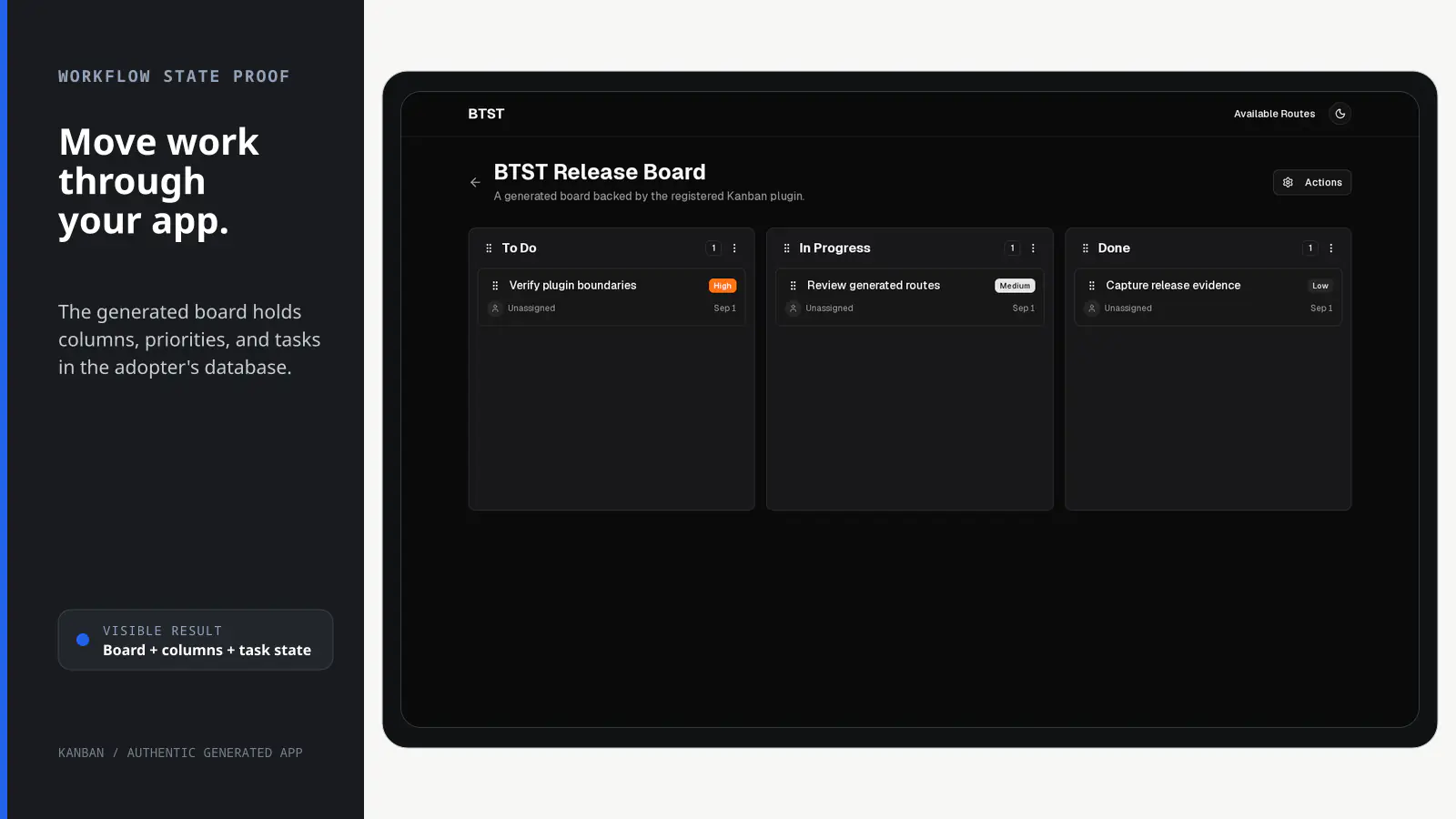
BTST supplies
- Board, column, task, and assignee data models with typed APIs and lifecycle hooks
- SSR-aware board list, creation, and detail routes
- Drag-and-drop column and task workflows with priority and assignee UI
- Customizable hooks and ejectable Kanban pages
You supply
- A database adapter with isolated transaction support for persistent writes
- Authorization rules plus user search and identity resolution when assignees are enabled
- Product-specific workflow rules through configuration and lifecycle hooks
- The application shell and deployment
You own and customize
Boards and tasks stay in your database. Your app supplies identity and workflow policy; packaged Kanban pages can be customized or ejected.
Compatibility and dependencies
Maintained: Next.js 15+ App Router, React Router v7, TanStack Start.
Requires: A database adapter with isolated transaction support.
External services: None required.
From registration to result
A semantic workflow, not a setup shortcut
- 1Create boards
Use supplied routes and APIs to create a board and its columns.
- 2Add work
Create prioritized tasks and connect assignees through your user resolver.
- 3Move
Reorder columns and drag tasks through isolated database transactions.
- 4Enforce policy
Apply app-owned authorization rules and domain hooks to every operation.
Installation
Ensure you followed the general framework installation guide first.
Follow these steps to add the Kanban plugin to your BTST setup.
1. Add Plugin to Backend API
Import and register the kanban backend plugin in your stack.ts file:
import { createBackendStack } from "@btst/stack/api"
import { kanbanBackendPlugin } from "@btst/stack/plugins/kanban/api"
// ... your adapter imports

const { handler, dbSchema } = createBackendStack({
  basePath: "/api/data",
  plugins: {
    kanban: kanbanBackendPlugin()
  },
  adapter: (db) => createPrismaAdapter(prisma, db, {
    provider: "postgresql"
  })
})

export { handler, dbSchema }
The kanbanBackendPlugin() accepts optional lifecycle hooks for domain
validation and integrations. Configure authorization once on createBackendStack({ auth });
ordinary role and ownership rules do not belong in hooks.
2. Add Plugin to Client
Register the kanban client plugin in your stack-client.tsx file:
import { createClientStack } from "@btst/stack/client"
import { kanbanClientPlugin } from "@btst/stack/plugins/kanban/client"
import type { StackIdentity } from "@btst/stack/context"
import { QueryClient } from "@tanstack/react-query"

function getBaseURL(serverOrigin?: string) {
  if (typeof window !== "undefined") return window.location.origin
  return (
    serverOrigin ||
    process.env.BTST_SITE_URL ||
    process.env.BASE_URL ||
    "http://localhost:3000"
  )
}

export const getStackClient = (
  queryClient: QueryClient,
  request?: { headers?: Headers; identity?: StackIdentity; origin?: string },
) => {
  const baseURL = getBaseURL(request?.origin)
  return createClientStack({
    api: {
      baseURL,
      basePath: "/api/data",
      headers: request?.headers,
    },
    site: { baseURL, basePath: "/pages" },
    queryClient,
    plugins: {
      kanban: kanbanClientPlugin({
        // Use the same validated identity that hydrates StackProvider so
        // protected SSR and browser query keys match.
        identityPartition: request?.identity,
        // Optional: SEO configuration
        seo: {
          siteName: "My Kanban App",
          description: "Manage your projects with kanban boards",
        },
      })
    }
  })
}
API, site, query-client, and request headers are configured once on
createClientStack(). For request-time SSR, pass identityPartition to the
plugin so its protected cache key exactly matches the browser's hydrated
identity. Anonymous and trusted static generation omit the identity.
Browser stacks derive their origin from window.location.origin. Server callers
may pass the framework request origin, or configure a public deployment URL in
BTST_SITE_URL/BASE_URL; keep request headers and server-only auth data in the
server call site.
The resolved runtime drives SSR loaders, metadata, sitemap generation, and
browser reads and mutations. A per-plugin endpoint override, when needed, is
configured in createClientStack({ endpoints: { kanban: ... } }).
3. Import Plugin CSS
Add the kanban plugin CSS to your global stylesheet:
@import "@btst/stack/plugins/kanban/css";This includes all necessary styles for the kanban board components and drag-and-drop functionality.
4. Add Context Overrides
Configure top-level framework wiring and kanban-specific overrides in your StackProvider:
import { StackProvider } from "@btst/stack/context"
import { nextRouter } from "@btst/stack/next"
import { resolveUser, searchUsers } from "@/lib/users" // Your user resolver

export default function Layout({ children }) {
  return (
    <StackProvider
      stack={clientStack}
      router={nextRouter()}
      overrides={{
        kanban: {
          // Required: User resolution for assignees
          resolveUser,
          searchUsers,
        }
      }}
    >
      {children}
    </StackProvider>
  )
}import { Outlet } from "react-router"
import { StackProvider } from "@btst/stack/context"
import { reactRouter } from "@btst/stack/react-router"
import { resolveUser, searchUsers } from "../lib/users" // Your user resolver
export default function Layout() {
return (
<StackProvider
stack={clientStack}
router={reactRouter()}
overrides={{
kanban: {
// Required: User resolution for assignees
resolveUser,
searchUsers,
}
}}
>
<Outlet />
</StackProvider>
)
}import { StackProvider } from "@btst/stack/context"
import { tanstackRouter } from "@btst/stack/tanstack"
import { Outlet } from "@tanstack/react-router"
import { resolveUser, searchUsers } from "../../lib/users" // Your user resolver
function Layout() {
return (
<StackProvider
stack={clientStack}
router={tanstackRouter()}
overrides={{
kanban: {
// Required: User resolution for assignees
resolveUser,
searchUsers,
}
}}
>
<Outlet />
</StackProvider>
)
}In these snippets, clientStack is the browser-safe resolved stack returned by
getStackClient(queryClient). Its registered kanban definition lets
StackProvider infer the override type without a provider generic.
The inferred kanban override block is required whenever the resolved stack
registers Kanban. It must provide resolveUser and searchUsers for assignee
display and selection; no provider generic is needed. Optional fields include
uploadImage, imagePicker, localization, attribution, route lifecycle hooks,
and taskDetailBottomSlot. Router and API fields are not plugin overrides in
v3.
5. Generate Database Schema
After adding the plugin, generate your database schema using the CLI:
npx @btst/cli generate --orm prisma --config lib/stack.ts --output prisma/schema.prismaThis will create the necessary database tables for boards, columns, and tasks. Run migrations as needed for your ORM.
Congratulations, You're Done!
Your kanban plugin is now fully configured and ready to use! Here's a quick reference of what's available:
API Endpoints
The kanban plugin provides the following API endpoints, mounted under the API
base path resolved by createClientStack():
Boards:
- GET
/boards- List boards with optional filtering - GET
/boards/:id- Get a single board with columns and tasks - POST
/boards- Create a new board (with default columns) - PUT
/boards/:id- Update a board - DELETE
/boards/:id- Delete a board
Columns:
- POST
/columns- Create a new column - PUT
/columns/:id- Update a column - DELETE
/columns/:id- Delete a column - POST
/columns/reorder- Reorder columns within a board
Tasks:
- POST
/tasks- Create a new task - PUT
/tasks/:id- Update a task - DELETE
/tasks/:id- Delete a task - POST
/tasks/move- Move a task to a different column - POST
/tasks/reorder- Reorder tasks within a column
Page Routes
The kanban plugin automatically creates the following pages, mounted under the
site base path resolved by createClientStack():
/kanban- Boards list page/kanban/new- Create new board page/kanban/:boardId- Board detail page with kanban view
Authorization
Kanban publishes a browser-safe, runtime-schema-backed catalog from
@btst/stack/plugins/kanban/permissions. Register it in one application-owned
authorization definition and bind that definition to both the browser and the
server. BTST does not depend on Better Auth, Clerk, Auth.js, or another
authentication provider; your client and server adapters only need to resolve
an identity matching your schema.
import { defineAuthorization } from "@btst/stack/authorization"
import { kanbanPermissions } from "@btst/stack/plugins/kanban/permissions"
import { z } from "zod"

const identitySchema = z.object({
  id: z.string(),
  role: z.enum(["user", "admin"]),
  organizationIds: z.array(z.string()).default([]),
})

type Identity = z.output<typeof identitySchema>
type BoardFacts = { ownerId?: string; organizationId?: string }

function canManageBoard(identity: Identity | null, facts: BoardFacts) {
  return identity !== null && (
    identity.role === "admin" ||
    identity.id === facts.ownerId ||
    (facts.organizationId !== undefined &&
      identity.organizationIds.includes(facts.organizationId))
  )
}

export const authorization = defineAuthorization({
  identity: identitySchema,
  permissions: [kanbanPermissions] as const,
  rules: ({ kanban }) => [
    // A collection check is deliberately coarse. It does not filter rows.
    kanban.board.read.when(({ identity, facts }) =>
      facts.scope === "collection"
        ? identity?.role === "admin"
        : canManageBoard(identity, facts),
    ),
    kanban.board.create.when(({ identity }) => identity !== null),
    kanban.board.update.when(({ identity, facts }) => canManageBoard(identity, facts)),
    kanban.board.delete.when(({ identity, facts }) => canManageBoard(identity, facts)),
    kanban.column.create.when(({ identity, facts }) => canManageBoard(identity, facts)),
    kanban.column.update.when(({ identity, facts }) => canManageBoard(identity, facts)),
    kanban.column.delete.when(({ identity, facts }) => canManageBoard(identity, facts)),
    kanban.column.reorder.when(({ identity, facts }) => canManageBoard(identity, facts)),
    kanban.task.create.when(({ identity, facts }) => canManageBoard(identity, facts)),
    kanban.task.update.when(({ identity, facts }) => canManageBoard(identity, facts)),
    kanban.task.move.when(({ identity, facts }) => canManageBoard(identity, facts)),
    kanban.task.delete.when(({ identity, facts }) => canManageBoard(identity, facts)),
    kanban.task.reorder.when(({ identity, facts }) => canManageBoard(identity, facts)),
  ],
})
The catalog covers every maintained Kanban operation:
| Descriptor | Facts |
|---|---|
kanban.board.read | { scope: "collection" } or { scope: "record", boardId, ownerId?, organizationId?, exists } |
kanban.board.create | No facts |
kanban.board.update, kanban.board.delete | { boardId, ownerId?, organizationId? } |
kanban.column.create, kanban.column.reorder | { boardId, ownerId?, organizationId? } |
kanban.column.update, kanban.column.delete | Board facts plus columnId |
kanban.task.create | Board facts plus columnId |
kanban.task.update, kanban.task.delete | Board facts plus columnId, taskId, assigneeId?, and isArchived |
kanban.task.move | Update facts plus optional targetColumnId |
kanban.task.reorder | Board facts plus columnId |
Routes and controls construct these descriptors directly. Their browser facts are presentation hints: a user can tamper with them and at worst render the wrong control. The backend reloads the board, column, and task, derives trusted ownership, organization, assignee, and archive facts, then runs the same rule before reading or mutating data.
Board ownership is server-owned mutation state. Authenticated board creation
uses the resolved identity as ownerId, and the browser create/update schemas
do not accept ownerId or organizationId. Assigning an organization or
transferring ownership therefore belongs in an application-owned, trusted
server workflow with its own authorization policy; it cannot be smuggled
through the generic board endpoints.
Local browser checks are synchronous and install no authorization-result cache.
They recompute from the current identity and descriptor. A registered permission
without a rule denies once authorization is enabled. Kanban declares no
maintained operation public by default; if your application intentionally makes
one public, declare that policy explicitly with .allow().
Protected Kanban query keys are also partitioned by the resolved identity. While identity is unresolved, each auth-provider/hydration source and manual identity refetch gets its own pending generation, so a login, logout, or account switch cannot reuse a prior user's pending response. Failed or invalid identity resolutions also use a distinct generation instead of the anonymous/SSG key.
Boolean collection authorization is not row- or tenant-level data scoping. The example makes collection access admin-only. If your application exposes a member collection, enforce its owner/organization filters in server-side query code; never rely on a browser filter or a permission rule to remove rows.
import "server-only"
import { createServerAuth } from "@btst/stack/authorization/server"
import { authorization } from "./authorization"

export const serverAuth = createServerAuth({
  authorization,
  getIdentityFromHeaders: async ({ headers }) => {
    const session = await getSession(headers)
    return session?.user ?? null
  },
})
Pass serverAuth to createBackendStack({ auth: serverAuth, ... }). Create the client
binding from the same browser-safe definition. Resolve the request identity and
trusted client origins in the request layout, then serialize only those plain
values to the client provider. Request headers and the resolved request stack
stay server-only:
import { headers } from "next/headers"
import { getServerClientOriginsFromHeaders } from "@/lib/stack-client.server"

const requestHeaders = await headers()
const initialIdentity = await serverAuth.getIdentityFromHeaders({
  headers: requestHeaders,
})
const clientOrigins = getServerClientOriginsFromHeaders(requestHeaders)

<PagesClientLayout
  clientOrigins={clientOrigins}
  initialIdentity={initialIdentity}
>
  {children}
</PagesClientLayout>
Inside app/pages/client-layout.tsx, create the browser stack from
clientOrigins and pass initialIdentity to StackProvider with the
browser-safe clientAuth binding.
Omitting stack authorization leaves request operations permissive. When authorization is configured, ordinary anonymous denials are 401 responses, authenticated denials are 403 responses, and identity, fact, schema, or rule failures remain errors rather than being converted to denials.
Page Component Overrides
You can replace any built-in page with your own React component using the optional pageComponents field in kanbanClientPlugin(config). The built-in component is used as the fallback whenever an override is not provided. Overrides for parameterized routes receive the route context ({ params }) as props.
kanbanClientPlugin({
  // ... other config
  pageComponents: {
    // Replace the boards list page
    boards: MyCustomBoardsPage,
    // Replace the board detail page — receives the route context as props
    board: ({ params }) => <MyCustomBoardPage boardId={params.boardId} />,
    // Replace the new board page
    newBoard: MyCustomNewBoardPage,
  },
})
Priority Levels
Tasks support four priority levels, each with a visual badge:
| Priority | Badge Color | Use Case |
|---|---|---|
| LOW | Gray | Nice-to-have tasks |
| MEDIUM | Yellow | Standard priority (default) |
| HIGH | Orange | Important tasks |
| URGENT | Red | Critical tasks requiring immediate attention |
Task Assignees
The kanban plugin supports assigning users to tasks. Since the plugin is authentication-agnostic, you provide resolver functions to integrate with your auth system.
KanbanUser Type
The plugin uses a simple KanbanUser interface for user information:
interface KanbanUser {
  id: string;       // Unique user identifier
  name: string;     // Display name
  avatarUrl?: string; // Optional avatar image URL
  email?: string;   // Optional email address
}
Required Resolver Functions
You must provide two resolver functions in your overrides:
overrides={{
  kanban: {
    // ... other overrides

    // Resolve user info from an ID (for displaying assignee on task cards)
    resolveUser: (userId: string) => {
      // Return KanbanUser or null if not found
    },

    // Search/list users (for the assignee picker dropdown)
    searchUsers: (query: string, boardId?: string) => {
      // Return array of KanbanUser matching the query
      // Return all users if query is empty
    },
  }
}}
Integration Examples
import { clerkClient } from "@clerk/nextjs/server"

const overrides = {
  kanban: {
    // ... other overrides
    resolveUser: async (userId) => {
      const user = await clerkClient.users.getUser(userId)
      return {
        id: user.id,
        name: user.fullName || user.username || "Unknown",
        avatarUrl: user.imageUrl,
        email: user.emailAddresses[0]?.emailAddress,
      }
    },
    searchUsers: async (query) => {
      const users = await clerkClient.users.getUserList({ query, limit: 10 })
      return users.map(user => ({
        id: user.id,
        name: user.fullName || user.username || "Unknown",
        avatarUrl: user.imageUrl,
        email: user.emailAddresses[0]?.emailAddress,
      }))
    },
  }
}import { prisma } from "@/lib/prisma"
const overrides = {
kanban: {
// ... other overrides
resolveUser: async (userId) => {
const user = await prisma.user.findUnique({
where: { id: userId }
})
return user ? {
id: user.id,
name: user.name || "Unknown",
avatarUrl: user.image || undefined,
email: user.email || undefined,
} : null
},
searchUsers: async (query) => {
const users = await prisma.user.findMany({
where: query ? {
OR: [
{ name: { contains: query, mode: "insensitive" } },
{ email: { contains: query, mode: "insensitive" } },
]
} : undefined,
take: 10,
})
return users.map(user => ({
id: user.id,
name: user.name || "Unknown",
avatarUrl: user.image || undefined,
email: user.email || undefined,
}))
},
}
}import type { KanbanUser } from "@btst/stack/plugins/kanban/client"
const MOCK_USERS: KanbanUser[] = [
{ id: "user-1", name: "Alice Johnson", avatarUrl: "https://api.dicebear.com/7.x/avataaars/svg?seed=alice" },
{ id: "user-2", name: "Bob Smith", avatarUrl: "https://api.dicebear.com/7.x/avataaars/svg?seed=bob" },
{ id: "user-3", name: "Carol Williams", avatarUrl: "https://api.dicebear.com/7.x/avataaars/svg?seed=carol" },
]
const overrides = {
kanban: {
// ... other overrides
resolveUser: (userId) => MOCK_USERS.find(u => u.id === userId) ?? null,
searchUsers: (query) => {
if (!query) return MOCK_USERS
const lower = query.toLowerCase()
return MOCK_USERS.filter(u => u.name.toLowerCase().includes(lower))
},
}
}Assignee Display
When a task has an assignee:
- Task Card: Shows the user's avatar and name
- Task Form: Displays a searchable dropdown to select/change assignee
When no assignee is set, the task card shows "Unassigned" with a placeholder icon.
useResolveUser and useSearchUsers intentionally remain callback-backed hooks. Assignees come from your application's user directory rather than a Kanban HTTP endpoint, so these hooks do not use the resource factory's HTTP-backed useSelect helper.
Localization
All built-in Kanban component copy is routed through the i18n provider on StackProvider. Translation keys use the kanban.* namespace, for example kanban.list.kanbanBoards, kanban.forms.createTask, and kanban.common.unassigned.
<StackProvider
  stack={clientStack}
  i18n={{
    translate: (key, defaultValue, params) =>
      i18next.t(key, { defaultValue, ...params }),
  }}
/>
The existing camel-case overrides.kanban.localization fields remain supported and take precedence over i18n, so current consumers can migrate incrementally.
API Reference
Backend (@btst/stack/plugins/kanban/api)
kanbanBackendPlugin
Creates the Kanban backend plugin and its single maintained operation inventory. HTTP endpoints, request-scoped calls, and trusted calls all adapt these same operations.
import {
  kanbanBackendPlugin,
  type KanbanBackendHooks,
} from "@btst/stack/plugins/kanban/api"

const hooks: KanbanBackendHooks = {
  // Add canonical lifecycle callbacks here.
}

const app = createBackendStack({
  auth: serverAuth,
  plugins: {
    kanban: kanbanBackendPlugin({ hooks })
  },
  // ...
})| Operation | Permission |
|---|---|
listBoards, getBoard | kanban.board.read |
createBoard | kanban.board.create |
updateBoard | kanban.board.update |
deleteBoard | kanban.board.delete |
createColumn | kanban.column.create |
updateColumn | kanban.column.update (and kanban.column.reorder when changing order) |
deleteColumn | kanban.column.delete |
reorderColumns | kanban.column.reorder |
createTask | kanban.task.create |
updateTask | kanban.task.update (and kanban.task.move when changing columns or order) |
deleteTask | kanban.task.delete |
moveTask | kanban.task.move |
reorderTasks | kanban.task.reorder |
Use the request-scoped API for user-driven server work. It resolves identity from the supplied request and enforces the operation permission:
await app.forRequest(request).operations.kanban.updateTask({
  id: taskId,
  data: { title: "Ready for review" },
})
Trusted jobs, seeds, and tests use trusted. This skips only user identity and
authorization; input validation, authoritative fact loading, lifecycle hooks,
ordering invariants, and domain behavior still run:
await app.trusted.kanban.moveTask({
  taskId,
  targetColumnId,
  targetOrder: 0,
})
These operation namespaces intentionally contain only the maintained operation
inventory. The raw app.raw.kanban business surface contains only prefetchForRoute; use trusted.kanban for explicitly trusted business calls.
Kanban writes require isolated transactions. Use a transactional production adapter in deployed applications. When Kanban is installed with the published memory adapter, it automatically serializes the shared adapter instance so single-process development and tests keep rollback and winner ordering safe across plugins and raw helpers. That behavior is not a production isolation substitute; raw Kanban helpers still bypass operation authorization and hooks.
KanbanBackendHooks
Authorization always runs before lifecycle hooks. Hooks are for server-only
domain preconditions, logging, notifications, and integrations—not ordinary
role, ownership, or organization policy. Their typed context includes immutable
validated input, authoritative facts, validated identity, and the
request/headers when one exists. After hooks also receive the operation
result.
import { kanbanBackendPlugin, type KanbanBackendHooks } from "@btst/stack/plugins/kanban/api"

const kanbanHooks: KanbanBackendHooks = {
  onBeforeUpdateTask: async (taskId, data, context) => {
    if (context.facts.isArchived) {
      throw new Error("Archived tasks are immutable")
    }
    await auditDomainAttempt({
      taskId,
      actorId: context.identity?.id,
      input: context.input,
    })
  },
  onAfterCreateTask: async (task, context) => {
    await sendTaskNotification(task, context.facts.boardId)
  },
}
The pipeline is: validate input, derive and validate trusted facts, resolve and validate request identity, evaluate permission, run the before hook, execute, then run the after hook. Identity, fact, schema, and authorization failures do not invoke lifecycle hooks. Operation error hooks observe only failures after successful authorization and cannot replace the original error.
Available hook groups:
| Group | Hooks |
|---|---|
| Board before | onBeforeListBoards, onBeforeGetBoard, onBeforeCreateBoard, onBeforeUpdateBoard, onBeforeDeleteBoard |
| Board after | onAfterListBoards, onAfterGetBoard, onAfterCreateBoard, onAfterUpdateBoard, onAfterDeleteBoard |
| Board error | onErrorListBoards, onErrorGetBoard, onErrorCreateBoard, onErrorUpdateBoard, onErrorDeleteBoard |
| Column before | onBeforeCreateColumn, onBeforeUpdateColumn, onBeforeDeleteColumn |
| Column after | onAfterCreateColumn, onAfterUpdateColumn, onAfterDeleteColumn |
| Task before | onBeforeCreateTask, onBeforeUpdateTask, onBeforeDeleteTask |
| Task after | onAfterCreateTask, onAfterUpdateTask, onAfterDeleteTask |
Client (@btst/stack/plugins/kanban/client)
kanbanClientPlugin
Creates the kanban client plugin with routes, loaders, and meta generators.
kanban: kanbanClientPlugin({
  // Optional SEO configuration
  seo: {
    siteName: "My Kanban App",
    description: "Project management",
  },
  // Optional hooks
  hooks: {
    beforeLoadBoards: async (context) => {
      performance.mark("kanban-boards-load-start")
    },
    beforeLoadBoard: async (boardId, context) => {
      analytics.track("kanban-board-load", { boardId })
    },
  },
})
Client load hooks are lifecycle callbacks, not a security boundary. Use the typed permission rules for UI presentation and the operation-backed server API for enforcement.
KanbanClientHooks
Customize client-side behavior with lifecycle hooks:
| Hook | Description |
|---|---|
beforeLoadBoards | Called before loading boards list. Throw to cancel. |
afterLoadBoards | Called after boards are loaded. |
beforeLoadBoard | Called before loading a single board. Throw to cancel. |
afterLoadBoard | Called after a board is loaded. |
beforeLoadNewBoard | Called before loading the new board page. Throw to cancel. |
afterLoadNewBoard | Called after the new board page is loaded. |
onErrorLoad | Reports a loading error once; reporter failures are contained. |
v3 board-list migration
useBoards(), onAfterListBoards, and afterLoadBoards now receive
SerializedBoardSummary[]. Summary dates are ISO strings and summary columns
intentionally omit tasks, keeping collection authorization from exposing
record-only task data. Code that previously read tasks from a list callback
should fetch useBoard(board.id) (or the authorized getBoard server
operation) for the selected board. Server-only infrastructure code may use the
standalone lower-level helpers, which explicitly bypass operation authorization
and lifecycle hooks.
KanbanPluginOverrides
Configure Kanban-specific overrides and route lifecycle hooks:
overrides={{
  kanban: {
    // Required: User resolution for assignees
    resolveUser: (userId) => findUserById(userId),
    searchUsers: (query) => searchAllUsers(query),

    // Optional lifecycle hooks
    onRouteRender: async (routeName, context) => {
      console.log("Rendering route:", routeName)
    },
  }
}}
Required overrides:
| Override | Type | Description |
|---|---|---|
resolveUser | (userId: string) => KanbanUser | null | Resolve user info from ID |
searchUsers | (query: string, boardId?: string) => KanbanUser[] | Search/list users for picker |
Slot overrides:
| Override | Type | Description |
|---|---|---|
taskDetailBottomSlot | (task: SerializedTask) => ReactNode | Render additional content below task details — use to embed a CommentThread |
import { CommentThread } from "@btst/stack/plugins/comments/client/components"

overrides={{
  kanban: {
    // ...
    taskDetailBottomSlot: (task) => (
      <CommentThread
        resourceId={task.id}
        resourceType="kanban-task"
      />
    ),
  }
}}
React Hooks
Import hooks from @btst/stack/plugins/kanban/client/hooks to use in your components:
import {
  useBoards,
  useBoard,
  useBoardForm,
  useBoardMutations,
  useColumnForm,
  useColumnMutations,
  useTaskForm,
  useTaskMutations,
  useResolveUser,
  useSearchUsers,
} from "@btst/stack/plugins/kanban/client/hooks"

// List all boards
const { data: boards, isLoading, error } = useBoards()

// Get a single board with columns and tasks
const { data: board, isLoading, error } = useBoard(boardId)

// Board mutations
const { createBoard, updateBoard, deleteBoard, isCreating, isUpdating, isDeleting } = useBoardMutations()

// Column mutations
const { createColumn, updateColumn, deleteColumn } = useColumnMutations()

// Task mutations (includes assigneeId support)
const { createTask, updateTask, deleteTask, moveTask } = useTaskMutations()

// Resource form lifecycles choose create/update, await cache invalidation,
// and expose normalized server validation issues through fieldErrors.
const boardForm = useBoardForm({
  action: board ? "edit" : "create",
  record: board ?? null,
  toCreateVars: (values) => values,
  toUpdateVars: (values) => ({ id: board.id, data: values }),
})

const columnForm = useColumnForm({
  action: column ? "edit" : "create",
  record: column ?? null,
  toCreateVars: (values) => ({ ...values, boardId }),
  toUpdateVars: (values) => ({ id: column.id, data: values }),
})

const taskForm = useTaskForm({
  action: task ? "edit" : "create",
  record: task ?? null,
  toCreateVars: (values) => values,
  toUpdateVars: (values) => ({ id: task.id, data: values }),
})

// Resolve user info (with caching)
const { data: user, isLoading } = useResolveUser(assigneeId)

// Search users for picker
const { data: users, isLoading } = useSearchUsers(searchQuery, boardId)
Types
The plugin exports TypeScript types for all data structures:
// API types
import type {
  Board,
  Column,
  Task,
  Priority,
  BoardWithColumns,
  ColumnWithTasks,
  SerializedBoard,
  SerializedColumn,
  SerializedTask,
} from "@btst/stack/plugins/kanban/api"

// Client types (for user resolution)
import type {
  KanbanUser,
  KanbanPluginOverrides,
} from "@btst/stack/plugins/kanban/client"
Server-side Data Access
Use app.forRequest(request).operations.kanban for user-driven server calls and app.trusted.kanban for explicitly trusted jobs. The authorized list operation returns board/column summaries; a single-board read returns its complete tree. app.raw.kanban is reserved for SSG prefetchForRoute.
Standalone getters remain lower-level adapter primitives for plugin internals and migrations.
Static Site Generation (SSG)
route.loader() uses the API endpoint resolved by createClientStack(), which may be unavailable during next build. Use prefetchForRoute() instead — it reads directly from the database and pre-populates the React Query cache before rendering.
prefetchForRoute() is a raw-data escape hatch. It does not run the
request-scoped Kanban operation, resolve a user, or evaluate a permission.
Pre-render only data that is safe for the generated output, and apply equivalent
deployment-level protection to protected static pages.
prefetchForRoute(routeKey, queryClient, params?)
| Route key | Params required | Data prefetched |
|---|---|---|
"boards" | — | First page of boards |
"newBoard" | — | (nothing) |
"board" | { boardId: string } | Single board with columns and tasks |
Next.js example
import { dehydrate, HydrationBoundary } from "@tanstack/react-query"
import { getOrCreateQueryClient } from "@/lib/query-client"
import { getStackClient } from "@/lib/stack-client"
import { myStack } from "@/lib/stack"
import { metaElementsToObject, normalizePath } from "@btst/stack/client"
import type { Metadata } from "next"

export async function generateStaticParams() {
  return [{}]
}

// export const revalidate = 3600 // uncomment for ISR

export async function generateMetadata(): Promise<Metadata> {
  const queryClient = getOrCreateQueryClient()
  const stackClient = getStackClient(queryClient)
  const route = stackClient.router.getRoute(normalizePath(["kanban"]))
  if (!route) return { title: "Kanban Boards" }
  await myStack.raw.kanban.prefetchForRoute("boards", queryClient)
  return metaElementsToObject(route.meta?.() ?? []) satisfies Metadata
}

export default async function KanbanBoardsPage() {
  const queryClient = getOrCreateQueryClient()
  const stackClient = getStackClient(queryClient)
  const route = stackClient.router.getRoute(normalizePath(["kanban"]))
  if (!route) return null
  // Reads directly from DB — works at build time, no HTTP server required
  await myStack.raw.kanban.prefetchForRoute("boards", queryClient)
  return (
    <HydrationBoundary state={dehydrate(queryClient)}>
      <route.PageComponent />
    </HydrationBoundary>
  )
}
ISR cache invalidation
If you use Incremental Static Regeneration, call revalidatePath inside the backend lifecycle hooks so Next.js regenerates the page on the next request:
import { revalidatePath } from "next/cache"
import type { KanbanBackendHooks } from "@btst/stack/plugins/kanban/api"

const kanbanHooks: KanbanBackendHooks = {
  onAfterCreateBoard: async (board) => {
    revalidatePath("/kanban")
  },
  onAfterUpdateBoard: async (board) => {
    revalidatePath("/kanban")
  },
  onAfterDeleteBoard: async (boardId) => {
    revalidatePath("/kanban")
  },
}
Query key consistency
prefetchForRoute uses the same query key shapes as createKanbanQueryKeys (the HTTP client). The shared constants live in @btst/stack/plugins/kanban/api as KANBAN_QUERY_KEYS and boardsListDiscriminator, so the two paths can never drift silently.
Server-side Mutations
Trusted jobs call the maintained trusted operations:
const board = await app.trusted.kanban.createBoard({ name: "Review Queue" })
await app.trusted.kanban.createTask({ title: "Review", columnId })
These calls skip user authorization but retain validation, domain behavior, transactions, and lifecycle hooks. Standalone mutation exports remain lower-level adapter primitives when the caller intentionally owns that composition.
Shadcn Registry
The Kanban plugin UI layer is distributed as a shadcn registry block. Use the registry to eject and fully customize the page components while keeping all data-fetching and API logic from @btst/stack.
The registry installs only the view layer. Hooks and data-fetching continue to come from @btst/stack/plugins/kanban/client/hooks.
npx shadcn@latest add https://github.com/better-stack-ai/better-stack/blob/main/packages/stack/registry/btst-kanban.jsonpnpx shadcn@latest add https://github.com/better-stack-ai/better-stack/blob/main/packages/stack/registry/btst-kanban.jsonbunx shadcn@latest add https://github.com/better-stack-ai/better-stack/blob/main/packages/stack/registry/btst-kanban.jsonThis copies the page components into src/components/btst/kanban/client/ in your project. All relative imports remain valid and you can edit the files freely — the plugin's data layer stays intact.
Using ejected components
After installing, wire your custom components into the plugin via the pageComponents option in your client plugin config:
import { kanbanClientPlugin } from "@btst/stack/plugins/kanban/client"
// Import your ejected (and customized) page components
import { BoardsPageComponent } from "@/components/btst/kanban/client/components/pages/boards-page"
import { BoardPageComponent } from "@/components/btst/kanban/client/components/pages/board-page"

kanbanClientPlugin({
  pageComponents: {
    boards: BoardsPageComponent, // replaces the boards list page
    // Param routes receive the route context ({ params }) as props
    board: ({ params }) => <BoardPageComponent boardId={params.boardId} />,
    // newBoard — omit to keep built-in default
  },
})
Any key you omit falls back to the built-in default, so you can override just the pages you want to change.