Analytics Plugin
Self-hosted page views, custom events, and a traffic dashboard without cookies
Best for
Teams adding traffic analytics to a BTST application while keeping event collection and storage under their control.
Measure page views and custom events in your own database without browser cookies.
BTST supplies
- First-party page view and custom event ingestion without cookies
- Traffic dashboard, date filters, real-time visitors, and CSV export
- Aggregation operations and configurable event retention
You supply
- A BTST database adapter and dashboard authorization rules
- A session secret shared across server instances
- A scheduled cleanup job for retention when traffic is inactive
- Application privacy policy and appropriate custom event properties
You own and customize
Events stay in your database. Your application supplies access rules, a session secret, retention scheduling, and a privacy policy.
Compatibility and dependencies
Maintained: Next.js 15+ App Router, React Router v7, TanStack Start.
Requires: A BTST database adapter.
External services: None required.
From registration to result
A semantic workflow, not a setup shortcut
- 1Collect activity
Track BTST route views automatically and send named custom events from application actions.
- 2Review traffic
Choose a date range and compare page views, anonymous visitors, top pages, referrers, and events.
- 3Use the data
Embed authorized aggregation queries, export CSV, and clean up expired events.
Analytics stores page views and custom events in your BTST database. The client sends first-party beacons without adding a third-party script or setting cookies. The dashboard shows traffic, referrers, custom events, and recent visitors.
Registration
Follow the framework installation guide, then register both
halves under the canonical analytics key:
import { createBackendStack } from "@btst/stack/api"
import { analyticsBackendPlugin } from "@btst/stack/plugins/analytics/api"

export const myStack = createBackendStack({
  basePath: "/api/data",
  adapter,
  auth: serverAuth,
  plugins: {
    analytics: analyticsBackendPlugin({
      retentionDays: 90,
      sessionSecret: process.env.ANALYTICS_SESSION_SECRET,
    }),
  },
})
Use a persistent database adapter in production. Set ANALYTICS_SESSION_SECRET
to a private random value of at least 16 characters shared by every server instance so anonymous session
hashes are consistent across instances.
import { createClientStack } from "@btst/stack/client"
import { analyticsClientPlugin } from "@btst/stack/plugins/analytics/client"

export function getStackClient(queryClient, origin: string) {
  return createClientStack({
    api: { baseURL: origin, basePath: "/api/data" },
    site: { baseURL: origin, basePath: "/pages" },
    queryClient,
    plugins: { analytics: analyticsClientPlugin() },
  })
}@import "@btst/stack/plugins/analytics/css";Mount the resolved stack in StackProvider with your framework router and client
auth adapter. Shared API, site, and query client configuration belongs on the
stack, not in analytics options.
Authorization
Register analyticsPermissions from
@btst/stack/plugins/analytics/permissions with your application's shared
authorization contract. Allow anonymous ingestion separately from dashboard
access. For an identity with a role field, these rules restrict reads, exports,
and retention cleanup to administrators:
permissions: [analyticsPermissions] as const,
rules: ({ analytics }) => [
  analytics.events.ingest.allow(),
  analytics.dashboard.read.when(({ identity }) => identity?.role === "admin"),
  analytics.dashboard.export.when(({ identity }) => identity?.role === "admin"),
  analytics.events.cleanup.when(({ identity }) => identity?.role === "admin"),
],
The dashboard uses the same authorization policy as the backend. It remains a
dynamic route; do not statically generate protected analytics data. With Next.js,
keep it in a request-rendered layout with dynamic = "force-dynamic".
Automatic page views
The analytics client plugin subscribes to onRouteRender. When a BTST route
renders in the browser, it sends the path to the ingestion API. Query strings
and fragments are removed. Server rendering does not send a page view.
Set analyticsClientPlugin({ tracking: false }) to disable automatic tracking.
Routes outside BTST need an explicit tracker call after their router navigates.
Custom events
After the analytics plugin has registered its browser runtime, use track:
import { track } from "@btst/stack/plugins/analytics/client"

await track("signup_completed", { plan: "pro" })
For pages outside BTST or an explicit destination, create a tracker:
import { createAnalyticsTracker } from "@btst/stack/plugins/analytics/client"

const analytics = createAnalyticsTracker({ apiBasePath: "/api/data" })
await analytics.track("button_clicked", { label: "Request demo" })
The plugin reuses public endpoints.analytics.api.browserHeaders for collection.
Standalone trackers accept headers for the same purpose. Custom headers use
keepalive Fetch instead of a beacon; requests retain the JSON content type.
Properties accept a flat object of strings, finite numbers, booleans, and null. Do not send names, email addresses, account identifiers, or other personal data. The server bounds the event name, path, and properties before accepting a record.
Dashboard
With site.basePath: "/pages", open /pages/analytics. Choose Today, 7 days,
30 days, or a custom UTC date range. The dashboard includes:
- Unique anonymous visitors, page views, bounce rate, and session duration.
- A daily traffic chart and top pages with trend sparklines.
- Top external referrers and custom event counts.
- A polling count of recently active visitors.
- Export CSV for the selected range.
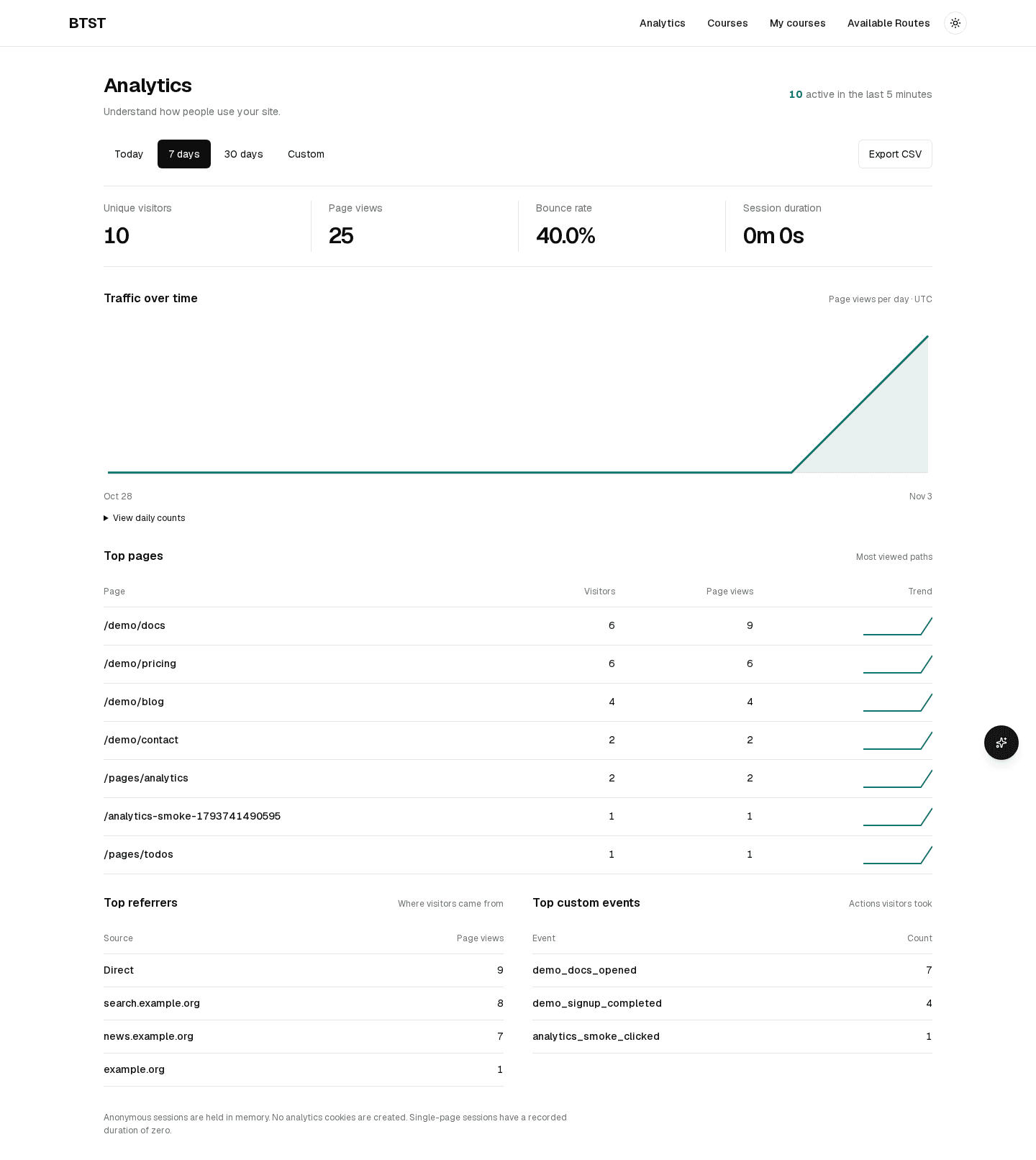
The image shows local demonstration traffic. Production dashboards display events ingested by your application.
Aggregation API
Use request-bound operations when serving application requests. They run the same authorization and validation as HTTP endpoints:
const analytics = myStack.forRequest(request).operations.analytics
const stats = await analytics.getDashboardStats({ range: "30d" })
const pages = await analytics.getTopPages({ range: "7d", limit: 10 })
const referrers = await analytics.getTopReferrers({ range: "7d" })

// Embed a view count using an authorized server-side query.
const post = await analytics.getDashboardStats({
  range: "30d",
  path: "/blog/introducing-our-product",
})
console.log(post.pageViews)
Trusted server jobs can call myStack.trusted.analytics. Keep trusted operations
on the server; do not expose their output without applying your own access policy.
Date filters accept range, start, end, path, and limit. Custom ranges
require both dates and span at most 366 days; a date-only end includes that UTC day.
Method and path, under api.basePath | Operation |
|---|---|
POST /analytics/pageviews | recordPageView |
POST /analytics/events | recordEvent |
GET /analytics/dashboard | getDashboardStats |
GET /analytics/pages | getTopPages |
GET /analytics/referrers | getTopReferrers |
GET /analytics/events | getTopEvents |
GET /analytics/realtime | getRealtimeVisitors |
GET /analytics/export | exportEvents |
POST /analytics/retention | cleanupExpiredEvents |
Privacy and measurement
The tracker keeps its anonymous session identifier in memory rather than browser storage. Reloading or opening another tab can start a new session, so unique visitor counts are estimates rather than a count of distinct people. The server hashes session identifiers with a daily salt before storage and never stores raw IP addresses. Daily rotation also separates the same session across UTC days. Referrer analytics retain the external host rather than sensitive URL details. Recognized bots are filtered by user agent; this reduces crawler traffic but does not authenticate human visitors.
Bounce rate measures sessions with one page view. Session duration measures the time between the first and last recorded page view, averaged across sessions including bounces as zero. Visits split after 30 minutes of page-view inactivity. Custom events do not change bounce rate or session duration. Leaving a page open does not produce a heartbeat. Date filters and retention can shorten the activity visible to these calculations.
Custom properties and page paths are application-controlled. Avoid putting personal data in paths or event properties. Your application owns its event properties and privacy policy.
Retention and hooks
retentionDays defaults to 90. Schedule cleanup to remove expired records even
when your site receives no traffic:
await myStack.trusted.analytics.cleanupExpiredEvents({})Use lifecycle hooks for application-specific filtering and observation. Hooks run inside the validated, authorized ingestion operation; access control belongs in the shared authorization rules.
analyticsBackendPlugin({
  hooks: {
    onBeforeIngest: async (event) => {
      if (event.path.startsWith("/internal")) throw new Error("Excluded path")
    },
    onAfterIngest: async (event) => {
      console.log("Analytics event recorded", event.path)
    },
  },
})
Configuration reference
Prop
Type
Prop
Type
Prop
Type